














 Email
Email SMS
SMS Whatsapp
 Web Push
 App Push
 Audience Sync for Ads
 Popups
 Channel A/B Testing
  Control groups Analysis
 Frequency Capping
 Funnel Analysis
 Cohort Analysis
 RFM Analysis
 Signup Forms
 Surveys
 NPS
NPS Landing pages personalization
  Website A/B Testing
  PWA/TWA
 Heatmaps
 Session Recording
 Wix
Wix Shopify
 Magento
 Woocommerce
 eCommerce D2C
  Mutual Funds
 Insurance
 Lending
  Recipes
  Knowledgebase
 Developer Docs
 Product Updates
 App Marketplace
 Academy
 Ebooks
 Case Studies
 Blog
Blog Templates
 manoj
manoj
If you are not signed up with InviteReferrals already, you’ll need to do so. Sign up for free now !!
Mailchimp Integration allows you to pass all the campaign participants data to your mailchimp account and keep them synchronized for further email marketing purposes.
Follow the steps below to link your mailchimp Integration account :
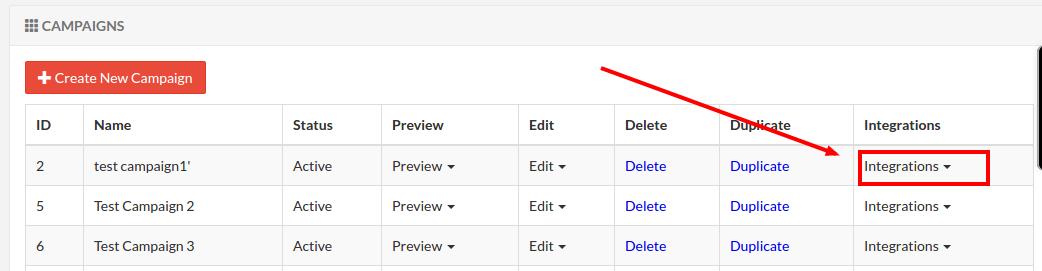
1. Go to “Campaigns” section in admin panel and select “Mailchimp” under “Integrations”.
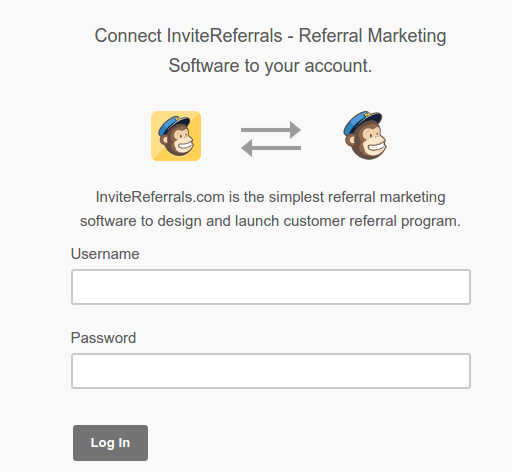
2. Login to your mailchimp account.
3. Select the list in which you want to pass the campaign participants data.
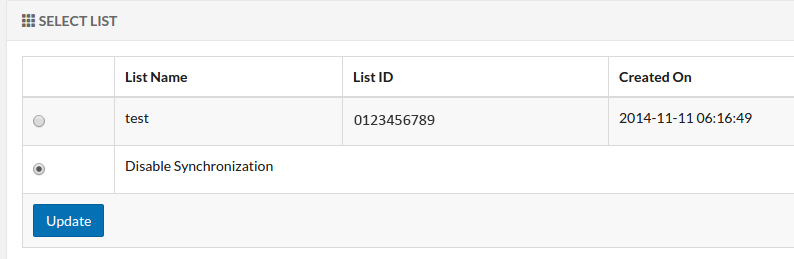
You can disable synchronization or delink your account any time.
For any assistance contact at support@tagnpin.com.
