














 Email
Email SMS
SMS Whatsapp
 Web Push
 App Push
 Audience Sync for Ads
 Popups
 Channel A/B Testing
  Control groups Analysis
 Frequency Capping
 Funnel Analysis
 Cohort Analysis
 RFM Analysis
 Signup Forms
 Surveys
 NPS
NPS Landing pages personalization
  Website A/B Testing
  PWA/TWA
 Heatmaps
 Session Recording
 Wix
Wix Shopify
 Magento
 Woocommerce
 eCommerce D2C
  Mutual Funds
 Insurance
 Lending
  Recipes
  Knowledgebase
 Developer Docs
 Product Updates
 App Marketplace
 Academy
 Ebooks
 Case Studies
 Blog
Blog Templates
 manoj
manoj
Referral Campaign Overview
Click here
to get the Addon. This Addon integrates the Social Referral Campaign Marketing on your CS-Cart eCommerce website (Supports all versions.). There are 3 parts to activate Referral Marketing Campaign on your CS-Cart website
1. Integrate InviteReferrals CS Cart AddOn. (Part A)
2. Create and activate campaign in InviteReferrals. (Part B)
Part A : Integrate InviteReferrals CS-cart module
1. First you have to download the invitereferrals Addon from CS-Cart MarketPlace (its free). You will get the .zip extension file of Invitereferrals Add-on.
2. Now goto your CS-Cart Admin Panel and click on Manage Add-ons

3. Install Add-on by click on + button at the right corner

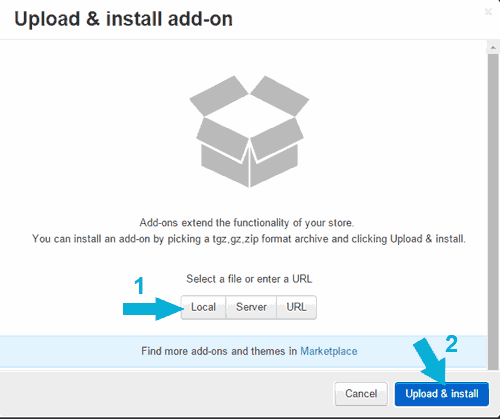
4. A popup will open, click on Local and Select Invitereferrals .Zip extension file then click on upload and install
5. After successfull installation, In Install Addons panel Scroll Down and you will see the SETTINGS button of InviteReferrals
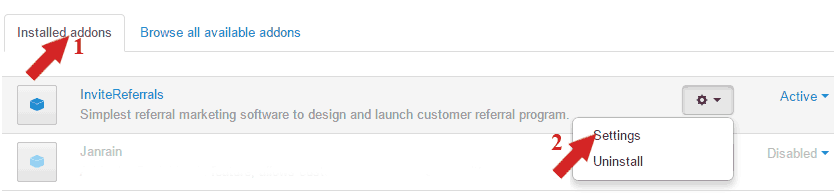
6. Now you will see the Settings page PASTE your Brand ID and Encrypted Key as:
a. Login to your InviteReferrals account and go to plugins Documentation Link to get your brandID and Encrypted Key
b. Enable: On (Check Mark).
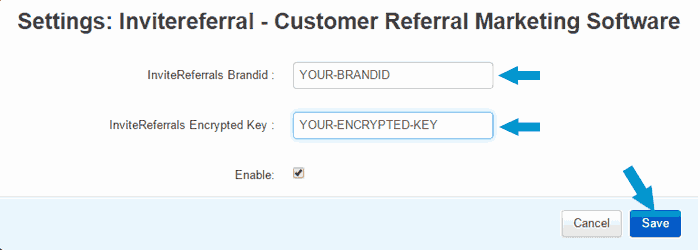
7. After Setting up Brand id & Secret Key click on Save button at the bottom right corner.
Your CS-CART ADD-ON integration is now complete.
Part B : Create campaign in InviteReferrals Software.
Setup up the campaign using easy setup tutorial guide given below
Go through referral program promotion guide to increase effectiveness of your referral program. You can also check out our case studies section to learn from success stories.

1 comment