














 Email
Email SMS
SMS Whatsapp
 Web Push
 App Push
 Audience Sync for Ads
 Popups
 Channel A/B Testing
  Control groups Analysis
 Frequency Capping
 Funnel Analysis
 Cohort Analysis
 RFM Analysis
 Signup Forms
 Surveys
 NPS
NPS Landing pages personalization
  Website A/B Testing
  PWA/TWA
 Heatmaps
 Session Recording
 Wix
Wix Shopify
 Magento
 Woocommerce
 eCommerce D2C
  Mutual Funds
 Insurance
 Lending
  Recipes
  Knowledgebase
 Developer Docs
 Product Updates
 App Marketplace
 Academy
 Ebooks
 Case Studies
 Blog
Blog Templates
 manoj
manoj
Refer a Friend program and rss to push notification is a effective way to increase subscribers. You can get more subscribers through your existing site visitors and subscribers for more details you can follow the case studies HERE
Follow the simple steps below to start a refer a friend program that integrates with your Mailchimp accoun. It requires a custom thank you page to be added using Mailchimp control panel as follows
Opt-in Confirmation Thank You page Tracking.
Step 1
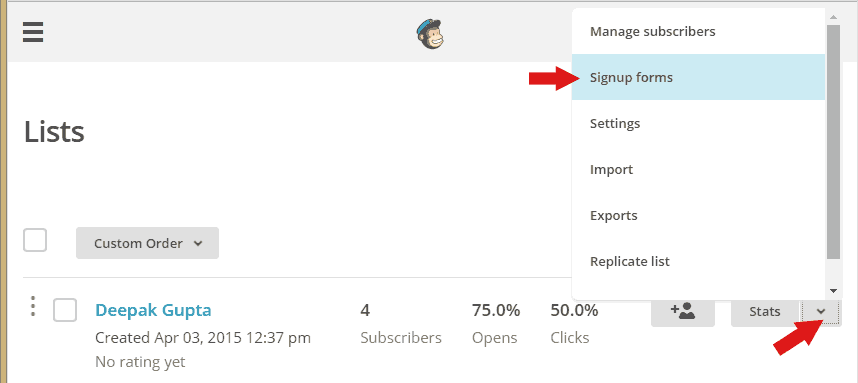
- Login to your MailChimp account and click on LIST from menu

Step 2
- Choose your Mailing list and Click on the SignUp forms from the right drop down menu
Step 3
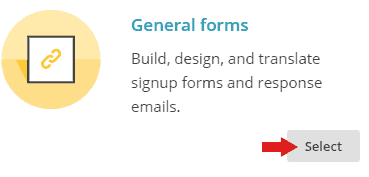
- Now select the General Forms which open general form setting page.
Step 4
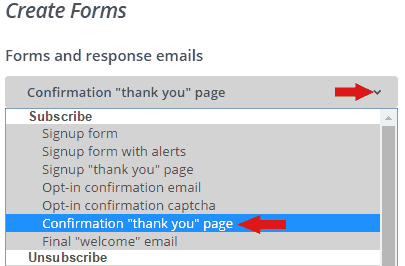
- Now Select the Confirmation “thank you ” page in drop down menu
Step 5
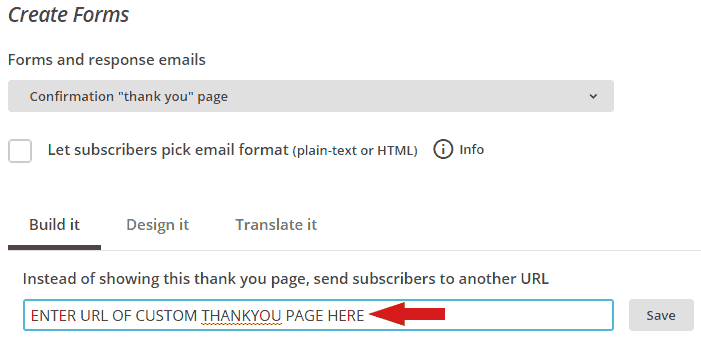
- Now enter the custom refer a friend thankyou page url of and SAVE.
- Example of Custom url with parameters: www.xyz.com/thankyou.php?email=*|EMAIL|*&name=*|FNAME|*
Step 6
You need to now place the InviteReferrals tracking pixel on this custom page. Follow the tutorials below to integrate Invitereferrals tracking pixel on the custom thank you page you just created.
Thanks
Other than mailchimp Invitereferrals also has modules/plugins for most widely used CMS’ Listed Here and it can also be integrated by simple copy pasting the javascript code from Here
