














 Email
Email SMS
SMS Whatsapp
 Web Push
 App Push
 Audience Sync for Ads
 Popups
 Channel A/B Testing
  Control groups Analysis
 Frequency Capping
 Funnel Analysis
 Cohort Analysis
 RFM Analysis
 Signup Forms
 Surveys
 NPS
NPS Landing pages personalization
  Website A/B Testing
  PWA/TWA
 Heatmaps
 Session Recording
 Wix
Wix Shopify
 Magento
 Woocommerce
 eCommerce D2C
  Mutual Funds
 Insurance
 Lending
  Recipes
  Knowledgebase
 Developer Docs
 Product Updates
 App Marketplace
 Academy
 Ebooks
 Case Studies
 Blog
Blog Templates
 Aparupa Saha
Let me start with something uncomfortable. You probably have customers right now — paying, active accounts — who are already planning to leave. They haven’t told you. Maybe they haven’t even fully admitted it to themselves yet.
But the signs are there. Fewer logins. A support ticket that left a bad taste. A feature they tried once, got confused by, and never touched again.
That is how churn begins, not with a cancellation click — but with a slow fade. And decision orchestration for retention is the only approach I’ve seen that actually catches it in time.
What Is Decision Orchestration?
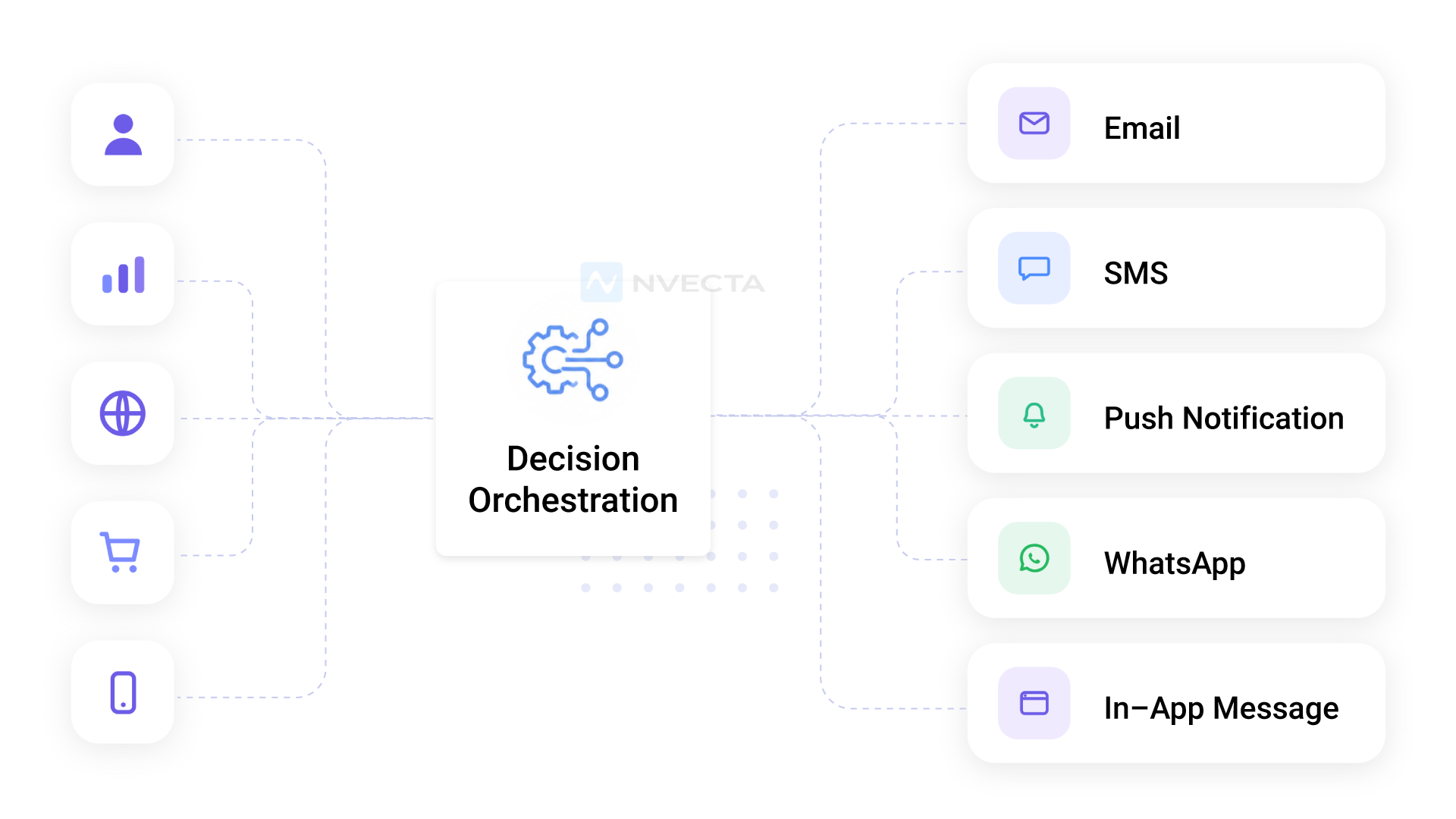
Decision orchestration is the practice of connecting every small decision your business makes about a customer (what to offer, when to reach out, which channel to use, whether to step in at all) into one system that decides and acts while things are actually happening.
Think about how a single customer gets handled today. Marketing decides what email they get. Support decides how a ticket is answered. The product team decides which nudge shows up in the app. Billing decides when to chase a failed payment. Each team makes a reasonable call on its own, and nobody is looking at the whole picture. The customer feels it. They get a renewal discount the same week support ignored their complaint.
Orchestration fixes that by pulling those decisions into one brain. It takes in signals (logins dropping, a support ticket left a sour taste, a feature tried once and abandoned), weighs them against your rules and models, and picks the next best action.
Then it hands that action off to whichever channel makes sense. The deciding and the doing stay separate, which is the part most people miss. One layer thinks. The channels just execute what it tells them.
For retention specifically, this is the difference between noticing churn and stopping it. A reporting dashboard tells you someone left last month. An orchestration layer catches the slow fade weeks earlier and does something about it on its own, without waiting for a human to spot the pattern in a spreadsheet.
So when people ask what makes 2026 retention different from the old “set up a win-back email and forget it” approach, this is it. You stop forcing customers down a fixed path and start re-deciding at every interaction what that specific person needs to stay.
Decision orchestration vs decisioning vs journey orchestration
People mix these three up all the time, so here’s the clean version.
Decisioning is a single call: should this person get a discount or not? Journey orchestration is the path you draw in advance, the email-then-SMS-then-call sequence everyone sets up.
Decision orchestration sits on top of both. It decides which decision to make next, picks which journey someone belongs on, and then re-decides the moment that the customer does anything new. A journey is a guess you made last quarter. Orchestration responds to what the customer just did this morning.
What Is Decision Orchestration for Retention?
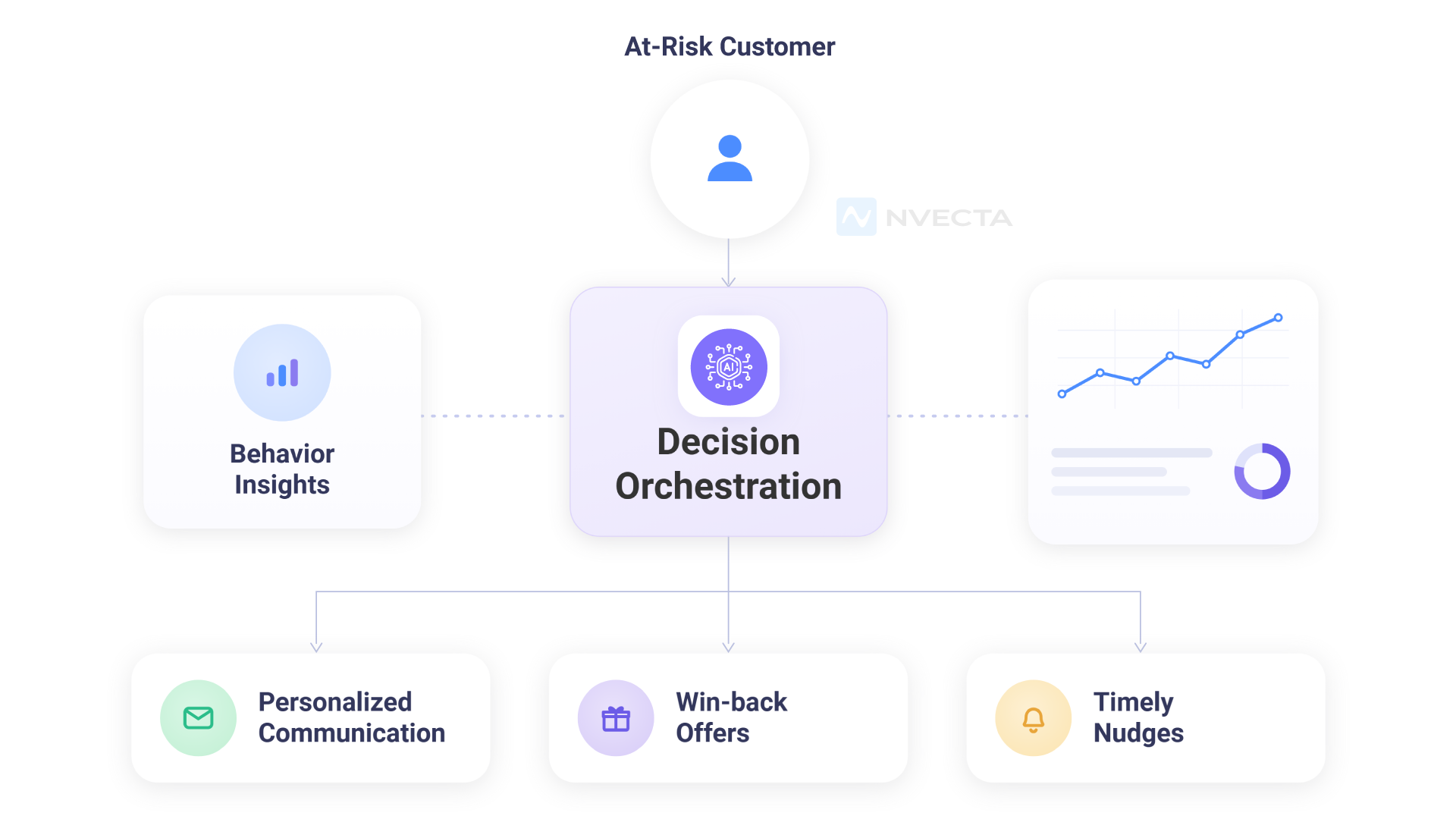
Think about what your best CSM actually does. She notices that one account went quiet. She digs into their usage.
She sends a message that doesn’t feel like a template. She offers something genuinely useful. She does this for maybe 20-30 accounts. That’s the ceiling of human capacity.
Now imagine that same judgment — applied to every single account, every single day, at 3 am, on weekends, across 10,000 customers simultaneously.
That’s decision orchestration. It’s not automation in the crude sense. It’s intelligent, contextual action at a scale no team can match.
Churn Doesn’t Announce Itself — That’s the Problem
I’ve talked to a lot of founders and CS leads about this. Most of them have the same story. They knew churn was happening.
They saw it in the monthly numbers. But by the time they saw it, there was nothing left to do. The customer was already gone — or so checked out that no email was going to save them.
Churn is a lagging indicator. By the time it shows up in your dashboard, you’re looking at decisions that were made weeks ago. Possibly months ago.
The Math That Nobody Wants to Do
Here’s a back-of-napkin calculation that tends to change people’s minds pretty quickly. Say you lose 4% of your customers every month.
That sounds manageable, right? Add it up: 4% monthly churn means you’re replacing almost half your customer base every year.
Half. From scratch. All that acquisition cost, all that onboarding work — gone and replaced, over and over.
It’s the quiet drain most teams underestimate: customer acquisition doesn’t end when someone signs up. In fact, that’s where the real cost begins.
Every churned user resets the cycle, forcing you to spend again—on ads, on sales effort, on onboarding—just to get back to where you already were.
Customer acquisition, then, isn’t just about growth; it’s about replacement. And if retention isn’t keeping pace, you’re not scaling—you’re treading water with a rising bill.
The standard stat floating around is that keeping a customer costs 5 to 7 times less than acquiring a new one.
I think that actually undersells it, because it ignores compounding. A retained customer can expand, refer others, and become a case study. A churned customer just… costs you money on the way out.
Why the Usual Fixes Don’t Work
Most retention teams default to a short list of tactics when things get bad:
- A ‘we miss you’ email campaign — goes to everyone, relevant to almost no one
- A quarterly business review call — scheduled for accounts that already feel neglected
- A discount when someone hits cancel — trains customers to wait for the offer
These approaches share one fatal flaw: they’re reactive. You’re responding to churn that has already occurred, or trying to reverse a decision that’s been building for a month. It’s like trying to patch a roof while it’s raining.
Decision orchestration works much earlier in the customer journey before frustration starts building, before customers stop logging in, and before they even begin looking at other options. It helps brands take proactive steps through smarter customer retention strategies, keeping customers engaged and satisfied before problems turn into churn.
How Decision Orchestration for Retention Actually Works
Let me walk through this without the jargon. There are four things happening, and they work as a loop that keeps getting better over time.
First — It Reads Signals You’d Never Catch Manually
Every customer leaves a trail. How often they log in. Which features they use and which ones they avoid.
Whether they’re engaging with your emails or ignoring them. How their support tickets are trending — are they asking for help, or are they complaining?
The system pulls all of this together and builds a running picture of each customer’s health. Not just one signal in isolation — all of them together.
A customer who logs in regularly but files three frustrated support tickets in a week is very different from a customer who’s just been on vacation. The system knows the difference.
- Login frequency and session depth
- Feature adoption — especially whether core features are being used
- Support ticket volume and tone
- Payment history — failed charges, plan downgrades
- Email open rates, NPS scores, in-app survey responses
Second — It Acts Before a Human Even Sees the Problem
Once a risk score crosses a threshold, the waiting stops. A pre-built response fires immediately. Not ‘flags for review’ — acts. The specific action depends on the situation:
- A customer who stopped using a key feature gets a short, helpful in-app message with a tutorial link
- A long-tenure account that’s gone quiet gets a personal-sounding email from their account owner
- An enterprise account with a dropping health score generates an immediate task for a senior CSM — fully pre-loaded with context
- A new user who never completed onboarding gets a gentle re-engagement nudge on day 14
The gap between ‘signal detected’ and ‘action taken’ goes from days to minutes. That gap is where customers used to fall through.
Third — It Doesn’t Send the Same Message to Everyone
This is where most basic automation tools fail. They can send emails automatically. What they can’t do is send the right email to the right customer based on who that customer actually is and what they actually need.
A churning power user needs to hear something completely different from a churning new user. One has a familiarity problem.
The other might have a value perception problem. Decision orchestration knows the difference and adjusts.
Fourth — It Learns and Gets Better on Its Own
Every action the system takes produces a result. Customer stayed. Customer ignored the message. Customer cancelled anyway. All of that feeds back in.
Over weeks and months, the model adjusts. It figures out that a certain message type works better for small-team customers.
That enterprise accounts respond better to a personal call than an email. That discounts work for one segment but backfire for another. With smart customer segmentation, you don’t tune this manually — it tunes itself.
Three Real Stories Worth Knowing
A Project Management SaaS Halved Their Churn Rate
This team had around 12,000 active accounts and a CS team that was, frankly, drowning. They could handle their top 200 accounts well. The other 11,800 were mostly on their own. Monthly churn was sitting at 6%.
After deploying decision orchestration, they stopped relying on the CS team to spot risk manually.
The system handled early detection, triggered in-app nudges, sent timed check-in emails, and created CS tasks only for the accounts that genuinely needed human attention. Six months later, churn was at 3.9%. Same team. No new hires.
A Subscription Box Brand Stopped Losing Customers at the 45-Day Mark
They noticed a very specific drop-off pattern. Cancellations spiked right around day 45 — the new-customer excitement phase was over, and people hadn’t built a real habit yet. That was the vulnerable window.
They built an automated flow that kicked in at day 30 — before that window opened. Personalized content, a behind-the-scenes video about product curation, and a surprise upgrade offer.
The result: about 28 out of every 100 customers who would have cancelled, didn’t. Zero manual effort per recovery.
A B2B Analytics Firm Went From 5-Day Response to 6-Hour Response
Enterprise accounts are high-stakes. When one churns, it’s not a $50 loss — it might be $50,000.
This platform set up automated health score monitoring across their enterprise portfolio. The moment a score dipped, a fully pre-loaded task hit the right CSM’s queue: customer background, recent behavior, risk reasons, suggested conversation approach.
Average response time dropped from five days to six hours. Account save rate on flagged accounts improved by 41%.
Where NVECTA Fits Into All of This
I want to mention NVECTA here specifically because it’s one of the few platforms that was actually built around this problem from the ground up — not bolted together from existing tools.
A lot of what passes for ‘
software’ is basically an alert system. It tells you something is wrong.
NVECTA goes further: it decides what to do about it, and does it. Across channels, in real time, without waiting for a human to approve each action.
Here’s what that looks like in practice:
- Signals from your product, CRM, billing, and support tools come in continuously — not in overnight batches
- The risk engine assesses each customer against your defined thresholds and segment logic
- The right action fires — email, in-app message, sales task, offer — based on who the customer is and what the risk looks like
- Every outcome feeds back into the model, so it sharpens over time
- Your team gets plain-language explanations for every risk flag — not just a number
The no-code rule builder is worth mentioning separately. CS teams usually have to go through engineering to adjust retention logic.
With NVECTA, they own it themselves. If a particular trigger isn’t working, they change it. That kind of speed matters a lot when you’re trying to iterate on retention.
What Actually Changes When You Do This Right
Rather than a long list of features, here’s what the outcomes actually look like:
| What Changes | What It Looks Like Day-to-Day | The Business Impact |
|---|---|---|
| Speed | Risk detected and acted on in minutes | Catch customers before they’ve fully decided to leave |
| Coverage | Every account monitored, always | No account slips through unnoticed |
| Relevance | Each intervention tailored to that customer | Customers respond because it actually applies to them |
| Consistency | Same logic, applied fairly across all accounts | No more lucky catches and missed ones |
| Self-improvement | Model sharpens with every outcome | Retention keeps getting better without manual tuning |
| Team leverage | CS focuses on what only humans can do | Higher-value work, less manual monitoring |
Four Retention Mistakes That Cost More Than You’d Think
Most of these show up in companies that care about retention — they just haven’t built the right infrastructure yet.
Running One Playbook for Everyone
A customer who signed up last week and never finished onboarding is in a completely different situation from a 2-year customer who’s been declining in usage.
If you send both of them the same recovery email, you’re probably annoying the loyal customer and confusing the new one. Segmentation isn’t optional — it’s the whole game.
Listening to Instincts Instead of Signals
Experienced CSMs have good intuition. But intuition doesn’t scale.
When you’re managing hundreds of accounts, the ones who make noise get attention, and the ones who go quiet — often the highest-risk ones — get forgotten. Data catches what gut feeling misses.
Waiting for the Inbound Cancellation
By the time a customer fills out a cancellation form, they’ve usually been unhappy for a while.
Most churn prevention that happens at the cancellation screen is too late to be truly effective. The goal is to intervene two to three weeks before that moment even arrives. The same principle applies to inbound phone calls as missed call statistics show that 69% of missed business calls don’t get a callback within 48 hours, meaning customers who reach out by phone and get no response are often already gone before anyone notices the signal was there.
Keeping Product and Retention in Separate Worlds
In-app behavior is probably the richest churn signal you have access to. If your product analytics aren’t feeding into your retention system, you’re making decisions with incomplete information.
This is one of the main reasons siloed teams consistently underperform on customer retention metrics.
Final Thought
Churn doesn’t happen because your product is bad. Usually it happens because a customer ran into a problem and nobody noticed fast enough. Or they never got deep enough into the product to feel the real value. Or they just drifted — and silence is easy to miss.
Decision orchestration for retention fixes the notice problem. The speed problem. The scale problem. It doesn’t replace the humans on your team — it makes them more effective by handling the parts that humans were never going to catch consistently at scale.
The companies that are going to win on retention over the next few years aren’t going to do it by hiring more CSMs. They’re going to do it by building smarter systems around the people they already have.
NVECTA is how a lot of them are doing it.
🚀 Curious What This Could Look Like for Your Business?
NVECTA’s decision orchestration platform gives you an intelligent retention layer that works around the clock — watching every account, catching risk early, and taking action automatically. No rip-and-replace. No massive onboarding. Just better retention, starting fast.
👉 Book a walkthrough with the NVECTA team. Bring your current churn numbers — we’ll show you exactly where the leaks are and what an automated retention system would do about them.
FAQs
Q1: What is decision orchestration for retention, in simple terms?
It’s a system that connects to your customer data, watches for signs that someone might be about to leave, and automatically takes the right action to keep them — without anyone on your team having to notice the problem first. It runs continuously, across all your accounts, at a speed and scale that a human team can’t match.
Q2: How does autonomous churn prevention actually work?
The system collects behavioral data constantly — logins, feature usage, support activity, billing signals. It scores each customer’s churn risk based on all of that combined. When a score hits a threshold, a pre-built workflow fires: an email, an in-app message, a CSM task, or a targeted offer. The whole thing can happen within minutes of the warning signal appearing.
Q3: Does this only make sense for large companies?
Actually, smaller teams tend to benefit more immediately. They don’t have the headcount to manually watch hundreds of accounts, so the leverage is higher. A 3-person CS team using something like NVECTA can cover their entire customer base at a quality level that most 10-person teams can’t sustain manually.
Q4: What data sources does a decision orchestration system need?
At minimum: product usage data, CRM records, billing history, and support tickets. The more signals you add, the more accurate the risk scoring gets. NVECTA connects to Salesforce, HubSpot, Segment, Mixpanel, and most major tools out of the box — so you’re usually not starting from scratch.
Q5: How is NVECTA different from a CRM or a customer success platform?
A CRM manages your data and helps your team take action. A CS platform organizes your team’s workflows. NVECTA does the action itself — automatically, without waiting for a human to trigger it. It sits on top of your existing tools and adds an autonomous decision layer. Think of it less as a replacement for what you have, and more as the intelligence that runs on top of it.
