














 Email
Email SMS
SMS Whatsapp
 Web Push
 App Push
 Audience Sync for Ads
 Popups
 Channel A/B Testing
  Control groups Analysis
 Frequency Capping
 Funnel Analysis
 Cohort Analysis
 RFM Analysis
 Signup Forms
 Surveys
 NPS
NPS Landing pages personalization
  Website A/B Testing
  PWA/TWA
 Heatmaps
 Session Recording
 Wix
Wix Shopify
 Magento
 Woocommerce
 eCommerce D2C
  Mutual Funds
 Insurance
 Lending
  Recipes
  Knowledgebase
 Developer Docs
 Product Updates
 App Marketplace
 Academy
 Ebooks
 Case Studies
 Blog
Blog Templates
 Siddharth
Integrating NVECTA site notifications tool is very simple with Tumblr. If you are not signed up with NVECTA already, Please sign up first. Sign up for free now !!
Follow these steps to integrate tumblr notification:
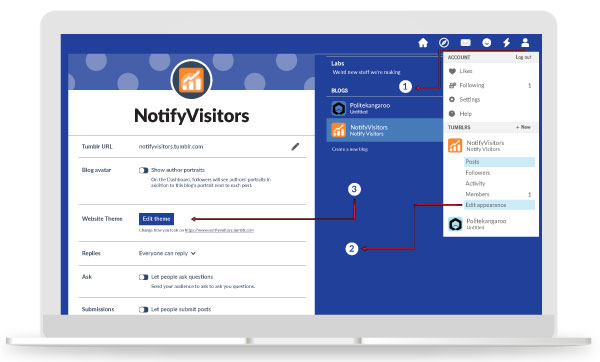
1. Customize your blog theme
Tumblr dashboard > Customize
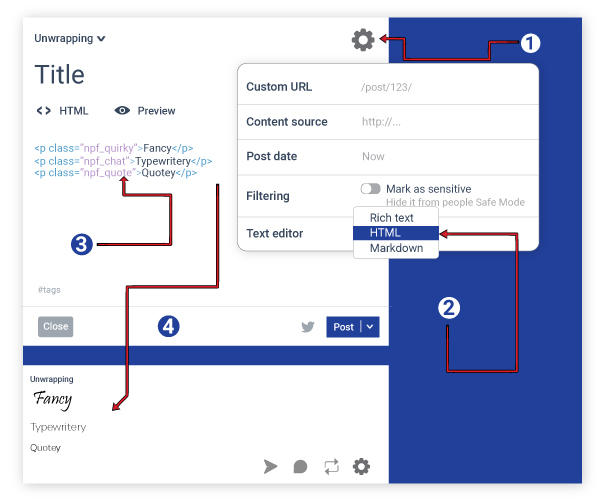
2. Edit HTML
Customize > Edit HTML
3. Copy-paste your NVECTA integration code into Tumblr’s HTML and save
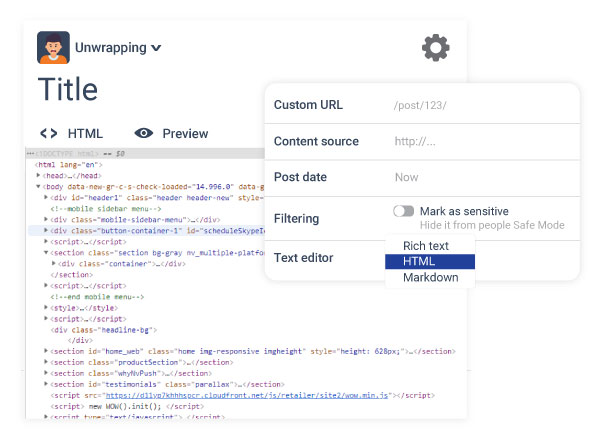
Get your NVECTA integration code from the ‘NVECTA Admin panel -> ‘Integration’ and paste the code just before closing body tag </body>.

First login to the site and then copy the code so that the secret keys are already prefilled.
Thats it! Your NVECTA site notifications tool is now integrated. You can customize anything from the admin panel. No code changes are needed on your Tumblr blog.
