














 Email
Email SMS
SMS Whatsapp
 Web Push
 App Push
 Audience Sync for Ads
 Popups
 Channel A/B Testing
  Control groups Analysis
 Frequency Capping
 Funnel Analysis
 Cohort Analysis
 RFM Analysis
 Signup Forms
 Surveys
 NPS
NPS Landing pages personalization
  Website A/B Testing
  PWA/TWA
 Heatmaps
 Session Recording
 Wix
Wix Shopify
 Magento
 Woocommerce
 eCommerce D2C
  Mutual Funds
 Insurance
 Lending
  Recipes
  Knowledgebase
 Developer Docs
 Product Updates
 App Marketplace
 Academy
 Ebooks
 Case Studies
 Blog
Blog Templates
 Aparupa Saha
Meta Description: Intelligence Unification connects all your AI tools into one smart system. Learn the 4 layers, top tools like LangChain & Pinecone, and how to build it fast.
Most businesses today use more than one AI tool. And most of those tools do not talk to each other.
You have one AI answering customer questions, another reading your documents, and a third pulling reports. None of them shares information. Your team ends up doing the connecting manually, copying outputs from one tool and pasting them into another. That is exhausting, and it wastes time.
There is a better way to set this up. It is called an intelligence unification stack. It is basically a group of tools that work together as a single system rather than as several separate ones. Your AI can share data, remember past conversations, and actually improve over time.
This post explains what that setup looks like, which tools you need, and how to build it step by step.
What Is Intelligence Unification?
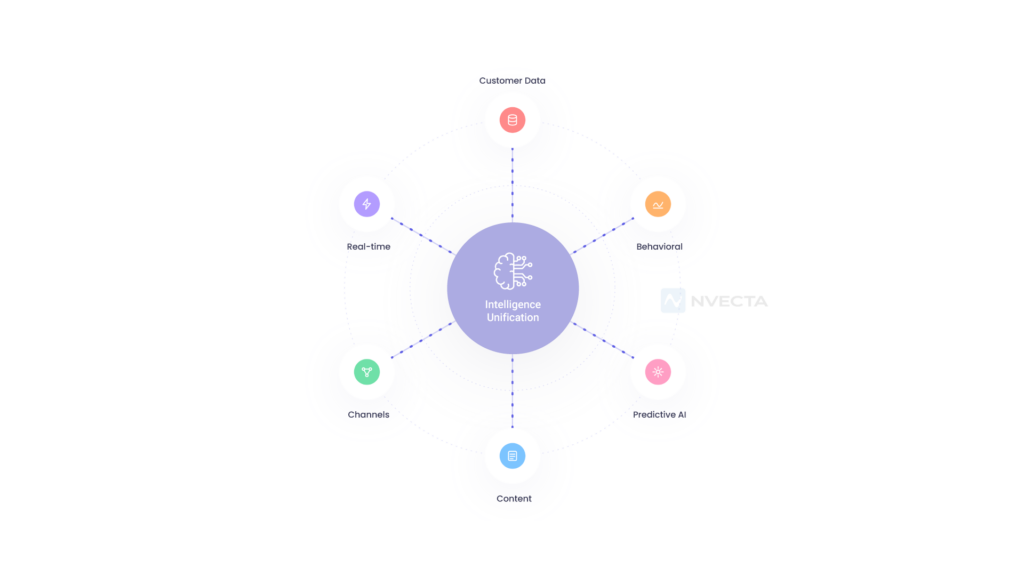
Intelligence unification simply means integrating all your AI tools into a single system.
Right now, most AI tools work alone. You ask one a question, it answers, and then it forgets everything. It cannot look at your past customer data. It cannot check what another tool just did. It starts fresh every single time.
Intelligence unification fixes that. It gives your AI tools shared memory, access to your real business data, and the ability to hand off work to each other when needed.
Think of it like a team of workers. Right now, your AI tools are like people in different rooms with no phone. Intelligence unification puts them all in the same room with a shared board and a clear way to communicate.
A properly unified system does three things. It shares memory across all tools, so each one knows what the others have seen. It keeps context going across different sessions and users, so nothing gets lost.
And it lets multiple AI models work together on the same task, rather than doing things separately.
Why This Is Such a Big Problem Right Now
Companies are adding AI tools faster than they are organising them.
The average mid-size business now uses between seven and twelve AI tools. Almost none of them are connected. That means someone on the team is always manually connecting, which takes a huge amount of time.
Studies show that teams spend between 30 and 40 per cent of their AI-related work hours just moving information from one tool to another. That is nearly half the day spent doing something a well-built system would handle automatically.
There is also a quality problem. When your AI lacks access to your full business data, it guesses. It gives answers based on general knowledge instead of your specific situation.
Those answers are often wrong or outdated, and over time, that damages trust in your AI setup.
When everything is unified, your AI gets smarter without you having to do anything extra. It has access to better information, so it gives better answers. And because you are tracking how well it is doing, it keeps getting better the longer you use it.
The Four Parts of a Unified AI Stack
A unified intelligence stack has four layers. Each one does a specific job. You need all four for the system to work properly.
| Layer | Purpose |
|---|---|
| Data Foundation | Ingest and clean your business data |
| Memory & Retrieval | Store and search information using RAG |
| Reasoning & Orchestration | Manage AI workflows and multi-agent tasks |
| Output & Evaluation | Track quality, log interactions, and validate outputs |
Part One: Your Data Foundation
This is where all your information lives and gets organised.
Before your AI can be useful, it needs access to your data. That means pulling in information from your CRM, your documents, your databases, your emails and any other source your business uses.
This layer takes all of that raw information and cleans it up so the AI can actually read and use it.
Most businesses already have some version of this, but it was usually built before AI was part of the plan. That means it often needs updating.
Apache Kafka is a tool that handles fast, real-time data streams. It is great when you need information to move through your system constantly and quickly. Airbyte connects over 300 data sources into one place and handles much of the heavy lifting for you.
DBT takes your raw data and turns it into clean, organised tables your AI can work with. Unstructured.io is useful for messy content such as PDFs and emails that are hard for AI to read in their original formats.
Part Two: Memory and Retrieval
This is what lets your AI remember things and look them up when needed.
Without this layer, your AI forgets everything after each conversation. It cannot pull up what a customer asked last week or check a document you uploaded a month ago. It starts fresh every time, leading to repetitive, generic answers.
The technology that powers this layer is called RAG, which stands for retrieval-augmented generation. Here is how it works in plain terms.
When someone asks your AI a question, the system searches your knowledge base for the most relevant information it has. It then gives that information to the AI as background context before generating a response.
The AI answers based on your actual data, not just its general training.
This is the layer that makes the biggest difference to answer quality. When it works well, your AI sounds like it actually knows your business.
Pinecone is a hosted tool that stores and searches large amounts of information very quickly. Weaviate is a free, open-source option that combines keyword search with the smarter semantic search AI relies on. Qdrant is another fast option that works well when you need to filter results by specific criteria.
pgvector is a simpler option that works within Postgres, a database many teams already use. LlamaIndex is a framework that helps you build and manage the whole retrieval pipeline from start to finish.
Part Three: Reasoning and Orchestration
This is the part that decides what to do and how to do it.
Once your AI has access to your data and can look things up, it needs something to manage the actual work. This layer decides which AI model to use for a given task, what information to pass to it, and what to do when things go wrong.
For simple tasks, this means chaining a few steps together in an ordered sequence. For complex tasks, this means running multiple AI agents in parallel, each handling a specific part of the problem, and combining their results at the end.
LangChain is the most popular tool for managing AI workflows. It lets you connect model calls, tools and data retrieval steps in a logical sequence.
AutoGen from Microsoft is built for situations where multiple AI agents need to work together and coordinate.
CrewAI is good when you want to assign specific roles to different agents, such as one that researches and another that writes. AWS Bedrock gives you access to powerful AI models with built-in tools for running agents, especially if your business already uses Amazon Web Services.
Part Four: Output, Evaluation and Feedback
This is where you check whether everything is actually working.
Most teams skip this part entirely. They build something, it seems to work, and they move on. The problem is that AI systems can quietly get worse over time. Answers start drifting. Retrieval misses things. Users notice before the team does.
This layer tracks your AI’s performance. It measures things like how often the AI gives wrong answers, how relevant the information it retrieves is, and how satisfied users are with the responses.
That information goes back into the system so you can fix problems before they become visible.
Langfuse records every AI interaction end-to-end so you can trace exactly what happened when something goes wrong. Helicone sits in front of your AI calls and logs everything automatically with very little setup.
Arize AI is built for larger teams and includes tools to evaluate how well your retrieval system is working. RAGAS is a free tool designed specifically for testing the quality of your retrieval and generation pipeline.
Guardrails AI checks every output before it reaches the user and blocks anything that does not meet your standards.
How It All Works Together: A Simple Example
A customer writes in asking about their renewal date and whether there are any new features they should know about.
The system receives the message and immediately pulls the customer’s account details from your CRM. It now knows who they are, when their renewal is, and what plan they are on.
At the same time, the retrieval layer searches your knowledge base for recent product updates and any relevant information related to this customer’s plan or history.
The orchestration layer splits the task. One part of the system looks up the structured billing information. Another searches the product documentation for relevant new features.
Both results come together into one clear, accurate response.
That response gets checked before it goes out. It passes through a validation step to ensure the answer is accurate and appropriate. Then it is sent.
The whole interaction is logged. The system tracks whether the customer was satisfied, how quickly it responded and whether anything needed to be escalated. That data is used to make the next response even better.
Real Examples from Real Businesses
A law firm with 200,000 internal documents connected its files to a RAG system built on LlamaIndex and Pinecone. Before the setup, lawyers spent about two hours searching for relevant cases.
After, they got accurate summaries with proper citations in under 30 seconds. The retrieval layer made that possible. Without it the AI would have invented case references that did not exist.
A software company connected their support tickets, product data and customer records into a unified AI layer. Instead of checking three different dashboards and manually spotting patterns, the system now automatically surfaces the most important signals.
They can see which customers are at risk of leaving before those customers contact support.
A financial firm automated the first draft of its analyst reports. Data flows in from market feeds and internal databases, moves through an AI reasoning layer, and produces a structured draft with risk notes in minutes.
The analysts spend their time on judgment and decision-making rather than pulling and formatting data.
Tools Organised by Layer
Data Foundation: Apache Kafka for real-time data, Airbyte for connecting data sources, dbt for cleaning and organising data, and Unstructured.io for parsing documents and emails.
Memory and Retrieval: Pinecone for fast, managed search; Weaviate for hybrid search; Qdrant for filtered retrieval; pgvector for Postgres users; LlamaIndex for building the retrieval pipeline.
Reasoning and Orchestration: LangChain for managing AI workflows, AutoGen for multi-agent collaboration, CrewAI for role-based agents, AWS Bedrock for managed model access.
Output and Evaluation: Langfuse for tracing AI calls, Helicone for logging, Arize AI for enterprise monitoring, RAGAS for testing retrieval quality, and Guardrails AI for output validation.
Full Platform: NVECTA covers all four layers in one integrated system built specifically for teams who want to move fast without assembling everything from scratch.
Mistakes That Slow Teams Down
The most common mistake is focusing on which AI model to use before determining where the data comes from. The model barely matters if it cannot access the right information. Build the data and retrieval layers first, then choose your model.
Skipping the evaluation layer is the second most common problem. When you have no way to measure quality, you have no way to improve it. Problems build up quietly until they become obvious to the people using the system.
Adding too much complexity too early is another trap. It is tempting to build a system with ten specialised agents all working together from day one.
Almost no team actually needs that at the start. Begin with simple, reliable flows and add complexity only when a clear need shows up.
Assuming the vector database will fix everything on its own is a mistake many teams make after reading about RAG. The database is only as useful as the data inside it.
If your documents are poorly organised, your chunks are too big or too small, or your metadata is missing, search results will be poor no matter how good the tool is.
Not building cross-session memory is something almost every team regrets later. If your AI cannot remember past conversations, users have to repeat themselves every time.
That feels broken even when individual answers are technically correct. Build memory early and save yourself the pain of retrofitting it.
Where NVECTA Fits In
Putting all four layers together from scratch takes a long time and a lot of engineering work. Most teams do not have the bandwidth to properly connect all the tools, maintain them, and ship their actual product.
NVECTA was built specifically to solve that problem. It is a unified platform that handles data routing, vector memory, AI orchestration and evaluation in one place.
You do not have to stitch five tools together with custom code and hope they stay connected. You get a system that is already designed to work as a whole.
Teams using NVECTA get to production faster and see better output quality from day one, because the memory and evaluation layers are built in rather than added as an afterthought.
If you want a unified AI stack without spending months building the infrastructure, NVECTA is the most direct way to get there.
Key Takeaways
Unifying your AI stack is not about picking a smarter model. It is about connecting the right layers so your models have better information to work with.
All four layers matter. Data, memory, reasoning and evaluation each do a job that the others cannot replace.
The retrieval layer is where most of the accuracy gains come from. Invest time in preparing your data well before connecting it to anything else.
Evaluation is not optional. If you cannot measure how well your system is working, you cannot improve it.
Start simple. Build the data and retrieval layers first, get them working reliably, then add orchestration and evaluation on top.
NVECTA cuts months off the setup time for teams that need to move quickly without sacrificing quality.
Frequently Asked Questions
What is intelligence unification in simple terms?
It means getting all your AI tools to work as a single connected system rather than separately. Each tool can access the same data, remember past interactions, and hand work off to other tools when needed. The result is more accurate answers, less manual work and a system that gets better over time rather than staying the same.
What tools do I need to start?
You do not need everything at once. Start with a way to bring your data together, like Airbyte. Add a simple vector database for search, like pgvector. Use LangChain to manage your AI workflows. And add Langfuse to track what is happening. Platforms like NVECTA bundle all of this and get you moving faster than building it piece by piece.
What is RAG and why does it matter?
RAG stands for retrieval-augmented generation. It lets your AI search your actual business data when answering questions, rather than relying only on what it learned during training. This is the main reason some AI systems give accurate, specific answers while others sound generic or make things up. It is the most important single improvement you can make to output quality.
What goes wrong most often when teams build an AI stack?
RAG stands for retrieval-augmented generation. It lets your AI search your actual business data when answering questions, rather than relying only on what it learned during training. This is the main reason some AI systems give accurate, specific answers while others sound generic or make things up. It is the most important single improvement you can make to output quality.
What goes wrong most often when teams build an AI stack?
Skipping evaluation is the number one failure. Without measuring quality, you do not know when things go wrong. The second most common issue is starting with model selection instead of data preparation. A great model with poor data access will always underperform a simpler model with good data access.
Does NVECTA replace all four layers or just one?
NVECTA covers all four layers on a single platform. It is not just an orchestration tool. It handles data routing, memory, reasoning and evaluation together. It also connects with tools you already use, so you do not have to start from scratch. The goal is to unify your existing setup, not replace it entirely.
