














 Email
Email SMS
SMS Whatsapp
 Web Push
 App Push
 Audience Sync for Ads
 Popups
 Channel A/B Testing
  Control groups Analysis
 Frequency Capping
 Funnel Analysis
 Cohort Analysis
 RFM Analysis
 Signup Forms
 Surveys
 NPS
NPS Landing pages personalization
  Website A/B Testing
  PWA/TWA
 Heatmaps
 Session Recording
 Wix
Wix Shopify
 Magento
 Woocommerce
 eCommerce D2C
  Mutual Funds
 Insurance
 Lending
  Recipes
  Knowledgebase
 Developer Docs
 Product Updates
 App Marketplace
 Academy
 Ebooks
 Case Studies
 Blog
Blog Templates
 manoj
manoj
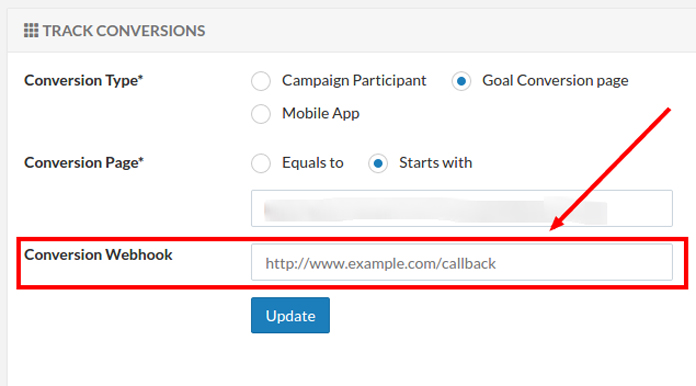
Conversion Webhook is a HTTP callback triggered when there is goal conversion.
How To Set
1) Edit Campaign.
2) Go to “Website Integration” section.
3) Add the HTTP callback url in Conversion Webhook field under track conversions.
Response
You will get a post back call on your webhook url with following GET PARAMETERS as soon as there is a referral conversion. You can then use this data as per flow requirements
| Parameter | Description | Value |
|---|---|---|
| conversion | whether a successful conversion or not | success / fail / pending |
| referrer_name | name of the referrer (who referred his friend) | Robert Downy |
| referrer_email | email id of the referrer | example@gmail.com |
| referee_name | name of the referee (friend) | Cristian Bale |
| referee_email | email id of the referee | example@gmail.com |
| orderID | orderID passed by you in javascript code | ASDXXXXX |
| purchaseValue | purchaseValue passed by you in javascript code | 1000 |
| referrer_converts | No. of conversions by referrer | 2 |
| referrer_customValue | custom value passed for referrer | xxxxxxx |
| goal_complete | whether the goal has completed. Eg. If you are rewarding referrer on 5 conversions, then for 5th conversion it will be 1 else 0 | 1 |

1 comment