














 Email
Email SMS
SMS Whatsapp
 Web Push
 App Push
 Audience Sync for Ads
 Popups
 Channel A/B Testing
  Control groups Analysis
 Frequency Capping
 Funnel Analysis
 Cohort Analysis
 RFM Analysis
 Signup Forms
 Surveys
 NPS
NPS Landing pages personalization
  Website A/B Testing
  PWA/TWA
 Heatmaps
 Session Recording
 Wix
Wix Shopify
 Magento
 Woocommerce
 eCommerce D2C
  Mutual Funds
 Insurance
 Lending
  Recipes
  Knowledgebase
 Developer Docs
 Product Updates
 App Marketplace
 Academy
 Ebooks
 Case Studies
 Blog
Blog Templates
 Shivani Goyal
📌 Quick Answer: What is Wix Email Marketing?
Wix Email Marketing is Wix’s built-in email marketing tool (formerly Wix ShoutOut) that lets website owners design, send, and track branded email campaigns directly from their Wix dashboard. The free plan includes 200 emails per month, while paid plans range from $10/month (Essentials, 500 emails) to $49/month (Advanced, 1 million emails). Wix Email Marketing is best for small businesses already using Wix for their website, but advanced marketers often choose specialized tools like Mailchimp, GetResponse, or Nvecta for deeper automation, segmentation, and customer data unification.
If you’re looking to drive more traffic to your Wix website, Wix email marketing can be the tool that takes your business to the next level. With 200+ million Wix-powered websites globally in 2026, the built-in email tool is the natural starting point for site owners who want to keep their tech stack in one place.
So why is email marketing still a big deal in 2026? With so many tools out there, why choose Wix? That’s what this guide covers. We’ll walk through the what, why, and how of Wix email marketing, plus pricing, setup steps, real alternatives, and the AI features changing email marketing this year.
What is Wix Email Marketing?
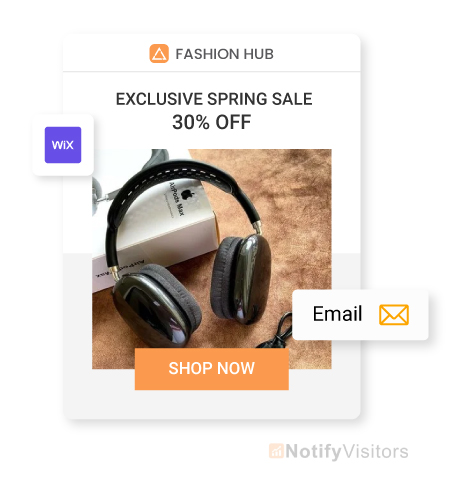
Wix Email Marketing is the built-in email tool inside the Wix platform that lets you design, send, and track email campaigns without leaving your Wix dashboard. It’s particularly useful for ecommerce sites running on Wix. You can use email marketing to send newsletters featuring new product launches and exclusive online store discounts.
Assume you’re selling unique, handmade jewelry through your ecommerce site. Wix Email Marketing lets you keep buyers in the loop on new collections, restocks, and seasonal sales without needing a separate email platform.
Don’t ignore offline marketing channels either. Attend events like trade fairs or host your own forums to build authority in your niche. Share an electronic business card with your social media links and contact details at these networking events.
The card can also direct new contacts to your landing page where they can sign up for your email list. Wix Email Marketing then lets you create, send, and manage email campaigns directly within the platform without needing third-party integrations for basic functionality.
One of the key strengths of Wix Email Marketing is its ease of use. The platform is designed for users at every skill level, so even if you’re not technical, you can put together professional email campaigns in minutes. A few clicks and you’re done.
Why email marketing? Because the numbers still hold up. According to Statista’s research, over 60% of marketers from companies around the world report that their email campaigns achieve open rates above 20%. That’s higher than most paid channels can claim.
That said, don’t rely on Wix email marketing alone to promote your brand. The best results come from combining email with social media, content marketing, and direct customer engagement strategies across multiple channels.
Does Wix Have Email Marketing?
Yes, Wix has a built-in email marketing tool that comes free with every Wix site. The tool was previously known as Wix ShoutOut and has been rebranded as Wix Email Marketing with significantly expanded features over the past few years.
The free plan supports up to 200 emails per month, which is enough for very small businesses or testing campaigns. For more serious use cases, paid plans extend the monthly limit up to 1 million emails on the Advanced plan. Wix Email Marketing also handles automation, basic segmentation, analytics, and template customization out of the box.
Key Features of Wix Email Marketing
You now have a sense of what Wix Email Marketing is. But what actually makes it the go-to choice for so many businesses? It’s all about simplicity and the core feature set.
Here’s a look at what you get:
1. Email Templates
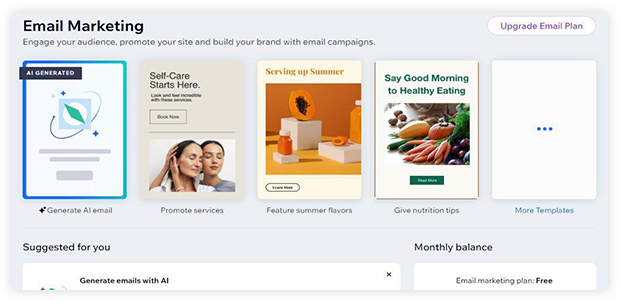
Wix offers a wide library of customizable email templates. These responsive templates cover different styles and use cases, from product announcements to newsletters to seasonal campaigns.
The Wix email builder lets you create polished emails that match your brand and message. Whether you’re selling cookies, offering yoga classes, or running a SaaS company, there’s a template in the library that’ll fit your brand and let you get sending faster.
2. Automation
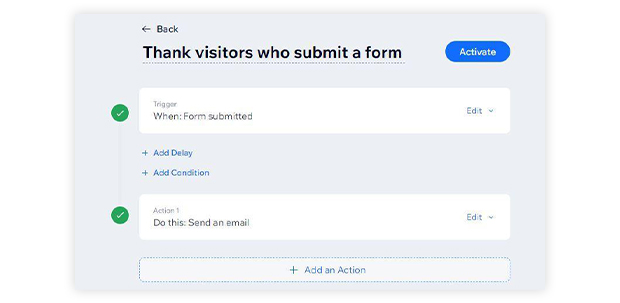
Automation lets you send emails without lifting a finger. Set up your sequences once, and Wix handles the rest. You can build automated emails for moments like welcoming new subscribers, sending birthday discounts, or following up after a purchase. Strong marketing automation is what turns email marketing from manual work into a system that scales.
Email marketing automation means your customers get the right message at the right time. It keeps communication consistent without anyone on your team having to hit “send” each day.
3. Analytics
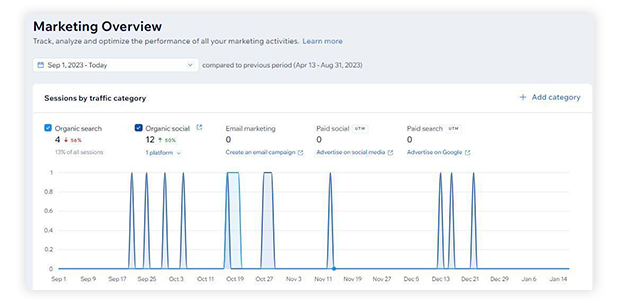
Understanding how your campaigns actually perform is critical, and Wix provides detailed analytics for this. You can see who’s opening your emails, clicking links, and engaging with your content.
Trackable metrics include open rates, click-through rates, bounce rates, and unsubscribe rates. These numbers help you refine your email marketing strategies and improve future campaigns based on what’s actually working rather than what you assume is working.
4. User-Friendly Editor
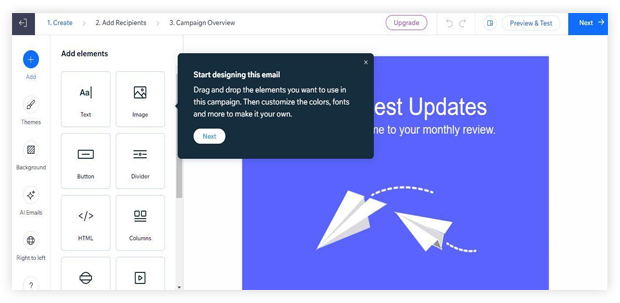
The Wix email editor is intuitive and easy to use. Drag and drop, click and edit, and your email is ready in minutes. You can add images, text, buttons, and other elements without writing a single line of code.
This makes Wix Email Marketing accessible for users with little to no technical background, which matters because most small business owners aren’t going to spend hours learning HTML to ship a single email.
5. Audience Segmentation
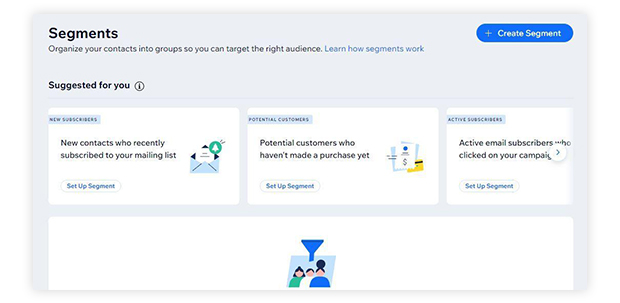
With audience segmentation, you can target specific groups of people in your subscriber list. Tailor your messages to match the unique needs and interests of each segment.
This feature lets you segment subscribers based on activities, location, purchase history, and other criteria. For deeper segmentation across multiple data sources, brands typically pair Wix with a dedicated customer data platform that unifies signals from web, app, and offline behavior.
6. Custom Reports
Custom reports in Wix Email Marketing give you an in-depth breakdown of each campaign’s success. These reports let you dig into the specifics of every send so you get the data needed to make informed decisions and tailor future marketing efforts more precisely.
Each feature is designed to make email marketing more efficient. If you want additional capabilities beyond the basics, you can upgrade your Wix Email Marketing plan or explore additional email marketing tools that integrate with Wix.
Wix Email Marketing Pricing Plans 2026
Wix Email Marketing plans are separate from Wix Premium website plans. You choose your email plan based on how many emails you intend to send each month.
With the free email marketing plan, Wix lets you send 200 emails for free. The free plan follows a monthly balance system. Certain email marketing actions don’t count against your balance, like sharing a campaign that has already been published.
Here’s a breakdown of the available Wix Email Marketing paid plans in 2026:
| Plan | Monthly Cost | Emails/Month | Best For |
| Free | $0 | 200 | Testing & very small businesses |
| Essentials | $10 | 500 | Solo creators & freelancers |
| Core | $25 | 5,000 | Small businesses |
| Advanced | $49 | 1,000,000 | Mid-size to enterprise brands |
- Essentials plan: The entry-level paid plan gives you 500 marketing and automated monthly emails. It includes all basic Wix Email Marketing features plus removal of Wix branding from emails, email scheduling, and an AI content-generation assistant.
- Core plan: Designed for small businesses, this plan lets you send 5,000 marketing and automated emails per month. It includes everything in Essentials plus the ability to send emails from multiple email addresses. You can also share emails in web view with a custom domain URL.
- Advanced plan: Recommended for large businesses and organizations, this plan supports up to 1 million emails per month. Feature-wise, it matches the Core plan, with the main difference being raw send volume.
All plans are monthly subscriptions, so you can upgrade or downgrade at any time based on your actual send volume.
Is Wix Email Marketing Free? (Free Plan Limits Explained)
Yes, Wix Email Marketing has a free plan that comes built into every Wix site. The free plan covers up to 200 emails per month and includes the basic features most small businesses need to get started.
What you get on the free plan:
- 200 emails per month
- Access to template library
- Basic analytics (opens, clicks, bounces)
- Basic segmentation
- Drag-and-drop editor
What’s missing from the free plan:
- Wix branding appears on every email
- No email scheduling (sends must go out immediately)
- No AI content assistant
- Limited automation capabilities
- No multiple sender addresses
The free plan is great for testing the platform, but most growing businesses need to upgrade within a few months once they exceed the 200-email limit or want to remove Wix branding.
How to Design a Wix Email Campaign (Step-by-Step)
Designing effective email campaigns with Wix is a 5-step process:
Step 1: Start From Scratch or Choose Your Template
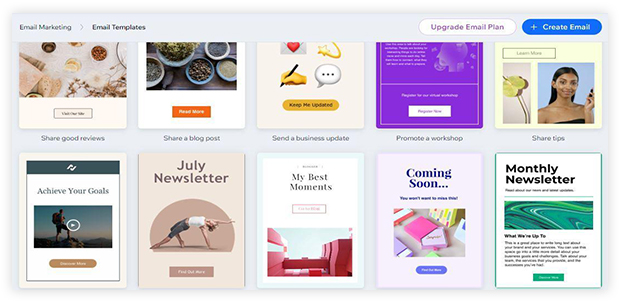
This step shapes the campaign’s appearance. Start by defining the purpose of your campaign. Are you announcing a new product, offering a discount, or sending a regular newsletter? Your goal serves as the foundation and keeps the entire campaign focused.
Then build your email either from scratch or by selecting one of the designer-made templates that matches your brand style and the campaign’s objective.
Step 2: Customize Your Email Campaign
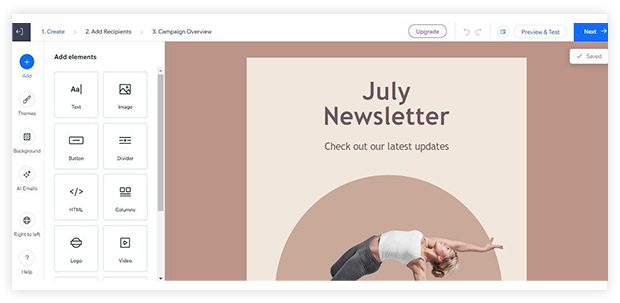
This is the creative part. Customize colors, fonts, and images to reflect your brand identity. Keep the design consistent with your Wix site so subscribers immediately recognize the email is from you.
Your email needs engaging content that resonates with your target audience. Keep it concise and impactful. The words you use are what actually convert opens into clicks.
Step 3: Preview and Send a Test Email
Always check how your email looks on both desktop and mobile before pushing it live. Send yourself a test email, review it, and make adjustments if anything looks off. Sending test emails doesn’t count against your monthly allowance.
Step 4: Choose Your Email List
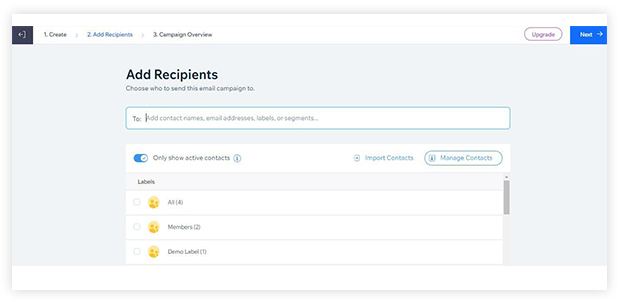
This step is about choosing which subscribers receive your email. You can select contacts one by one, or pick labels and segments to send to multiple groups at once.
Personalizing your email is an effective tactic. Personalized emails generate six times higher transaction rates per email than non-personalized messages. The easiest move is to address recipients by name. To take personalization further, segment your contacts and tailor different emails to each group. Strong personalization strategy built on unified customer data is what separates good email programs from great ones.
Step 5: Publish and Send Your Campaign
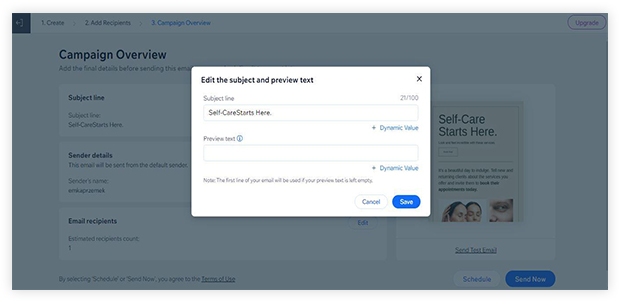
Finally, write your subject line and set the sender name your subscribers will see in their inbox.
Then choose to send your campaign immediately or schedule it for a future date and time. Scheduled sends are useful for hitting subscribers at peak engagement windows for their timezone.
You can boost your Wix Email Marketing campaigns by integrating them into your broader viral marketing strategy using social media. Share lead magnets, newsletters, and offers through your social channels to promote your brand across every touchpoint.
With this multi-channel approach, your brand stays top of mind for potential customers wherever they spend time online.
Monitor the email analytics to evaluate campaign performance. Learn from the data and improve continuously based on what your specific audience responds to.
Wix Email Marketing Pros and Cons
Here’s an honest breakdown of where Wix Email Marketing shines and where it falls short.
Pros
- Integrated directly with Wix sites (no third-party setup)
- No-code, drag-and-drop builder
- Free plan available for testing
- Solid template library covering most use cases
- Beginner-friendly with minimal learning curve
- Built-in analytics dashboard
- AI content assistant on paid plans
Cons
- Limited automation depth compared to specialized tools
- Basic segmentation that doesn’t handle multi-channel data
- Fewer integrations than Mailchimp or Klaviyo
- 200-email cap on free plan is restrictive
- Reporting less detailed than dedicated email platforms
- Wix branding on free plan emails
- Best suited only for Wix-hosted websites
Wix Email Marketing vs Mailchimp Comparison
Wix Email Marketing and Mailchimp are both popular choices, but they serve different needs. Here’s a side-by-side comparison to help you choose:
| Feature | Wix Email Marketing | Mailchimp |
| Free plan | 200 emails/month | 1,000 emails/month (500 contacts) |
| Entry paid plan | $10/month (Essentials) | $13/month (Essentials) |
| Maximum emails/month | 1,000,000 (Advanced) | Unlimited (paid plans) |
| Template library | Moderate | Extensive |
| Automation depth | Basic | Advanced |
| Segmentation | Basic | Advanced |
| A/B testing | Limited | Built-in |
| Wix site integration | Native | Plugin required |
| Best for | Wix site owners | Standalone email programs |
| Learning curve | Very low | Moderate |
Verdict: If you’re running a Wix site and want everything in one place, Wix Email Marketing is the easier choice. If you want serious automation, advanced segmentation, and a richer template library (even if it means managing a separate tool), Mailchimp is the stronger option. For a deeper comparison of options across the whole category, see our breakdown of best email marketing services.
AI Features in Wix Email Marketing 2026
The biggest shift in Wix Email Marketing for 2026 is the integration of AI across the entire campaign workflow. The old approach involved manual writing and template selection. The new approach uses AI to suggest subject lines, generate body copy, optimize send timing per recipient, and dynamically personalize content based on subscriber behavior.
Wix’s AI content assistant on paid plans can:
- Generate subject line variations
- Write email body copy from a brief
- Suggest send times based on subscriber behavior
- Recommend templates by industry
- Translate emails for multilingual audiences
For brands that need deeper AI capabilities, modern agentic AI systems can autonomously manage entire post-purchase, onboarding, and re-engagement flows across email plus SMS, WhatsApp, and push notifications. These multi-channel AI agents go beyond what any single-channel tool like Wix Email Marketing can deliver.
The catch worth stating clearly: AI only works on clean data. Adding AI to fragmented systems creates worse outcomes faster, not better ones. The data layer has to come first, then AI optimization builds on top.
Wix Email Marketing Limits Explained
One of the most common questions about Wix Email Marketing is around send limits and what counts toward your monthly cap. Here’s a clear breakdown:
- Free plan: 200 emails per month total
- Essentials plan: 500 emails per month
- Core plan: 5,000 emails per month
- Advanced plan: 1,000,000 emails per month
What counts toward your limit:
- Marketing emails sent to subscribers
- Automated emails (welcome series, birthday emails, etc.)
- Each unique recipient on a campaign send
What doesn’t count toward your limit:
- Test emails sent to yourself
- Sharing a campaign that’s already been published
- Transactional emails through Wix’s other systems
3 Best Wix Email Marketing Alternatives
While Wix Email Marketing handles the basics well, it’s smart to explore alternatives if you need deeper automation, segmentation, or multi-channel capabilities. Here are three strong alternatives worth considering.
1. Nvecta
Nvecta is built for businesses that have outgrown basic email tools and need a complete email marketing platform with deep automation, segmentation, and multi-channel capabilities. The platform handles email plus SMS, WhatsApp, and push notifications from a single dashboard, which makes it useful for brands that want to coordinate messaging across channels rather than juggle separate tools.
Nvecta offers easy-to-use drag-and-drop content editors and lets you integrate extras like forms, quizzes, and feedback widgets directly into emails. Beyond just email, the platform covers push notifications, user feedback, customer journey orchestration, and AI-driven personalization at scale.
If you’re after a multi-tool rather than a single-channel email tool, schedule a demo with Nvecta to see how it fits your stack.
2. Mailchimp
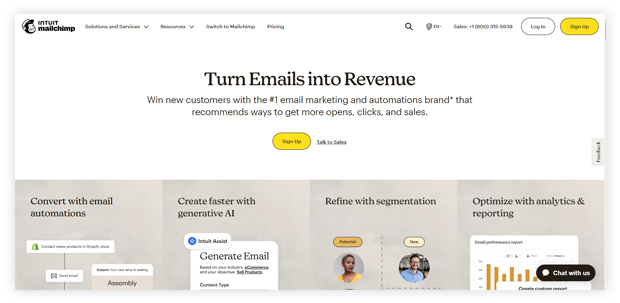
Mailchimp is known for its user-friendly interface and strong feature set across the email category.
It covers everything from email campaigns to detailed analytics. Mailchimp is a solid all-in-one marketing platform with good deliverability and a much richer template library than Wix. You can also connect it to a Wix site through the official integration if you want a Wix front end with Mailchimp powering the email layer.
3. GetResponse
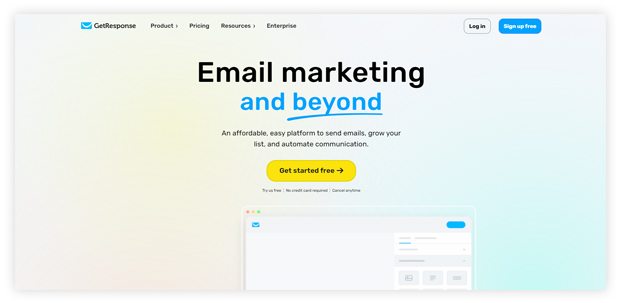
GetResponse lets you design responsive, optimized emails and launch professional campaigns quickly. It has a drag-and-drop creator and supports A/B testing across subject lines, send times, and content variations.
With 200+ professionally designed templates, you’ll find emails optimized for different campaign goals. GetResponse also offers 170+ third-party integrations, many of which connect directly to Wix websites.
In Closing
Sending emails to subscribers brings real benefits beyond just driving sales. It’s how you build relationships, share stories, and create experiences. Every email is an opportunity to connect with your audience in a way that paid ads can’t match.
In this guide to Wix Email Marketing for 2026, we’ve covered the what, why, and how — features, pricing, setup steps, pros and cons, comparison with Mailchimp, AI features, and three strong alternatives.
Now it’s your turn to take these tips, tools, and templates and create something your subscribers will actually want to open. Go out there and make your mark with email marketing. Your subscribers can’t wait to hear from you.
Frequently Asked Questions
What is Wix Email Marketing?
Wix Email Marketing is the built-in email marketing tool (formerly Wix ShoutOut) that comes free with every Wix site. It lets you design, send, and track branded email campaigns directly from your Wix dashboard without needing third-party integrations for basic functionality.
Does Wix have email marketing?
Yes, Wix has built-in email marketing that comes free with every Wix site. The free plan supports 200 emails per month. Paid plans go up to 1 million emails per month on the Advanced plan and include features like email scheduling, AI content assistance, and multiple sender addresses.
Is Wix Email Marketing free?
Yes, Wix Email Marketing has a free plan that includes 200 emails per month, basic templates, analytics, and segmentation. The free plan does include Wix branding on every email and doesn’t support email scheduling or the AI content assistant, which are available on paid plans starting at $10/month.
How much does Wix Email Marketing cost in 2026?
Wix Email Marketing costs range from $0 (free plan, 200 emails) to $49/month (Advanced plan, 1 million emails). Mid-tier options include Essentials at $10/month (500 emails) and Core at $25/month (5,000 emails). All plans are monthly subscriptions you can upgrade or downgrade at any time.
How many emails per month can I send on Wix?
You can send between 200 and 1 million emails per month on Wix depending on your plan. The free plan supports 200 emails, Essentials supports 500, Core supports 5,000, and Advanced supports 1 million. Test emails sent to yourself don’t count against your monthly limit.
How do I set up email marketing in Wix?
To set up email marketing in Wix, log into your Wix dashboard, navigate to Marketing → Email Marketing, choose a template or start from scratch, customize the design with your brand colors and content, select your email list, preview on desktop and mobile, then publish and send (or schedule for later). The full flow takes about 15-20 minutes for your first campaign.
Can Wix integrate with other email marketing tools?
Yes, Wix integrates with several third-party email marketing tools through the Wix App Market. Popular integrations include Mailchimp, GetResponse, Constant Contact, Brevo, and ActiveCampaign. You can also use the Wix API or Zapier to connect Wix to almost any email platform if no native integration exists.
What’s the difference between Wix Email Marketing and ShoutOut?
Wix ShoutOut was the original name of Wix’s email marketing tool. It was rebranded as Wix Email Marketing with expanded features including better automation, the AI content assistant, more pricing tiers, and improved analytics. Functionally, Wix Email Marketing replaces ShoutOut completely.
Is Wix Email Marketing better than Mailchimp?
Wix Email Marketing is better than Mailchimp if you’re already on Wix and want everything in one dashboard with minimal setup. Mailchimp is better if you need advanced automation, deeper segmentation, a larger template library, or want to use email marketing independently of any specific website builder. Both tools have free plans, so testing both is the fastest way to decide.
Can Wix be used for automating emails?
Yes, Wix lets you automate email sending. You can send thank-you emails to visitors who submit a form, set up welcome email series for new subscribers, send birthday discounts, follow up after purchases, and re-engage inactive subscribers. Automation features expand significantly on paid plans compared to the free tier.
Is Wix Email Marketing user-friendly?
Yes, Wix Email Marketing is designed with simplicity in mind. The drag-and-drop editor, customizable templates, and intuitive interface let you create polished emails without any coding knowledge. The learning curve is one of the lowest in the email marketing category, which is why Wix is popular with first-time email marketers.
How does Wix handle list management?
Wix has built-in tools for subscriber list management. You can add, organize, and manage email subscribers directly within the platform. Labels let you organize contacts by source or interest, and you can input contact details like phone number or address. Segmentation for targeted campaigns is supported across all paid plans.
Does Wix have AI email features in 2026?
Yes, Wix Email Marketing includes an AI content assistant on paid plans starting at $10/month. The AI can generate subject line variations, write email body copy from a brief, suggest send times based on subscriber behavior, recommend templates by industry, and translate emails for multilingual audiences.
Can I use Wix Email Marketing without a Wix website?
No, Wix Email Marketing requires an active Wix account, and most features work best when paired with a Wix website. If you don’t have a Wix site, alternatives like Mailchimp, GetResponse, Brevo, or Constant Contact will be better choices since they work independently of any specific website builder.
What’s Wix Email Marketing’s deliverability rate?
Wix Email Marketing’s deliverability rate is generally in line with industry averages of 85-95% inbox placement. Deliverability depends heavily on your sender reputation, list quality, and email content. Using a verified custom domain (available on paid plans) significantly improves deliverability over the default Wix sending domain.
What are the best Wix Email Marketing alternatives?
The best Wix Email Marketing alternatives include Nvecta (for multi-channel marketing with deep AI and CDP capabilities), Mailchimp (for standalone email programs with advanced features), GetResponse (for marketing automation and A/B testing), Brevo (formerly Sendinblue, for SMB-focused email + SMS), and Constant Contact (for small business email marketing with strong support).
