














 Email
Email SMS
SMS Whatsapp
 Web Push
 App Push
 Audience Sync for Ads
 Popups
 Channel A/B Testing
  Control groups Analysis
 Frequency Capping
 Funnel Analysis
 Cohort Analysis
 RFM Analysis
 Signup Forms
 Surveys
 NPS
NPS Landing pages personalization
  Website A/B Testing
  PWA/TWA
 Heatmaps
 Session Recording
 Wix
Wix Shopify
 Magento
 Woocommerce
 eCommerce D2C
  Mutual Funds
 Insurance
 Lending
  Recipes
  Knowledgebase
 Developer Docs
 Product Updates
 App Marketplace
 Academy
 Ebooks
 Case Studies
 Blog
Blog Templates
 Tanya
Tanya📅 Last updated: May 2026
Inside this guide: What a confirmation email is, why it matters, the 8-element anatomy of a great one, 10 steps to write one, 6 real examples, 12 copy-paste templates by use case, 20 subject lines, best practices checklist, how to reply to one, common mistakes to avoid, and 12 FAQs.
Customers, suppliers, or partners expect to receive a confirmation email when they perform, arrange services, or buy products.
A confirmation email can help recipients and senders investigate ongoing issues or transactions or both have the same information in their logs. Knowing how to write a confirmation email can improve your company’s communication capabilities.
In this article, we discuss these confirmation emails and provide examples to help you create your email.
Quick Definition: What Is a Confirmation Email?
A confirmation email is an automated transactional message that confirms an action a user just took — a purchase, signup, booking, registration, or appointment. It should arrive within 60 seconds of the trigger, include the action confirmed plus key details (order number, date, amount), provide a clear next step, and stay readable on mobile. Done well, confirmation emails see 60-70% open rates, roughly three times higher than promotional email.
What is a Confirmation Email?
A marketing email triggered by a specific customer action best describes a confirmation email. It can be a purchase or registration.
The purpose of confirmation emails is to notify buyers that the payment process has been completed. The confirmation email contains important information about your purchase, such as payment or shipping information.
A Lead generation and Lead management software helps Marketers to generate new leads, manage them as well as provide additional promotions with confirmation emails to increase sales. Marketers can generate new leads and provide additional promotions with confirmation emails to increase sales. Remember that all confirmation emails have high open and engagement rates.
Why Confirmation Emails Matter (5 Numbers Worth Knowing)
Before getting into the how, here’s what the data says about confirmation emails in 2026:
- Open rates of 60-70%. That’s roughly 3-4x what a typical promotional email earns. People actively look for these messages.
- Cart-recovery confirmation flows recover 8-12% of abandoned purchases when sent within an hour of the action.
- Customers expect a confirmation within 60 seconds. Anything slower starts generating support tickets.
- Missing or delayed confirmations are a top-3 driver of “where’s my order?” tickets for ecommerce brands. Fixing this saves real money on support.
- Mobile devices generate 60%+ of confirmation email opens, so designing mobile-first isn’t optional anymore.
The takeaway: this email type isn’t just operational hygiene. It’s one of the few touchpoints where you have your customer’s full attention and they actively want to hear from you. A well-crafted confirmation can carry more brand value than a paid ad.
Why Use Confirmation Email Templates?
Email confirmations can be used as an important marketing tactic. It helps the buyer take the next step or complete the transaction. In other words, a confirmation email is a transactional email automatically sent when a transaction is made, such as a sale or the end of a meeting.
Email confirmation templates can be used to further engage with a new customer or potential customer. It’s a great tool to improve customer relationships and build trust. AI writers can be particularly useful in creating effective and engaging confirmation email templates that resonate with customers, ensuring consistency and personalization in communication.
With poster maker, you can easily create eye-catching posters that reflect your brand identity and values, saving you time and effort while leaving a lasting impression on your audience.
- Maintain trust between the brand and the customer- With a confirmation email, they will trust you have received their order and follow through with the next payment and shipping steps.
- You can introduce yourself- You can promote and benefit from a high email open rate in confirmation messages when you send an email. Please keep it simple by sharing social media profiles and other things the customer might be interested in.
- Act as a reminder- With so much going on, it’s easy to forget! A confirmation letter can remind someone of a meeting, appointment, and more.
- Share canned responses- Your confirmation email can answer frequently asked questions, and include useful links like Legally.io for customers needing to create or access important legal documents.
- Increase participation- About 70% of customers open the confirmation email. Someone on your mailing list might not read your message, but they will open their confirmation, so add something extra.
Types of Confirmation Emails
1. Order Confirmation Email

When a customer places an order, this action triggers a confirmation email explaining that their request has been processed – confirming the order. Typically order confirmation emails are commonly used in e-commerce stores or B2C transactions. This email contains all relevant information, including a full-order summary.
These emails are further divided into these categories:
- Monitoring customer feedback
- Payment confirmation email
- Purchase confirmation email
- Email confirmation of shipping information
2. Booking Confirmation Email
Another frequently sent email confirming an online reservation. The reservation confirmation email acts as a thank you email that you send to customers after they confirm the online reservation.
It helps you build stronger relationships with customers who love your services.
3. Registration Confirmation Email
This email is typically sent to customers registering for an event or pre-booking a product. Marketers often use subscription emails as welcome emails. Later on, customers can also unsubscribe by sending an online confirmation email.
Confirmation emails are usually of the following types:-
- Webinar confirmation email
- Event registration email confirmation
- Thank you for the registration email
- A confirmation email for registration
- Cancellation confirmation email
4. Subscription Confirmation Email

Subscription confirmation emails are generated when a visitor joins your mailing list. In a double opt-in, verifying the confirmation email to verify that a valid email address has been received is critical.
The confirmation emails are further divided into two categories.
- Thank you for signing up for the email
- Double confirmation email
Let us now understand how to write a confirmation email.
How to Write a Confirmation Email?
1. Identify and add the recipient
Add the recipient’s email address to the email address bar. If you plan to meet with all the recipients, you can see their email addresses in case they need to contact each other. If you email multiple customers or vendors, you can hide each other’s email addresses using the Blind Carbon Copy (BCC) feature.
2. Write a pleasing subject line
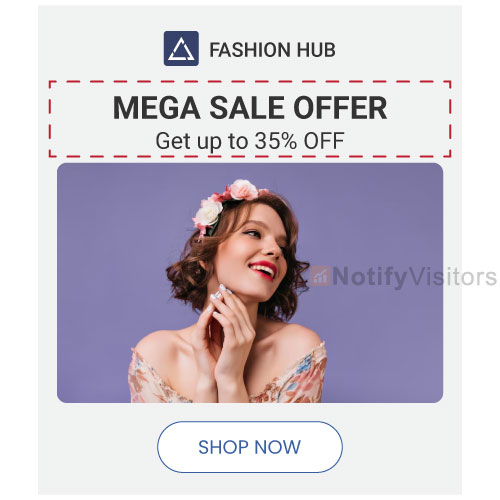
Your email subject line should clearly state the purpose of your email. Keep email subject lines as short as possible when expressing yourself when messaging.
3. Explain the purpose of the email
Begin the first paragraph of the body of your message with a brief explanation of why you are writing this email. For example, when writing to confirm an order, you can say: “I am writing to confirm your last order from our company.”
4. List the details
List any details about the event or activity that your buyer needs. Necessary details for meetings, interviews, and meetings usually include the event’s date, time, and exact location. For product orders, provide details such as order number, estimated delivery date, and estimated arrival date.
5. Ask for more information
If you need more information from recipients, please use the confirmation email to receive it. Businesses that accept clients often require clients to pre-fill forms with contact, personal, health, or other useful information. If you plan a meeting, you can ask future participants to add items to a shared meeting agenda. You can make use of tools like Evernote and Onenote to jot down all the relevant information in a centralized location.
6. Ask questions
The confirmation email also provides a good opportunity to ask questions if needed. If you’re writing a confirmation email to confirm an interview with a potential employer, ask if they want you to prepare anything or read the company’s materials beforehand. You can also use the confirmation email to ask if you must bring materials or documents to an upcoming meeting. Behind the scenes, many companies use document processing automation to keep those materials organized and ready when needed.
7. Express your gratitude
Thank the recipient or recipients of your message. In the messages you send to your colleagues, you can thank them for the hard work they can do before the meeting. If you write to customers, express your appreciation for their purchase, patronage, or loyalty.
8. Close the email
Choose an email signature, such as “best” or “sincerely.” Depending on the content of your message, you can use your name or the name of your department or company. Enter your personal or company contact information. You can also create an email signature from scratch.
9. Edit and correct
Please review your message carefully before sending it. Ensure your content is as clear as possible and contains all the information the buyer needs. You can rewrite text to replace complex terms with synonyms that are easy to understand for buyers. Also, make sure to avoid common grammar errors like misspellings, and typos. Also, make sure to avoid common grammar errors like misspellings, and typos.
10. Link to your legal documents
Linking to legal documents such as Privacy Policies or Terms and Conditions in confirmation emails is crucial for two reasons. Firstly, it promotes transparency by informing recipients about their privacy rights and the agreements they’ve consented.
This is also a legal necessity in many areas. Secondly, it acts as a protective measure for your business, helping to reduce legal disputes by ensuring agreements and data practices are acknowledged. To easily get started and check this off your list, begin with this guide on how to write a standard privacy policy.
The 8-Element Anatomy of a Confirmation Email
The 10-step process above tells you how to write the email. This section tells you what every confirmation email should actually contain, element by element. Pull up any great confirmation email you’ve received recently (Amazon order, Calendly booking, Stripe receipt) and you’ll see all eight of these in some form:
| # | Element | What goes here |
|---|---|---|
| 1 | Subject line | Clear, action-confirming, under 50 characters. Lead with what was confirmed: “Your order #1234 is confirmed” beats “Thanks for your purchase!” |
| 2 | Pre-header text | The 30-90 character snippet that shows next to the subject line in inbox previews. Use it to add details the subject line couldn’t fit (delivery date, amount, location). |
| 3 | Greeting | Personalized with first name when you have it. “Hi Sarah” outperforms “Dear Customer” by a wide margin in real-world A/B tests. |
| 4 | Confirmation statement | One sentence stating what’s confirmed. “Your booking for May 15 at 2pm is confirmed.” No marketing fluff before this line. |
| 5 | Key details | Order number, date, time, amount, address, attendee list, whatever’s specific to the action. Format as a scannable list, not a paragraph. |
| 6 | Primary CTA | One clear next step. “Track your order,” “Add to calendar,” “View receipt.” Resist adding a second button; it dilutes the click. |
| 7 | Support contact | A real way to get help if something’s wrong: email, phone, or chat link. Sending from a no-reply address kills replies and hurts deliverability. |
| 8 | Footer | Brand name, address, unsubscribe link if marketing content is mixed in, and any legal text required by your region (GDPR, CAN-SPAM). |
If you’re auditing an existing confirmation email, run through these eight elements as a checklist. Most email teams find at least two missing on the first pass, usually the pre-header and a real support contact.
Examples of Confirmation Emails
1. Purchase confirmation email example
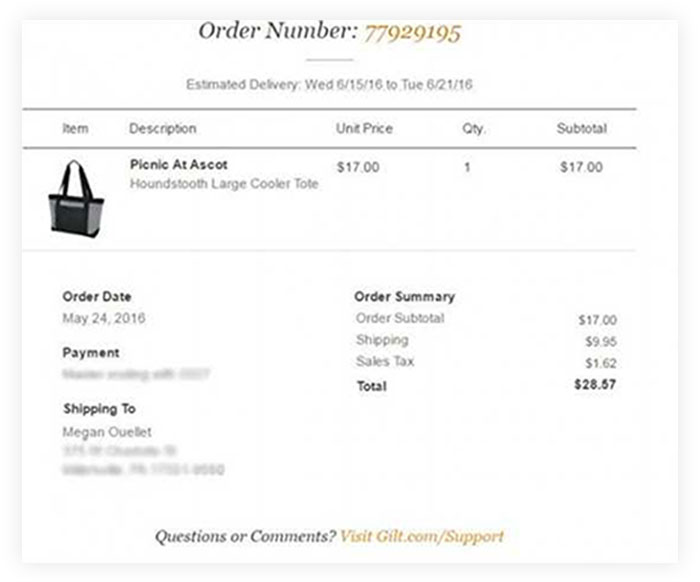
An online purchase is successful when an autoresponder arrives in your inbox.
The purchase confirmation email includes the product, description, unit, subtotal, price, quantity, etc. The address of the sender and the recipient is also indicated.
The example mentioned below clearly includes all the information and helps the customer get the requisite information about their purchase. It has an interesting CTA where it asks the customers to visit their support section in case they require any help.
2. User feedback email
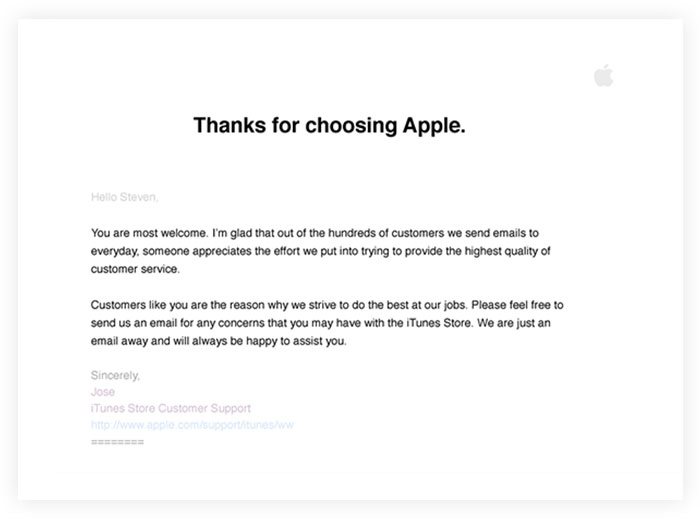
An email requesting immediate feedback will appear in your inbox within 24 hours of receiving your order. It personalizes the customer’s experience with your brand and encourages long-term retention.
This way, you can ask customers if they have questions or suggestions.
The example of the apple company below appreciates the customers for their time and effort. Also, it asks the customers directly if they have any concerns or feedback.
3. Double opt-in confirmation email example

It is an easy-to-use email that contains the notification actions sent to confirm your registration.
The primary purpose is to eliminate the possibility of a wrong email address and ensure the user is with an email service provider.
Sock Drawer kept the double opt-in email design simple to confirm visitor interest and avoid misunderstandings.
4. Webinar Confirmation email example
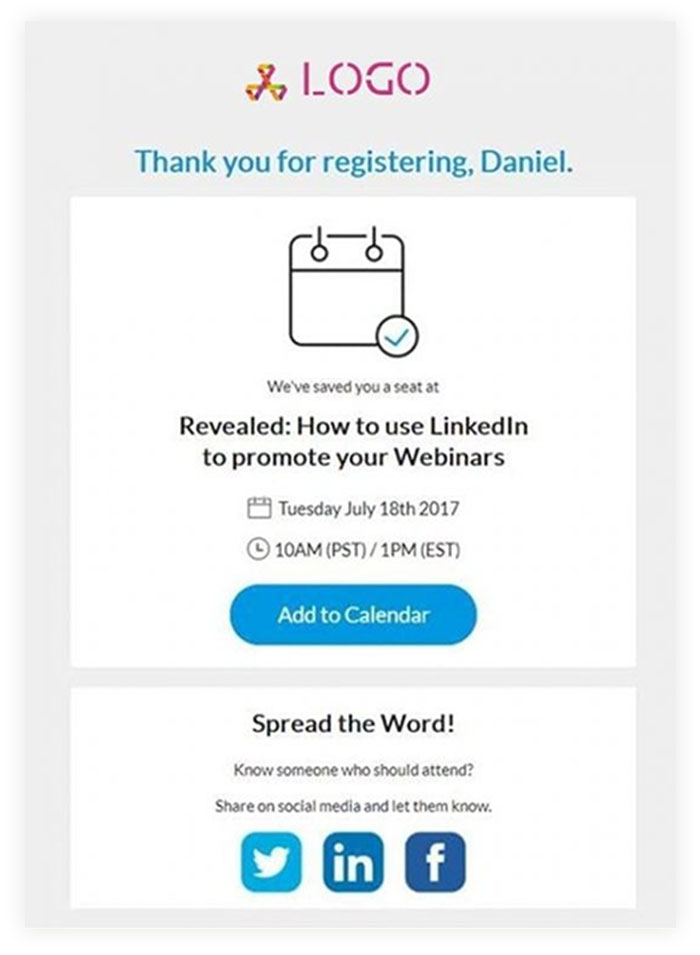
The user who registers for the webinar will receive a confirmation email describing the upcoming event along with the date and time. Sometimes this can also include the number of participants.
The design of the email is simple and neat. The logo confirms registration for the webinar. You can also see links to social media profiles in the footer. One of the most critical elements in email copy is the “Add to Calendar” CTA button.
The user must set a reminder date on their calendar to be notified so that they can attend the event.
5. Cancellation confirmation email example
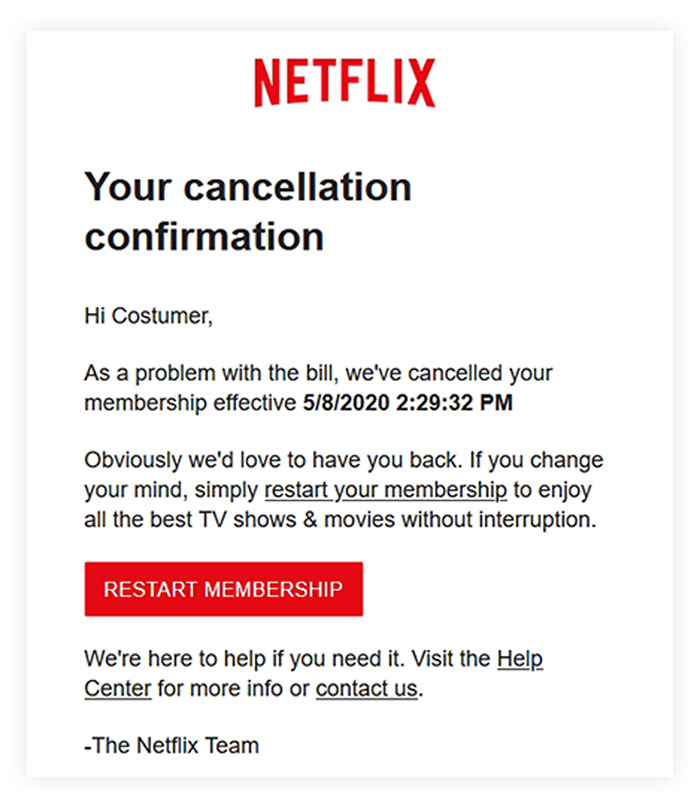
If the customer decides to cancel the order, it is still essential to confirm the action. The purpose of unsubscribing confirmation emails is to invite the recipient to return. It also helps marketers understand the reasons for the decision.
Below is an email from Netflix confirming the cancellation due to unpaid fees.
The CTA encourages users to resume their membership. The email copy excludes any negative impact, allowing the user to enjoy the subscription.
6. Reservation confirmation email example
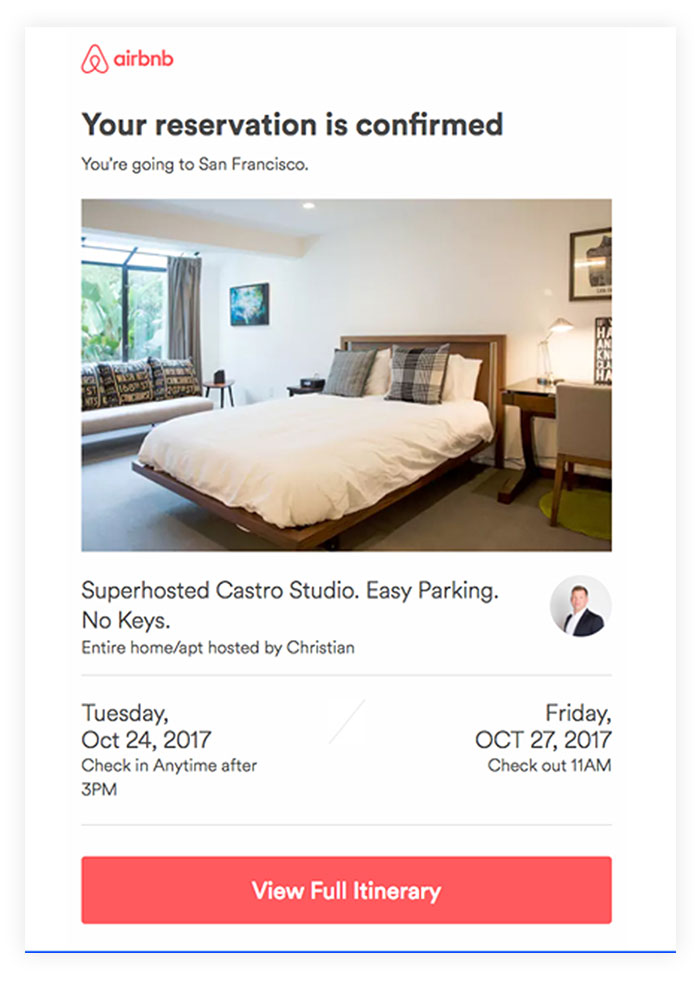
The sending of a restaurant reservation confirmation email confirms a customer’s successful reservation. It contains the necessary information about the time and place of the reservation.
Airbnb shows the reservation of a house in San Francisco. A clear image of a cleanly designed room will appear in the center of the email copy, confirming the customer’s choice. Also, details of the day, date, and check-in and check-out time are mentioned with the CTA, which directs the customer to the desired page for the entire itinerary.
12 Copy-Paste Confirmation Email Templates by Use Case
The examples above show what good confirmation emails look like in the wild. This section gives you copy-paste templates you can adapt for your own brand. Each one keeps to the 8-element anatomy and stays under 150 words, which is roughly where the read-through cliff sits in mobile inboxes.
Template 1: Order Confirmation Email
Subject: Your order #[ORDER_NUMBER] is confirmed
Hi [FIRST_NAME],
Thanks for your order. We’ve received it and are getting it ready to ship.
Order summary:
Order number: #[ORDER_NUMBER]
Items: [PRODUCT_LIST]
Total: [AMOUNT]
Estimated delivery: [DELIVERY_DATE]
Shipping to: [ADDRESS]
You’ll get another email with tracking details once your order ships. If anything looks wrong, reply to this email or contact us at [SUPPORT_EMAIL].
[CTA: Track your order]
Template 2: Sign-Up / Double Opt-In Confirmation
Subject: Please confirm your email address
Hi [FIRST_NAME],
Welcome to [BRAND]. One quick step before we can send you anything: please confirm your email address by clicking the button below.
[CTA: Confirm my email]
This helps us make sure your messages reach you and protects your account from being signed up by someone else.
If you didn’t sign up for [BRAND], you can ignore this email. We won’t add you to our list without confirmation.
Template 3: Booking Confirmation Email
Subject: Your booking for [DATE] is confirmed
Hi [FIRST_NAME],
You’re all set. Here are the details:
Booking confirmation:
Service: [SERVICE_NAME]
Date: [DATE]
Time: [TIME]
Location: [ADDRESS]
Booking reference: [REFERENCE_ID]
Need to reschedule? You can manage your booking using the link below.
[CTA: Manage booking]
Template 4: Appointment Confirmation Email
Subject: Appointment confirmed for [DATE] at [TIME]
Hi [FIRST_NAME],
Your appointment with [PROVIDER_NAME] is confirmed.
Details:
Date: [DATE]
Time: [TIME] ([TIMEZONE])
Location: [ADDRESS or video link]
Duration: [DURATION]
Please arrive 5-10 minutes early. If you need to reschedule, do so at least 24 hours in advance using the link below.
[CTA: Add to calendar]
Template 5: Event Registration Confirmation
Subject: You’re registered for [EVENT_NAME]
Hi [FIRST_NAME],
You’re confirmed for [EVENT_NAME] on [DATE]. Save this email — it’s your ticket.
Event details:
When: [DATE], [TIME]
Where: [VENUE or virtual link]
Speakers: [LINEUP]
Registration ID: [ID]
We’ll send a reminder 24 hours before the event with everything you need to join.
[CTA: Add to calendar]
Template 6: Payment Confirmation Email
Subject: Payment received — [AMOUNT]
Hi [FIRST_NAME],
We’ve received your payment. Here’s your receipt:
Payment details:
Amount: [AMOUNT]
Date: [DATE]
Payment method: [METHOD] ending in [LAST_4]
Reference: [TRANSACTION_ID]
For: [INVOICE/SERVICE]
Keep this email for your records. A PDF receipt is attached. Questions about this charge? Reply to this email or visit your account.
[CTA: View receipt]
Template 7: Subscription Confirmation Email
Subject: Welcome to [PLAN_NAME] — your subscription is active
Hi [FIRST_NAME],
Your [PLAN_NAME] subscription is now active. Welcome aboard.
Subscription details:
Plan: [PLAN_NAME]
Billing: [AMOUNT] / [INTERVAL]
Next billing date: [DATE]
Account: [EMAIL]
You can manage your subscription, change plans, or cancel anytime from your account.
[CTA: Go to dashboard]
Template 8: Refund Confirmation Email
Subject: Your refund of [AMOUNT] has been processed
Hi [FIRST_NAME],
We’ve processed your refund. Here are the details:
Refund summary:
Original order: #[ORDER_NUMBER]
Refund amount: [AMOUNT]
Refund method: [METHOD]
Expected to land: 5-10 business days
Banks process refunds at their own pace, so it may take up to 10 days to show up on your statement. If you don’t see it after that, reply to this email and we’ll investigate.
Template 9: Shipping Confirmation Email
Subject: Your order #[ORDER_NUMBER] has shipped
Hi [FIRST_NAME],
Good news. Your order is on its way.
Shipping details:
Tracking number: [TRACKING_NUMBER]
Carrier: [CARRIER]
Estimated delivery: [DATE]
Shipping to: [ADDRESS]
You can track your package using the button below. Most deliveries arrive within the estimated window, though weather and carrier delays can push it a day or two.
[CTA: Track package]
Template 10: Interview Confirmation Email
Subject: Interview confirmed for [DATE] at [TIME]
Hi [CANDIDATE_NAME],
Confirming your interview for the [ROLE] position at [COMPANY].
Interview details:
Date: [DATE]
Time: [TIME] ([TIMEZONE])
Format: [In-person / Video]
Location / link: [LOCATION_OR_LINK]
Interviewer(s): [NAMES]
Duration: [DURATION]
If you have any portfolio pieces, code samples, or work to share, please send them ahead of the call. Looking forward to speaking with you.
Template 11: Meeting Confirmation Email
Subject: Confirming our meeting on [DATE]
Hi [FIRST_NAME],
Confirming our meeting on [DATE] at [TIME] ([TIMEZONE]) to discuss [TOPIC].
Meeting details:
Where: [VIDEO_LINK or LOCATION]
Duration: [DURATION]
Agenda: [BRIEF_AGENDA]
If anything changes on your end, just let me know. Otherwise, talk soon.
Best,
[YOUR_NAME]
Template 12: RSVP Confirmation Email
Subject: RSVP received — [EVENT_NAME]
Hi [FIRST_NAME],
Got your RSVP. We’re glad you’re coming.
Event details:
Event: [EVENT_NAME]
Date: [DATE]
Time: [TIME]
Venue: [LOCATION]
Your party: [GUEST_COUNT]
Dress code: [IF_APPLICABLE]
Plans change? Update your RSVP using the link below. No awkward emails needed.
[CTA: Update RSVP]
20 Confirmation Email Subject Line Examples
Subject lines for confirmation emails work differently than for marketing email. Curiosity hurts here. The reader is actively looking for confirmation that something happened, so be the first thing they see and tell them clearly. Here are 20 examples organized by use case:
Order & Purchase (5)
- Your order #1234 is confirmed
- Thanks, Sarah — your order is on its way
- Order received: 3 items, ships [DATE]
- We’ve got your order ✓
- Receipt for your purchase from [BRAND]
Booking & Appointment (4)
- Your booking for [DATE] at [TIME] is confirmed
- Appointment confirmed: [DATE] with [PROVIDER]
- You’re booked. See you on Tuesday
- Confirmation: [SERVICE] on [DATE]
Sign-Up & Subscription (4)
- Please confirm your email to get started
- Welcome to [BRAND]: one quick step left
- Your subscription is active
- You’re in. Confirm to finish setup.
Payment & Refund (3)
- Payment received: $[AMOUNT]
- Your refund of $[AMOUNT] is on its way
- Receipt for [INVOICE_NUMBER]
Event & RSVP (4)
- You’re registered for [EVENT_NAME]
- RSVP received. See you on [DATE]
- Save this email: your ticket to [EVENT]
- Confirmed: webinar on [DATE]
One rule that beats all others: if a reader can’t tell from the subject line alone what was confirmed, the subject line failed. Marketing-style curiosity gaps work for promo emails. They actively hurt confirmation deliverability and trust.
Confirmation Email Best Practices Checklist
Run any confirmation email you’re building through this 12-point checklist before launching. Most teams that audit their own confirmation flows find 3-5 of these missing on day one:
- ✓ Send within 60 seconds of the trigger event
- ✓ Lead the subject line with what was confirmed, not branding
- ✓ Personalize with first name where you have it
- ✓ Include order, booking, or reference ID prominently
- ✓ Format key details as a scannable list, not paragraphs
- ✓ Design mobile-first. 60%+ opens are on phones
- ✓ Use a single primary CTA per email
- ✓ Include a real way to reach support (not just no-reply@)
- ✓ Maintain consistent brand voice and visuals
- ✓ Provide a plain-text version for accessibility and deliverability
- ✓ Set up SPF, DKIM, and DMARC records on your sending domain
- ✓ Test in Gmail, Outlook, and Apple Mail before going live
The deliverability items at the bottom (SPF, DKIM, DMARC, plain-text version) tend to be skipped by smaller teams. They matter more than you’d think. Emails that fail authentication often land in promotions or spam, which kills the entire point of a confirmation email arriving fast.
How to Reply to a Confirmation Email
Most confirmation emails don’t need a reply. The system is just letting you know something happened: order placed, payment received, account created. But there are situations where a reply is expected: meeting and interview confirmations, RSVPs, business agreements, and any case where the sender asked you to confirm receipt.
When You Should Reply
- The sender explicitly asked you to confirm or reply
- It’s a meeting, interview, or appointment with a real person on the other end
- It’s a B2B context where silence reads as ambiguity
- Something in the confirmation is wrong and needs correcting
Reply Template 1: Formal (Business / Vendor)
Hi [FIRST_NAME],
Thank you for the confirmation. Confirming receipt of your email regarding [TOPIC]. The details look correct on my end. Please let me know if you need anything further from me before [DATE].
Best regards,
[YOUR_NAME]
Reply Template 2: Friendly (Meeting / Interview)
Hi [FIRST_NAME],
Got it. Confirmed for [DATE] at [TIME]. I’ve added it to my calendar. Looking forward to it.
Thanks,
[YOUR_NAME]
Reply Template 3: Brief (Acknowledgement)
Confirmed, thanks. See you on [DATE].
That last one feels too short, but in busy professional contexts (especially for meetings already on calendar), it’s exactly the right length. Anything longer wastes the recipient’s time. Match the formality and length of the email you received. That’s the safest rule.
7 Common Confirmation Email Mistakes to Avoid
The mistakes below show up across thousands of customer-facing confirmation flows. Avoiding them is mostly free since they’re craft issues, not technical ones.
- Vague subject line that doesn’t confirm an action. “Thanks for visiting” tells the reader nothing. “Your order #1234 is confirmed” tells them everything they need in eight words.
- Slow delivery (more than 5 minutes). Anything beyond a minute starts to feel broken. By 10 minutes, customers are submitting support tickets.
- No mobile preview testing. If your CTA button gets clipped on iPhone or your details table breaks on Android, you’ve burned the whole email.
- Multiple competing CTAs. “Track your order” + “View account” + “Shop more” + “Read our blog” = nobody clicks anything.
- Missing order or booking ID. If a customer needs support, the first thing your team will ask for is the reference number. Make it impossible to miss.
- No support contact information. Putting “support@brand.com” in the footer takes 30 seconds and saves hours of frustration when something goes wrong.
- Sending from a no-reply@ address. This is the worst single mistake. It kills replies, hurts deliverability with major email providers, and tells your customer you don’t want to hear from them.
How to Set Up Automated Confirmation Emails
Manual confirmation emails work when you’re sending five a week. Past that, you need automation, both for speed and consistency. Here’s the practical setup most teams use:
1. Identify Trigger Events
List every action that should generate a confirmation: form submission, purchase, account creation, booking, subscription change, payment success or failure, refund. Each becomes a trigger in your automation tool.
2. Set Up Your Sender Domain
Use a domain you own (not Gmail or Outlook for transactional sends). Add SPF, DKIM, and DMARC records. Without these, deliverability suffers, and even legitimate confirmation emails end up in spam folders.
3. Build Templates Once, Parameterize Variables
Use the templates from earlier in this guide as a starting point. Replace the bracketed placeholders ([FIRST_NAME], [ORDER_NUMBER]) with merge tags from your platform. This way you build once and reuse across every transaction type.
4. Test in a Sandbox First
Send to a test address from your team. Open in Gmail, Outlook, and Apple Mail. Check the mobile rendering. Run through the customer journey end-to-end before going live. About 30% of issues only show up under real conditions.
5. Monitor the Right Metrics
For confirmation emails, watch: delivery rate (above 99% is healthy), open rate (60-70% is normal), bounce rate (under 2%), complaint rate (under 0.1%). A sudden drop in open rate is usually a deliverability problem rather than a content one.
Nvecta’s email automation platform handles all of this end-to-end (trigger setup, deliverability infrastructure, template management, and reporting) so your team can focus on the content rather than the plumbing.
Conclusion
After reading this blog, you may have understood how to write a confirmation email. Confirmation emails are important in the entire customer journey. They reassure your customers while reaffirming your brand recognition in their inboxes.
In addition, thanks to their high open rate, confirmation emails can be used as an integral part of your business marketing strategy, both to start a long-term conversation and as an opportunity to provide more value to your customers.
To get more help on confirmation emails and templates, you can schedule a demo with Nvecta.
Frequently Asked Questions
1. What is a confirmation email?
A confirmation email is an automated message that confirms an action a user just took — such as a purchase, signup, booking, or registration. It typically arrives within a minute of the trigger and includes the action confirmed, key details (order number, date, amount), and a clear next step.
2. How quickly should a confirmation email arrive?
Most confirmation emails arrive within 60 seconds. Anything past 5 minutes feels broken to most customers and starts generating support tickets.
If a confirmation email never arrives, the most common causes are spam filters, a misspelled email address, or a deliverability problem on the sending domain.
3. What’s the difference between a confirmation email and a transactional email?
A confirmation email is one specific type of transactional email. Transactional emails include any automated message triggered by a user action — confirmations, password resets, shipping updates, receipts, and account alerts.
All confirmation emails are transactional, but not all transactional emails are confirmations.
4. What makes a good confirmation email subject line?
The best confirmation email subject lines lead with what was confirmed and stay under 50 characters. Examples that work:
- Your order #1234 is confirmed
- Booking confirmed for May 15
- Payment received: $89
- You’re registered for [event name]
Avoid curiosity gaps — they work for marketing email but actively hurt confirmation email trust.
5. How do I confirm receipt of an email?
Reply with a short message acknowledging what you received and any next steps you’ll take. A typical reply:
“Thank you for the email. Confirming receipt of [topic]. I’ll get back to you by [date].”
Match the formality of the original email — formal for business contexts, friendlier for casual ones.
6. What are the best practices for sending confirmation emails?
The 7 highest-impact best practices:
- Send within 60 seconds
- Lead the subject line with the confirmed action
- Personalize with first name
- Include the reference ID prominently
- Design mobile-first
- Use a single primary CTA
- Never send from a no-reply address
Setting up SPF, DKIM, and DMARC records on your sending domain is also essential for deliverability.
7. How do I automate confirmation emails?
Automating confirmation emails takes 5 steps:
- Identify trigger events (purchase, signup, booking)
- Set up your sender domain with SPF/DKIM/DMARC records
- Build reusable templates with merge tags for personalization
- Test the full flow in a sandbox
- Monitor delivery rate, open rate, and bounce rate after launch
Most email automation platforms handle the technical infrastructure so your team can focus on the content.
8. Why didn’t my confirmation email arrive?
The 4 most common reasons:
- The email landed in spam or promotions — check those folders first
- The email address was misspelled at signup
- The sending domain has a deliverability problem (missing SPF/DKIM/DMARC)
- The trigger didn’t fire correctly on the sender’s side
Most of these resolve in 5 minutes once identified.
Also Read:
