














 Email
Email SMS
SMS Whatsapp
 Web Push
 App Push
 Audience Sync for Ads
 Popups
 Channel A/B Testing
  Control groups Analysis
 Frequency Capping
 Funnel Analysis
 Cohort Analysis
 RFM Analysis
 Signup Forms
 Surveys
 NPS
NPS Landing pages personalization
  Website A/B Testing
  PWA/TWA
 Heatmaps
 Session Recording
 Wix
Wix Shopify
 Magento
 Woocommerce
 eCommerce D2C
  Mutual Funds
 Insurance
 Lending
  Recipes
  Knowledgebase
 Developer Docs
 Product Updates
 App Marketplace
 Academy
 Ebooks
 Case Studies
 Blog
Blog Templates
 Shivani Goyal
📌 Quick Answer: What is an Opt-in Email?
An opt-in email is a permission-based email sent only to subscribers who have explicitly given consent to receive it. The opt-in process protects users from spam and keeps brands compliant with regulations like GDPR and CAN-SPAM. According to Litmus, opt-in email lists generate roughly 4x higher engagement and 6x higher conversion rates than purchased lists. There are two main types: single opt-in (one-step signup) and double opt-in (signup plus confirmation email). Double opt-in delivers higher quality but slower list growth, while single opt-in grows lists faster with lower quality.
Email marketing is one of the most reliable channels available to modern businesses, especially for ecommerce brands. But none of it works without an opt-in email list as the foundation.
Sending unsolicited messages to prospects damages your sender reputation, hurts deliverability, and can land you in legal trouble under GDPR or CAN-SPAM.
Unlike outbound marketing where you push messages to everyone, opt-in is a targeted, ethical approach where prospects actively agree to hear from you. Open rates run 50% or higher on opt-in lists versus the 20% industry average for cold lists, according to Mailchimp.
In opt-in marketing, prospects choose to receive content like advertising, newsletters, offers, and product updates. This guide covers opt-in email definition, the difference between single and double opt-in, benefits, best practices, real brand examples, GDPR compliance, and how AI is changing opt-in flows in 2026.
What is an Opt-in Email? (Meaning & Definition)
Email opt-in refers to the permission-based registration method marketers use when someone signs up for their email newsletter, product updates, or promotional content. The “opt-in” part is the active consent the subscriber gives before any marketing email is sent.
The opt-in process can be either single or double. In single opt-in, subscribers are added to a list the moment they click “subscribe.” In double opt-in, recipients have to verify their email address through a confirmation email that arrives minutes after registering. Both approaches are valid with different trade-offs.
The opt-in step is what separates legitimate email marketing from spam. Without it, brands risk damaging their sender reputation, losing deliverability, and breaking laws like the GDPR in the European Union or the CAN-SPAM Act in the United States.
Single Opt-in Email
As the name implies, single opt-in needs only one action to turn a visitor into a subscriber. This signup approach is popular with ecommerce sites that want to capture as many email addresses as possible and convert them into buyers fast.
To understand why most online stores prefer this method, here are the pros and cons of single opt-in:
Pros
- Subscriber list grows fast
- Minimizes visitor friction from extra steps
- Instant access to the promised value (discounts, offers, downloads)
Cons
- Poor email list hygiene over time
- Sender score can be impacted by spam complaints
- Legal compliance issues in certain regions, especially in the EU under GDPR
Double Opt-in Email
The double signup process adds a verification step to confirm your visitors’ email addresses. One of the biggest benefits is its ability to prevent fraudulent signups and build a healthy email list. This approach is common across SaaS companies, agencies, and online stores that care about long-term engagement quality.
Instead of getting a marketing message right away, recipients receive a transactional campaign in the form of a confirmation email. According to GetResponse, double opt-in lists deliver roughly 13.4% higher open rates than single opt-in equivalents.
Here are the pros and cons of double opt-in:
Pros
- Supports clean email list hygiene
- Higher email deliverability score
- Gathers quality contacts who actually want your emails
- Full GDPR compliance built in
Cons
- Longer registration process
- Some subscribers feel friction from the extra step
- Users must confirm their email address before receiving any messages
Single vs Double Opt-in (Comparison Table)
| Parameter | Single Opt-in | Double Opt-in |
| Signup process | One step (form submit) | Two steps (form + email confirm) |
| List growth speed | Faster | Slower |
| List quality | Lower | Higher |
| Open rate | Average | 13.4% higher (GetResponse data) |
| Spam complaint rate | Higher | Lower |
| GDPR compliance | Partial | Full |
| Deliverability | Average | Better |
| Best for | Lead volume, fast growth | High-engagement segments |
So Which Opt-in Process is Best?
Both methods have real trade-offs. If you want to grow your list fast and don’t mind cleaning up unverified emails later, single opt-in works. If you want better engagement, deliverability, and GDPR safety, double opt-in is the cleaner long-term choice.
Most growing brands start with single opt-in to build volume, then move to double opt-in once they have enough subscriber data to justify the slower growth. The right answer depends on your goals, your geography, and what you can afford to clean up later.
Opt-in vs Opt-out (What’s the Difference?)
Opt-in and opt-out describe two opposite approaches to email subscriber consent. Knowing the difference matters for both compliance and engagement quality.
| Parameter | Opt-in | Opt-out |
| User consent | Active (user signs up) | Passive (user is added automatically) |
| Default state | Not subscribed | Subscribed |
| GDPR compliance | Required and supported | Restricted, often non-compliant |
| Spam complaints | Lower | Higher |
| Subscriber engagement | Higher | Lower |
| Trust signal | Strong | Weak |
Opt-in is the ethical and legally compliant approach in 2026. Opt-out is increasingly restricted, especially under GDPR, and tends to generate higher spam complaints because subscribers feel ambushed rather than informed.
What is Soft Opt-in?
Soft opt-in is a specific consent rule that applies when someone provides their email during a transaction (like making a purchase). Under soft opt-in rules, you can send them related marketing emails without separate explicit consent, as long as you give them a clear and easy way to opt out at any time.
Soft opt-in rules vary by jurisdiction. EU rules are stricter than US rules, and even within Europe the exact requirements differ between countries. The safest approach is to combine soft opt-in with a clear preference center so subscribers can quickly adjust what they receive.
Best Practices for Creating Opt-in Emails
1. Don’t Ask for Too Much Information
This is one of the most common mistakes marketers make during opt-in. If you ask for too much info upfront, visitors will bounce because they care about their privacy and don’t want to fill out a long form to get a 10% discount or a free guide.
You’re meeting these visitors for the first time, so the impression you leave matters. The best practice is to ask only for the most essential details, usually just an email address and maybe a first name for personalization.
2. Make Your Opt-in Form Visible
There’s no single rule on where to place your opt-in form, but it has to be where visitors actually see it. Top bars and exit popups work well for grabbing attention. Sidebars are a popular spot but often yield lower conversion rates than dedicated CTAs or full-screen offers, so test both.
3. Tell Users What to Expect
When a user signs up to receive marketing messages, setting clear expectations matters. Tell them what content they’ll receive and how often. By being upfront, you reassure visitors that they’ll get something valuable in their inbox and won’t be spammed. “Weekly marketing tips every Tuesday” performs better than vague “stay in the loop” framing.
4. Add a Privacy Statement
One of the main issues marketers run into is that visitors hesitate to share personal information during the opt-in process.
This usually comes down to fear that their information will get misused or that the company will spam their inbox. The fix is a clear privacy statement that puts them at ease. Make sure you reassure visitors that any data they share is secure and used only for the stated purpose.
Choose the language carefully. The goal is to leave no room for misinterpretation and make a genuine impression on subscribers from the very first interaction.
5. Use Social Proof
Social proof like subscriber counts, customer testimonials, or recognizable logos shows visitors that others have already signed up and trust your brand. “Join 50,000+ marketers reading our weekly tips” works because it’s concrete and verifiable. Use this to build confidence right at the opt-in moment.
6. Use a Form Instead of a Link
The problem with linking to a separate opt-in page is that you add friction to what should be a smooth signup. Users have to click the link, wait for the page to load, fill in their information, and then click the CTA button. Every extra step loses signups.
Embedding the form directly on the home page or wherever the user is means they can complete signup without leaving the page. This consistently outperforms link-based opt-ins by a meaningful margin.
Since results vary based on factors like website layout, you should run A/B testing on different placements to find what works best for your specific audience.
7. Include Customer Segmentation
One important thing marketers need to know: your audience is at different stages of the conversion funnel. What works for one segment won’t work for another. Strong customer segmentation lets you send different opt-in offers to different audience groups, which lifts conversion across the board. You can segment by behavior, source, or stated preferences.
8. Be Creative with Your Subscribe Button
When designing your subscribe button, use creativity rather than defaulting to the generic “Subscribe” word. Companies usually slap “Subscribe” on every CTA, which feels repetitive and unappealing to anyone who’s seen it a hundred times.
Instead, use specific, benefit-driven language. “Get my free guide” or “Yes, send me deals” or “Send me weekly tips” all perform better than plain “Subscribe” because they tell the user exactly what they’re getting.
9. Offer Discounts for Visitors Who Sign Up
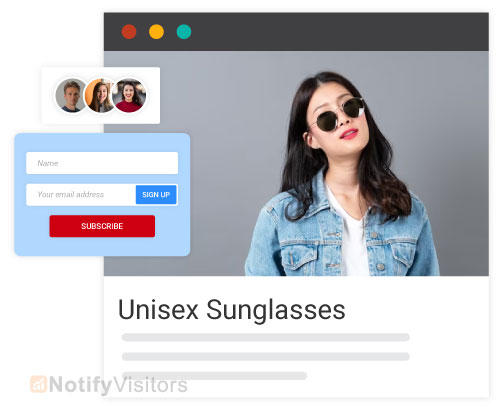
One of the main reasons visitors sign up is to get specific incentives. This is especially true for ecommerce websites where shoppers expect a welcome offer.
Alongside being educational and informative, lead magnets let subscribers save money or get something useful. Offering a discount or a free resource through opt-in helps grow subscriber numbers significantly. Brands like Casper and Glossier both use “10% off your first order” as their primary opt-in incentive, and the math works for them year after year.
What are the Benefits of Opt-in Emails?
- Increased Engagement: Subscribers who opted in are interested in hearing from you, which translates into higher open rates, click-through rates, and overall engagement compared to cold lists.
- Improved Deliverability: Email service providers (ESPs) favor senders with high engagement and low complaint rates. Opt-in emails help you build a positive reputation and better deliverability for every campaign you send afterward.
- Stronger Brand Relationships: Opt-in subscribers are more receptive to your messages, which builds trust and loyalty over time. This lets you develop stronger long-term relationships with your audience and position yourself as a trusted voice in your space.
- Targeted Communication: Opt-in lets you segment your audience based on their interests, behaviors, and preferences. You can then send targeted emails that resonate with each segment, which lifts engagement and conversions noticeably. A solid customer data platform sitting underneath this is what makes deep segmentation actually work at scale.
- Compliance with Regulations: Many countries have regulations like GDPR (Europe) and CAN-SPAM (US) that require user consent for marketing emails. Opt-in ensures compliance and protects you from legal issues and potential fines.
How to Create an Opt-in Email (Step-by-Step)
Setting up an opt-in email flow takes 8 steps that any team can knock out in an afternoon:
- Choose your email marketing platform. Pick a tool that fits your audience size and budget. An email marketing platform with opt-in form templates and automation features will save you significant setup time.
- Decide on single or double opt-in. Single opt-in for fast growth, double opt-in for higher quality lists. EU audiences require double opt-in for full GDPR safety.
- Write a clear value proposition. Tell subscribers exactly what they’ll get and how often. Specificity converts better than vague promises.
- Create your opt-in form. Keep it short (email + first name). Add a clear CTA button with benefit-led copy.
- Set up a welcome email. The first email after signup gets 50%+ open rates, so use it well. For inspiration, see our guide on welcome email templates.
- Add GDPR-compliant consent text. Include a clear privacy statement and an easy unsubscribe option.
- Test your opt-in flow. Run through the signup as a new user to verify confirmation emails, welcome messages, and unsubscribe all work properly.
- Place forms strategically. Use top bars, exit popups, inline forms, and footer signups. A/B test placements to find what converts best for your audience.
Pair this with smart marketing automation and you can move from manual list management to a system that nurtures subscribers automatically based on their behavior.
GDPR and CAN-SPAM Compliance for Opt-in Emails
Legal compliance isn’t optional in 2026. Here are the basics for the two biggest frameworks:
GDPR (European Union)
- Explicit consent required (no pre-checked boxes)
- Clear language about what subscribers are opting into
- Easy opt-out option in every email
- Records of when and how consent was given
- Right to be forgotten (delete data on request)
CAN-SPAM (United States)
- Honest subject lines (no deception)
- Clear “From” identification
- Physical business address in every email
- Clear unsubscribe mechanism that works within 10 days
- Disclose commercial nature of message
Most modern email platforms handle compliance basics automatically once you configure your sender details. The bigger risk is rushing your opt-in process or buying email lists, both of which can violate GDPR specifically and trigger serious fines.
AI-Powered Opt-in Emails in 2026
The shift in opt-in email marketing for 2026 is the integration of AI across the entire flow. Old opt-in programs sent the same welcome email to everyone. New ones use machine learning to personalize the opt-in moment based on what brought the visitor to the site, what they browsed, and what offer is most likely to convert them.
Modern agentic AI systems can decide when to show the opt-in form, what offer to lead with, and how to phrase the confirmation email based on individual behavior signals. This kind of optimization used to require a full growth team. Now it runs automatically through tools layered on top of your email platform.
Strong personalization strategy built on AI consistently outperforms static opt-in flows by significant margins. The catch worth stating clearly: AI only works on clean data foundations. Adding AI to fragmented systems creates worse outcomes faster, not better ones. The data layer has to come first, then AI optimization builds on top.
7 Real Opt-in Email Examples (with Brand Inspiration)
These opt-in email examples show how real brands structure and position their opt-in forms for maximum impact. For a deeper library of 20+ opt-in email examples and wording templates, see our complete guide on opt-in email examples.
1. Modern Me Boutique

This Modern Me Boutique opt-in email template is a creative way to capture email addresses. It’s more interactive than most popups because prospects can spin a wheel to win a prize, and the wheel only spins if they enter their email address first.
The form doesn’t push people to purchase. Instead, it focuses on the reward the customer earns rather than what they have to give. It’s also visually appealing and gamified, which lifts opt-in conversion significantly.
2. All Birds
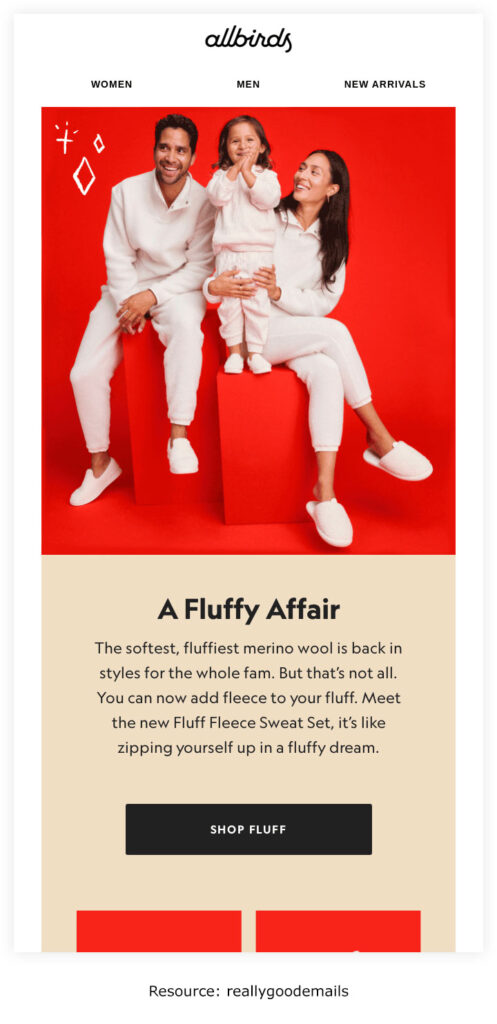
With ecommerce marketing, you can sometimes offer discounts when gathering information for your opt-in emails. Instead, you can use All Birds’ approach and get visitors excited about the email updates they’ll receive.
Using discounts everywhere can build an expectation in customers’ minds that you may not always be able to meet, which leads to disappointment later.
This opt-in email template promises subscribers they’ll be alerted whenever there’s an interesting sale, which is compelling enough to drive signups without committing to a permanent discount cycle.
All Birds uses opt-in forms in several places including popups. The example above is one embedded directly on their homepage.
The opt-in wording works well because it creates a sense of exclusivity by asking “want first dibs?” which feels like an invitation rather than a sales pitch.
3. Distorted People
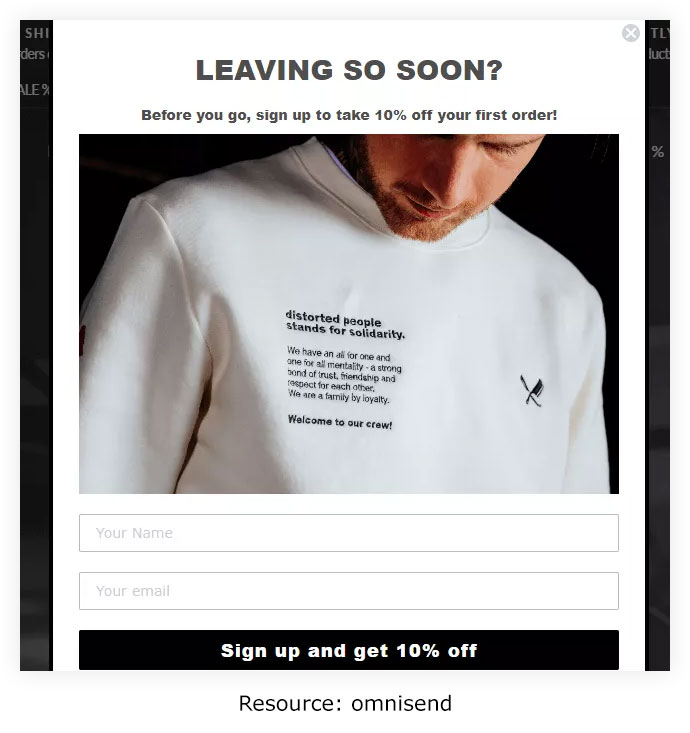
This is one example of opt-in email marketing that uses an exit popup signup form. With exit popups, the software tracks the cursor, and when the visitor looks like they’re about to leave the site, an opt-in email form appears. Businesses can hire nearshore developers to help create and implement effective exit popup strategies for opt-in email marketing.
The form offers a 10% discount on the first order as an incentive for visitors who sign up.
Distorted People keeps the popup straightforward. The form only asks for the prospect’s name and email address. The call-to-action button is direct and obvious rather than burying the subscribe option.
4. Recess

The tiny popup at the bottom of the page on the Recess website is a smart way to collect opt-in emails without being intrusive.
Unlike full-screen popups, the positioning doesn’t interrupt the visitor’s browsing activity. It appears as a small box at the bottom of the site and takes up minimal space on the page, which makes it feel helpful rather than annoying.
Recess also shows an incentive: a coupon code for 10% off the first purchase.
5. Ripped Body

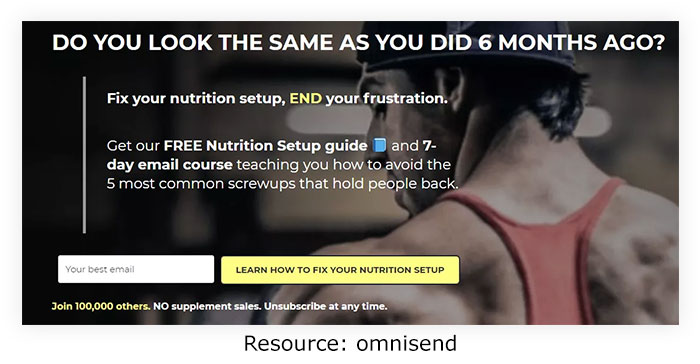
This site uses its homepage as a landing page to capture information for opt-in emails. Here’s what this opt-in marketing page does well.
The first thing you notice on Ripped Body is a direct, persuasive copy encouraging fitness-enthusiast visitors to fix their diet.
They then offer a nutrition guide and a meal course to anyone who subscribes to their opt-in email list.
The copy uses social proof to enhance credibility, inviting subscribers to join an existing list of 100,000 people.
Further down the landing page, there’s more social proof in the form of statistics. All of this builds credibility, further strengthened by a clear opt-out option in the copy.
6. Frank Body
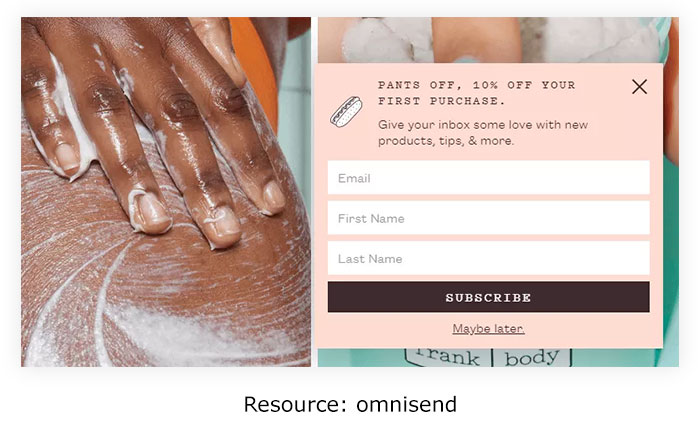
This site’s opt-in form pops up on the bottom left side of the screen a few minutes into browsing. The location is well-chosen because it’s noticeable but doesn’t block the main content. The copy lets visitors know what to expect from subscribing: new products, tips, and more.
It shows an incentive in the form of a 10% discount on the first purchase. Since it’s the first thing visitors see when reading the opt-in email form, they’re more likely to convert.
7. She Simply Shops
This is one example of how to embed opt-in email forms on your website. The position can vary. You can place it at the base of every page (as shown above) or on the right side, as with the forms on blog pages. It gives visitors an extra opportunity to sign up without being pushy.
The opt-in email template is brief and only asks for the subscriber’s email address. It also uses the “fear of missing out” angle to make visitors sign up so they get access to the latest deals.
The opt-in email form also lets people know exactly what to expect when they sign up, and it does that upfront. Visitors can expect promotional emails and other updates.
And they earn a 10% discount on their first purchase as a welcome offer.
Common Opt-in Email Mistakes to Avoid
- Vague value proposition. “Sign up for our newsletter” doesn’t tell anyone what they’re getting. Be specific.
- Pre-checked consent boxes. Illegal under GDPR. Always require active consent.
- Hidden opt-out link. Makes you look untrustworthy and violates compliance rules.
- Buying email lists. Damages sender reputation, violates GDPR, and produces near-zero engagement.
- Sending before verifying email. Hurts deliverability and increases bounce rates.
- Generic welcome emails. The first email gets the highest open rate. Use it to deliver real value, not just say “thanks.”
- Inconsistent sending frequency. Subscribers tune out when they can’t predict when you’ll show up.
- Ignoring engagement metrics. List quality decays without active monitoring. Clean disengaged subscribers regularly.
Conclusion
After reading this guide, you should have a solid understanding of what opt-in email means, how single and double opt-in differ, and how to use opt-in effectively for your business. The brand examples above show how leading companies structure opt-in forms to convert visitors into engaged subscribers without being pushy or breaking compliance rules.
The key takeaway is that opt-in is the foundation of every successful email program in 2026. Get the consent layer right, and everything else (engagement, deliverability, ROI) gets easier. Skip it, and you’ll spend years fighting deliverability problems and compliance fines.
Frequently Asked Questions
What is an opt-in email?
An opt-in email is a permission-based email sent only to subscribers who have explicitly given consent to receive it. The subscriber actively signs up through a form, which separates legitimate email marketing from spam. Opt-in is required for compliance with regulations like GDPR (EU) and CAN-SPAM (US).
What does email opt-in mean?
Email opt-in means the user has actively agreed to receive emails from a specific sender or brand. It’s the opposite of unsolicited or cold email. Email opt-in can be single (one-step signup) or double (signup plus email confirmation). Opt-in lists generate higher engagement and better deliverability than purchased lists.
What’s the difference between single and double opt-in?
Single opt-in requires subscribers to submit their email through a form once. Double opt-in adds a second confirmation step where subscribers click a link in a verification email. Single opt-in grows lists faster but with lower quality. Double opt-in grows lists slower but with significantly higher engagement and better deliverability. Double opt-in is required for full GDPR compliance.
What is the difference between opt-in and opt-out?
Opt-in means users actively choose to subscribe to your emails. Opt-out means users are added to a list by default and must take action to unsubscribe. Opt-in is the ethical and GDPR-compliant approach. Opt-out is legally restricted in most regions and generates significantly higher spam complaints.
What is opt-in email marketing?
Opt-in email marketing is a permission-based email marketing approach where brands only send promotional messages to people who have actively signed up to receive them. It generates noticeably higher open rates, click rates, and conversions than cold email or purchased list marketing, because every subscriber asked to be there.
What is a soft opt-in?
Soft opt-in is a specific consent rule allowing brands to send marketing emails to people who provided their email during a transaction (like a purchase), as long as they’re given an easy opt-out option. Soft opt-in rules vary by region, with stricter rules in the EU and more flexible ones in some US states.
What are some best practices of opt-in emails?
The best practices for opt-in emails include not asking for too much information upfront, making the opt-in form clearly visible, telling subscribers what to expect, adding a privacy statement, using social proof, embedding forms directly rather than linking out, segmenting your audience, using creative subscribe button copy, and offering discounts or incentives to drive signups.
What are a few examples of opt-in emails?
Top examples of opt-in emails include Modern Me Boutique (gamified spin-the-wheel form), All Birds (exclusivity-led with no discount), Distorted People (exit popup with discount), Recess (small unobtrusive popup), Ripped Body (homepage landing page with social proof), Frank Body (bottom-left timed popup with discount), and She Simply Shops (embedded footer form with FOMO copy).
What is an opt-in form?
An opt-in form is the actual form on a website where visitors enter their email address to subscribe to a brand’s email list. Opt-in forms can appear as pop-ups, inline blocks within content, sidebar widgets, footer signups, welcome mats, slide-ins, or dedicated landing pages. The best opt-in forms ask only for what’s essential and lead with a clear benefit.
How do I create an opt-in email list?
To create an opt-in email list, choose an email marketing platform, decide between single or double opt-in, write a clear value proposition, create a short opt-in form, set up a welcome email, add GDPR-compliant consent text, test the full flow, and place forms strategically across your website (top bar, exit popup, inline content, footer).
Is opt-in email required by GDPR?
Yes, GDPR requires explicit opt-in consent before sending marketing emails to EU residents. Pre-checked boxes, hidden opt-out links, and purchased lists all violate GDPR. Double opt-in is the safest path to full GDPR compliance, since it creates clear records of when and how consent was given.
What is the meaning of opt-in?
Opt-in means actively choosing to participate or subscribe to something. In email marketing, opt-in specifically means actively signing up to receive a brand’s emails through a clear consent action like submitting a form or clicking a confirmation link. Without opt-in, marketing emails are considered unsolicited and risk being marked as spam.
What is an opt-in page?
An opt-in page is a dedicated landing page designed specifically to capture email signups. It typically includes a clear value proposition, an opt-in form, social proof elements, and a strong CTA button. Opt-in pages convert better than generic homepage forms because they remove distractions and focus entirely on the signup action.
What is opt-in marketing?
Opt-in marketing is any marketing approach where prospects actively give consent before receiving promotional content. Beyond email, opt-in marketing also covers SMS marketing, WhatsApp marketing, push notifications, and direct mail. The common thread is explicit consent from the recipient before any promotional message is sent.
Why is opt-in important?
Opt-in is important because it protects sender reputation, lifts deliverability, ensures legal compliance with regulations like GDPR and CAN-SPAM, generates higher engagement rates, and builds trust with subscribers. Skipping opt-in damages your email program for years through poor sender scores and high spam complaints.
How does AI change opt-in emails in 2026?
AI is reshaping opt-in emails through predictive form timing (deciding when to show signup prompts), personalized opt-in offers based on visitor behavior, AI-generated subject lines for confirmation emails, dynamic content per segment, and agentic AI that manages multi-step welcome sequences autonomously. The brands using mature AI in their opt-in flow see noticeably higher signup rates.
Also Read:
