














 Email
Email SMS
SMS Whatsapp
 Web Push
 App Push
 Audience Sync for Ads
 Popups
 Channel A/B Testing
  Control groups Analysis
 Frequency Capping
 Funnel Analysis
 Cohort Analysis
 RFM Analysis
 Signup Forms
 Surveys
 NPS
NPS Landing pages personalization
  Website A/B Testing
  PWA/TWA
 Heatmaps
 Session Recording
 Wix
Wix Shopify
 Magento
 Woocommerce
 eCommerce D2C
  Mutual Funds
 Insurance
 Lending
  Recipes
  Knowledgebase
 Developer Docs
 Product Updates
 App Marketplace
 Academy
 Ebooks
 Case Studies
 Blog
Blog Templates
 Aparupa Saha
Here’s something most marketers don’t want to admit: the average promotional email gets about two seconds of attention before someone decides whether to keep reading or hit delete. Two seconds. That’s barely enough time to read the subject line.
And yet, a lot of businesses are still sending the same email to their entire list. Same subject line, same offer, same product image, whether you’re writing to someone who bought three times last month or someone who signed up two years ago and never came back.
It’s not that personalisation is a new idea. Most email tools have had merge tags for years. The problem is that merge tags only pull from whatever data lives in your email list, which is usually just a name and an email address. That’s not personalisation. That’s just filling in a blank.
Email personalisation using CDP data is a different thing entirely. A Customer Data Platform collects information from every tool in your stack (your website, your store, your CRM, your support system) and connects it all into one profile per customer. When that data feeds into your email program, you can do a lot more than drop in a first name. You can send emails that reflect what someone actually did, what they’re interested in, and where they are in their relationship with your brand.
This guide covers the strategies that work, real examples you can learn from, and a practical setup process you can follow. And if you’re looking for someone to help you put it all together, NVECTA helps brands build this kind of data-driven email program from the ground up.
What a CDP Is and Why It Matters for Email Personalisation
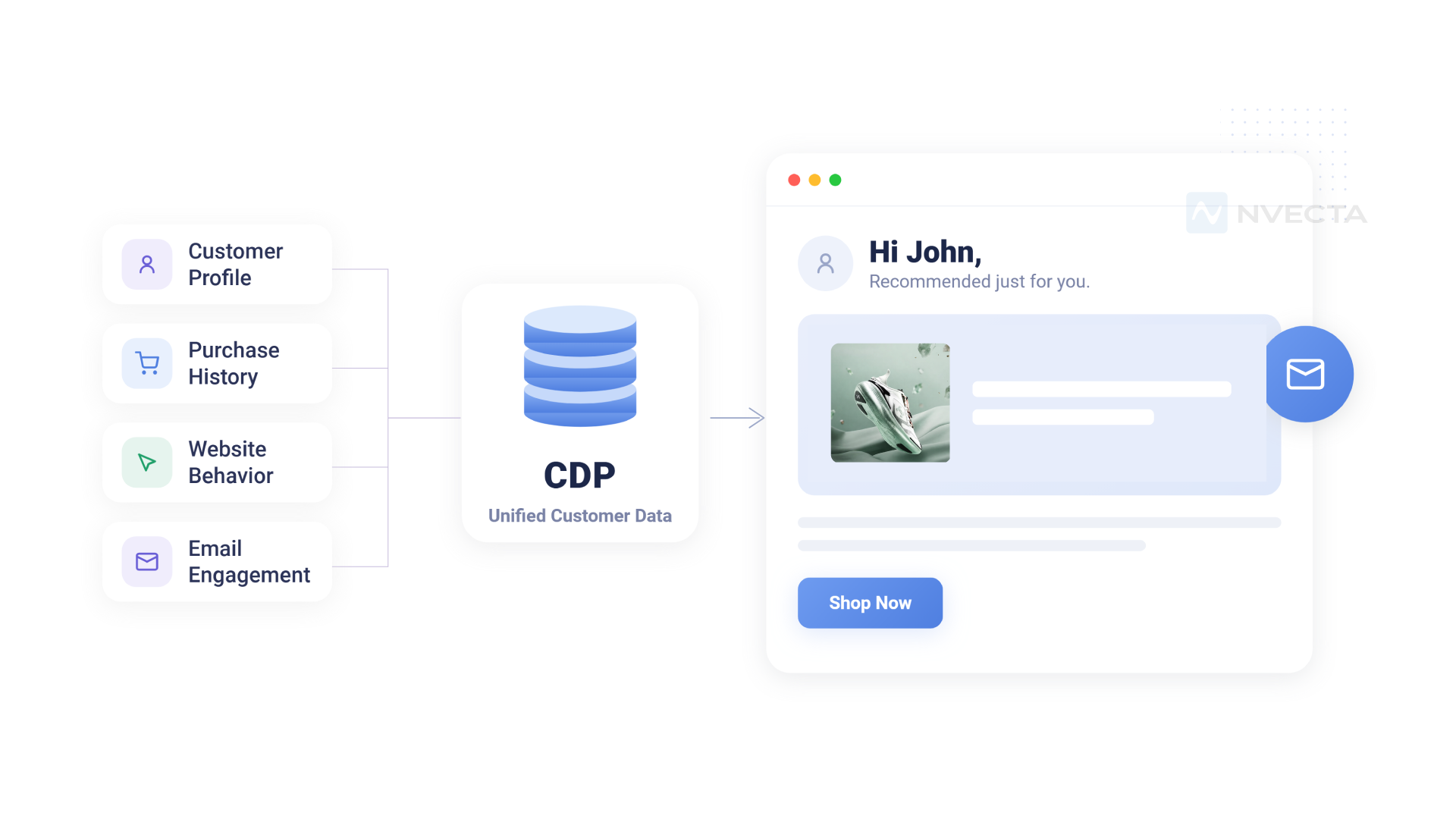
Think about all the places customer data lives in a typical business. Your website analytics tool knows which pages someone visited and how long they stayed.
Your CRM has contact details and maybe some notes from past interactions. Your e-commerce platform has every order they’ve placed.
Your helpdesk has its support history. Your email tool knows whether they open your campaigns.
All of that is useful. The problem is that it’s stuck in separate places and you can’t easily combine it.
A Customer Data Platform solves this. It connects all those sources, pulls in the data, and builds a single profile for each customer.
It also handles the messy parts, like when someone buys using a different email than the one on your list, or when they browse your site anonymously before logging in.
A good CDP figures out that these are the same person and merges the data together.
The result is a full customer profile that updates in real time as people interact with your brand.
For email, this is a big deal. Without a CDP, your email platform is working with a pretty limited picture of who’s on your list.
With one, it has access to purchase history, browsing behaviour, engagement patterns, loyalty status, and more.
That’s what makes genuinely personalised emails possible, not just ones that include someone’s name.
Benefits of CDP-Powered Email Personalisation
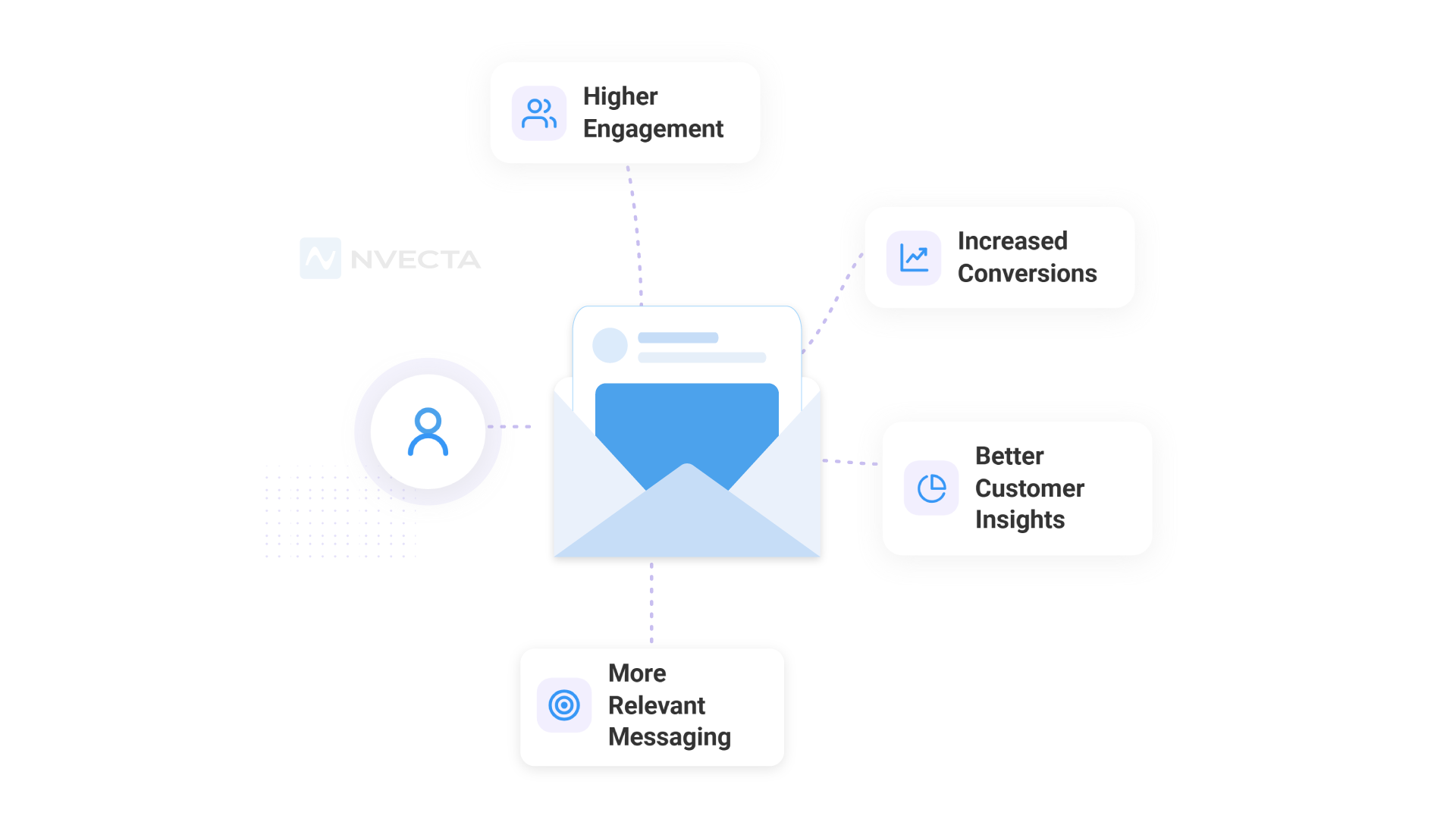
Let’s talk about what actually changes when you start personalising emails with CDP data, because the benefits show up in a few different ways.
Open rates go up: This one’s pretty straightforward. When a subject line says something relevant to a specific person, they’re more likely to open it.
A subject line that references a product they were just looking at, their current loyalty tier, or something tied to where they live will outperform a generic one almost every time.
More clicks and conversions: Relevance inside the email matters just as much as the subject line. If someone has been browsing your hiking gear section for two weeks and your email shows them new arrivals in that category, the click rate will be higher than if you show them the same hero banner everyone else sees. Personalised product recommendations, content blocks that reflect someone’s interests, offers that match their buying history, all of these move conversion numbers.
Lower churn and better retention: One of the quieter benefits of CDP-powered email is its impact on long-term retention. When customers feel like a brand actually pays attention to them, they’re less likely to drift away. Lifecycle emails that reach someone at the right moment, a re-engagement message before they’ve fully checked out, a loyalty reward when they hit a milestone, a helpful follow-up after a purchase, build the kind of relationship that keeps people coming back.
A better overall experience: Most people can tell the difference between an email written for them and one sent to a list. CDP-powered personalisation closes that gap. The experience feels more intentional, and that affects how people perceive your brand even beyond the inbox.
Core Data Types You Can Use for Email Personalisation
Before you start building personalised email campaigns, it helps to understand what kinds of data a CDP actually pulls together. Here’s a breakdown.
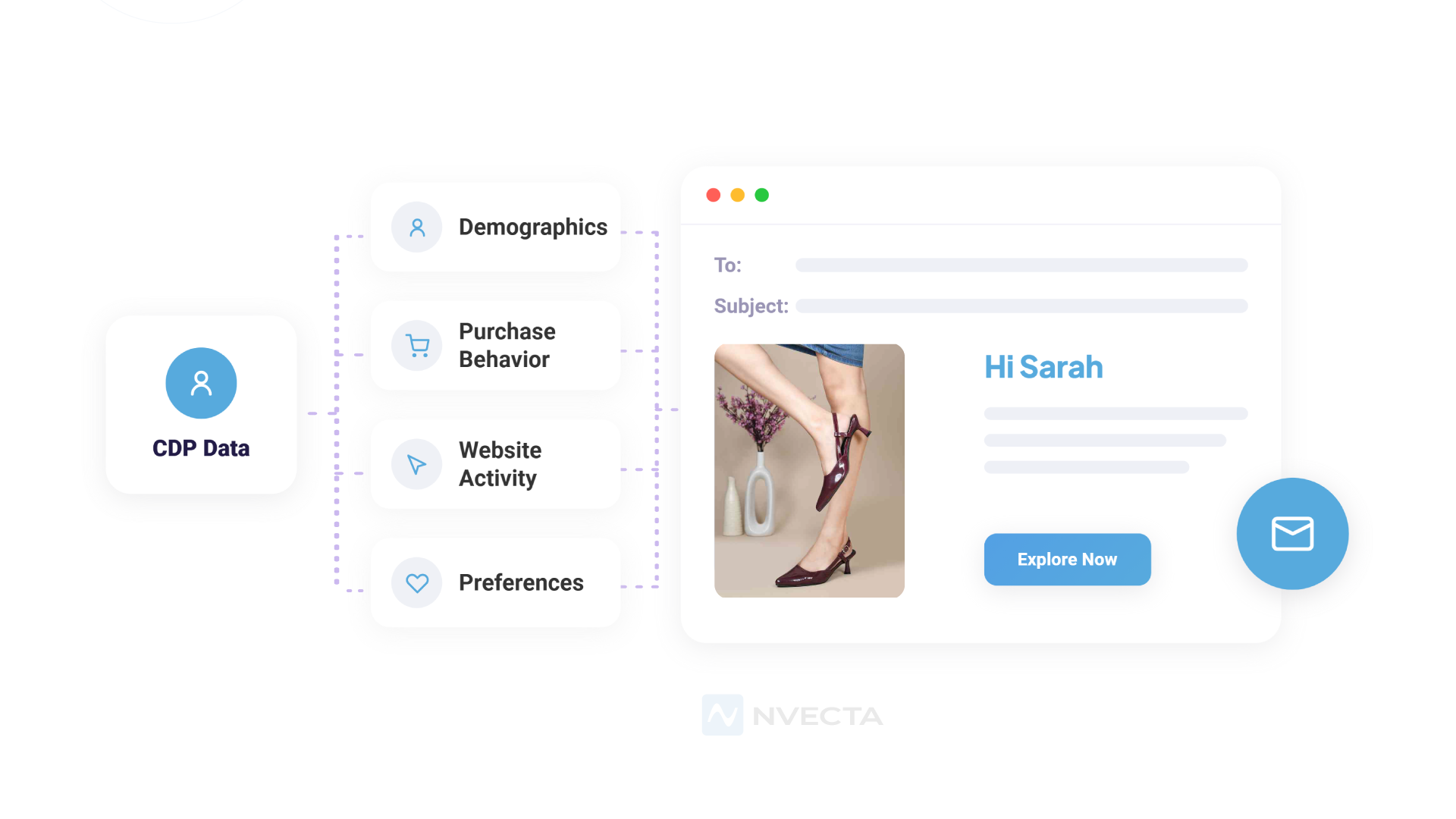
Demographic data is the starting point. Age, gender, location, language, stuff like that. It’s useful for localising content or making sure you’re speaking to people in the right way, but it doesn’t tell you much about intent. You need other data layers for that.
Behavioural data is where things get really useful. Every page someone visited, every product they clicked on, every search they ran, every video they watched. This is the stream of signals that tells you what someone is actually interested in right now, not just who they are on paper. Someone who’s been browsing the same category repeatedly is giving you a pretty clear signal about what they want.
Transactional data covers all purchases. What someone bought, how much they spent, how often they buy, and whether they’ve returned anything. This data is gold for building recommendation logic and understanding the difference between a casual browser and a loyal buyer.
Lifecycle and engagement data tell you where someone is in their journey with your brand. Have they been a customer for a week or three years? Do they open most of your emails or almost none? When did they last make a purchase? This layer determines what kind of email a person should get and how frequently.
Preference and consent data is the layer that keeps you on the right side of privacy regulations and customer expectations. What channels have they opted into? How often do they want to hear from you? What have they explicitly said they’re interested in? Respecting this layer isn’t just a legal requirement. It’s what keeps people subscribed.
5. Email Personalisation Strategies Using CDP Data
Dynamic Subject Lines and Preheaders
A first name in a subject line is table stakes at this point. CDP data opens up a lot more. You can reference the actual product someone was looking at, acknowledge their loyalty status, mention their city, or call back to something they did recently.
“Back in stock: the jacket you saved” hits differently than “New arrivals this week.” “Your next reward is closer than you think” is more compelling than “Check out our loyalty program.”
These aren’t tricks; they work because they’re specific. The preheader text, the short line that shows up below the subject in most inboxes, is another chance to add context before someone even opens.
Personalised Product and Content Recommendations
This is probably the most impactful use of CDP data in email. Instead of showing everyone the same products,
You show each person something that actually makes sense for them, based on their browsing history, past purchases, or what similar customers tend to buy next.
For a media or publishing brand, this looks like surfacing articles or episodes based on what someone has already consumed.
For a retailer, it might be showing items from the category someone keeps returning to, or the natural follow-up to their last purchase. The key is that the recommendation is grounded in real data rather than a guess.
Event-Triggered Emails
These are emails that fire automatically based on something a customer did or didn’t do. A CDP unlocks a much wider range of triggers than you’d get from a basic email tool, because it’s watching behaviour across your whole ecosystem.
Cart abandonment is the obvious one, but there are plenty of others. Someone visits your pricing page three times a week.
A customer hits their loyalty points threshold. A subscriber hasn’t opened anything in 60 days. Someone finishes onboarding but never uses a key feature.
Each of these signals that a specific email would be helpful right now, and a CDP lets you act on it automatically.
Lifecycle-Based Segmentation
Different customers need different emails, and not just because of their interests. A first-time buyer who signed up last week needs to be welcomed and educated.
A customer who’s been buying regularly for two years might respond better to loyalty perks and early access. Someone who was active six months ago but has gone quiet needs a different message entirely.
CDP data makes it possible to segment by where someone actually is in their lifecycle with your brand, not just by list membership or how long ago they subscribed.
And because the CDP updates profiles continuously, people move between segments automatically as their behaviour changes.
Location and Timing
If your CDP has location data from shipping addresses, IP, or app check-ins, you can use it to make emails more locally relevant.
A chain with physical stores can surface the nearest location or a local event. Even without physical locations, you can use time zone data to ensure emails arrive at a time that makes sense for each person, not just your sending schedule.
Win-Back and Re-Engagement
CDP engagement data makes it easy to spot customers who are starting to fall off. You can define what “going quiet” looks like for your business,
Maybe it’s 45 days without a purchase, or 60 days without opening an email, and set up a re-engagement flow that fires automatically.
The better approach is to segment within that group. A high-value customer who’s been quiet for two months deserves a different message than someone who made one purchase a year ago and never came back.
CDP data gives you what you need to make that distinction and tailor the message accordingly.
Cross-Sell and Upsell
Post-purchase is one of the best moments to reach someone. They’ve already bought from you, so trust is established.
A CDP can show you what customers who bought the same thing went on to purchase next, and you can use that pattern to build a cross-sell email that actually makes sense.
For subscription or SaaS businesses, upsell triggers can be tied to usage data. Someone who’s consistently hitting their plan limits is a natural candidate for an upgrade conversation.
6. Real-World Examples
Welcome Email Based on Signup Source
When someone signs up through an ad promoting a specific product category, the CDP captures that context.
The welcome email they receive can reflect it, leading with that category, featuring relevant products, and setting expectations that match why they signed up.
Someone who comes in through a different channel gets a welcome that reflects their path. It’s a small difference that sets the right tone from the start.
Abandoned Cart Email Done Right
The difference between a mediocre abandoned cart email and a good one is specificity. A good one shows the exact item, includes a photo, mentions the price, and maybe flags if stock is running low.
If the customer browsed other items during that same session, those can appear in the email too. The timing also matters; within an hour or two of abandonment tends to outperform next-day sends. All of this requires real-time behavioural data that a CDP makes accessible.
Post-Purchase Follow-Up
Three days after someone buys a stand mixer, they get an email with attachments: a dough hook, a pasta roller, and a splatter shield. Not random accessories, the ones that customers who bought the same model most commonly add.
The CDP surfaces that pattern, and the email platform renders it into a product block. The customer reads it as a helpful tip. That’s how good cross-sell works.
Milestone Emails
A customer crosses 500 loyalty points. Another reaches its two-year anniversary. The CDP triggers an email for each.
The message reflects the specific milestone, shows the customer’s current status, and offers something that fits their history with the brand.
These emails take almost no effort to send once they’re set up, but they make people feel recognised in a way that generic campaigns never do.
Reactivation Campaign
A customer who was buying regularly has gone quiet for three months. The CDP surfaces what they purchased last, what they browsed before they drifted, and how valuable they’ve been historically.
That information shapes the reactivation email: the subject line, the offer, and the products featured. It’s not a mass “we miss you” blast. It’s a message that could only have been sent to that specific person.
7. How to Set Up Email Personalisation using CDP Data
Step 1: Figure Out What You’re Trying to Achieve
Don’t start with technology. Start with use cases. Which two or three email programs would make the biggest difference for your business right now?
Pick things you can measure, open rates, purchase rates, revenue per send, so you know whether it’s working.
Step 2: Connect Your Data Sources
List every tool that holds customer data and start connecting them to your CDP. Most platforms have pre-built connectors for common tools. Work through them in order of priority, starting with whatever data you need for your first use case.
Step 3: Get Your Customer Profiles in Order
This part takes time, but it’s worth doing properly. Deduplication, identity resolution, and cleaning up incomplete or incorrect records, it all matter.
Personalisation that’s based on bad data is worse than no personalisation at all. A customer who gets a recommendation for something they returned won’t be impressed.
Step 4: Build Your Segments
With clean profiles, start building the audience segments you need. Keep the logic clear and specific.
“Purchased at least once in the last 90 days and has not opened an email in 30 days” is a real segment. “Engaged customers” is too vague to be useful. Make sure segments refresh automatically so they stay accurate.
Step 5: Connect Your CDP to Your Email Tool
Push segments and profile data to your email platform. Set up dynamic content blocks inside your emails that pull from CDP attributes.
Build your trigger logic so emails fire when the right events happen. This is the step where strategy meets execution.
Step 6: Test Before Anything Goes Live
Check what happens when profile data is missing. What does your email look like when someone has no purchase history?
What if the first name field is blank? Every dynamic element needs a fallback that keeps the email readable.
Test across different email clients, different profile states, and different trigger scenarios before you flip the switch.
Step 7: Measure and Lterate
Track the numbers that matter for each use case. Compare against what you were seeing before. Run tests on subject lines, content blocks, and send timing.
What works for one segment might not work for another. Treat every campaign as something you can learn from, not just something to check off a list.
8. Best Practices
Make it feel useful, not intrusive: There’s a version of personalisation that feels helpful, you recommended something I was just thinking about, and a version that feels unsettling, you know exactly when I was on your site and what device I used.
Stay on the right side of that line. If something feels odd to read as a customer, it probably is odd.
Use only data people actually gave you: First-party data, collected with proper consent, is the foundation. Stitching data from unclear sources might seem like a shortcut, but it creates compliance and trust risks at the same time.
Pick a few things and nail them first: Personalisation programs that try to do too much too fast tend to collapse under their own complexity. Start small, get it working, and expand once you’ve proven the model.
Write fallbacks for everything: CDP profiles are never 100% complete. Someone will always be missing a data point you’re counting on. Your email needs to hold together even when that happens. Build fallback content for every dynamic block before you go live.
Revisit your segments: Customer behaviour shifts. What made sense in your segmentation six months ago might not still make sense today. Build a regular schedule for reviewing and updating segment logic.
Think beyond the inbox: CDP data can power personalisation across channels: website, SMS, paid ads, push notifications. When all those channels pull from the same customer profile, the experience feels coordinated. When they’re not, it shows.
9. Common Mistakes to Avoid
Overdoing it: More personalised elements in one email doesn’t mean a better email. Sometimes it means a confusing one. Be selective about which pieces of personalisation actually serve the customer, and cut the rest.
Stale data: A recommendation based on a purchase from three years ago, or a loyalty tier someone has since left, does more harm than good. Make sure your CDP data is up to date and that your personalisation logic accounts for recency.
Forgetting about compliance: GDPR, CCPA, and a growing list of other regulations have specific rules about how you can collect and use personal data. Build compliance into your data architecture from the start, before you launch, not after something goes wrong.
Segments that are too wide: If your “personalised” email block shows the same content to 85% of your list, your segment is too broad to be meaningful. Push yourself to be more specific about who sees what and why.
Skipping QA: A personalisation bug that ships to your whole list is a painful lesson. A placeholder that didn’t get replaced, an empty product block, a broken image, these things happen when the logic isn’t tested properly. Build a QA checklist and use it before every send.
10. Tools and Tech Stack for Email Personalisation
There’s no single right stack for this. But here’s how the pieces typically come together.
The CDP is the core. NVECTA, Segment, Bloomreach, mParticle, ActionIQ, and Treasure Data are among the most commonly used. The right choice depends on how much data you’re working with, what your team can manage technically, and which integrations you actually need. Don’t pick based on feature lists alone; talk to your team about what’s realistic to implement and maintain.
Your email platform is where campaigns get built and sent. NVECTA, Klaviyo, Braze, HubSpot, Salesforce Marketing Cloud, Iterable, and ActiveCampaign all support CDP integrations and dynamic content in different ways. The depth of that support varies, so it’s worth checking how well your email platform works with the CDP you’re considering before you commit to either.
Analytics close the loop. Whether you use your email platform’s built-in reporting or a separate BI layer connected to your CDP, you need to be able to see how different segments are performing over time, not just overall campaign stats.
Other activation channels like SMS, paid social, push notifications, and on-site personalisation can plug into the same CDP data if you want the customer experience to feel consistent across everything they encounter.
Conclusion
Most email programs are underperforming, not because the copy is bad or the design is off, but because the targeting isn’t there. The same email going to a 40,000-person list can’t feel relevant to everyone on it. It’s just not possible without data.
Email personalisation using CDP data changes that. When you have a unified view of each customer (Integrate this naturally into the existing content by anchoring it to the customer journey—capturing their actions, motivations, and current position), you can write emails that actually speak to them. Not the average person on your list. The specific person receiving the message.
You don’t have to build the whole thing at once. Start with one use case where better data would clearly improve results. Prove it works. Then build from there. That approach is slower in the short term and almost always faster in the long term, because you’re not trying to untangle a system you built too fast.
If you want support figuring out where to start or how to put the pieces together, NVECTA helps brands build data-driven email programs that actually deliver. CDP setup, segmentation strategy, personalisation logic, ongoing optimisation, they handle it.
Start with the data you have. The rest follows.
Thinking about building a smarter email program? NVECTA can help you figure out what’s possible with the data you already have.
