














 Email
Email SMS
SMS Whatsapp
 Web Push
 App Push
 Audience Sync for Ads
 Popups
 Channel A/B Testing
  Control groups Analysis
 Frequency Capping
 Funnel Analysis
 Cohort Analysis
 RFM Analysis
 Signup Forms
 Surveys
 NPS
NPS Landing pages personalization
  Website A/B Testing
  PWA/TWA
 Heatmaps
 Session Recording
 Wix
Wix Shopify
 Magento
 Woocommerce
 eCommerce D2C
  Mutual Funds
 Insurance
 Lending
  Recipes
  Knowledgebase
 Developer Docs
 Product Updates
 App Marketplace
 Academy
 Ebooks
 Case Studies
 Blog
Blog Templates
 Stella
📌 Quick Answer: Best Shopify Email Templates for 2026
Shopify email templates are pre-designed email layouts for transactional and marketing emails that Shopify store owners use to engage customers. Categories include welcome emails, abandoned cart recovery, order confirmation, shipping notifications, review requests, seasonal promotions, newsletters, event invitations, and anniversary emails. The best Shopify email templates in 2026 are available free through Klaviyo, Omnisend, Stripo, Privy, and the Shopify App Store, with deep Liquid code customization options for advanced merchants. According to Shopify, email marketing delivers the highest conversion rate at 4.29% for Shopify stores compared to other channels.
Marketing emails can significantly boost conversion rates for your Shopify stores. The problem is, you often run short of ideas when writing emails, and generic templates won’t fit your specific brand voice or product catalog. That’s why we’re sharing 25 Shopify email template ideas across 9 categories that you can adapt for your email marketing strategy in 2026.
With these Shopify email templates at hand, you won’t spend hours creating each email from scratch. They lift productivity, improve communication, and help you run high-converting campaigns without reinventing the wheel every campaign cycle.
What Are Shopify Email Templates?
Shopify email templates are pre-built email layouts that Shopify merchants use for both transactional emails (order confirmation, shipping, account creation) and marketing campaigns (welcome series, abandoned cart, promotions, newsletters). Shopify ships several default email templates out of the box, but most successful stores customize them through Liquid code or use third-party tools like Klaviyo, Omnisend, or Nvecta for deeper personalization.
Anchor stats worth knowing for 2026:
- Shopify powers 4.6 million live stores globally
- Email automation drives 320% higher revenue than broadcast emails (DMA)
- Abandoned cart emails recover 10-15% of carts on average (Klaviyo)
- Welcome emails generate 320% more revenue than other promotional emails (Invesp)
- Average ecommerce email ROI: $36-42 per $1 spent
9 Types of Shopify Email Templates for Your Marketing Strategy
Here are nine types of Shopify email templates that you should add to your e-commerce marketing strategy to lift the customer experience. Whichever template you use, remember to customize it with your brand colors, design, fonts, and tone for brand consistency across every touchpoint.
1. Welcome Email Templates
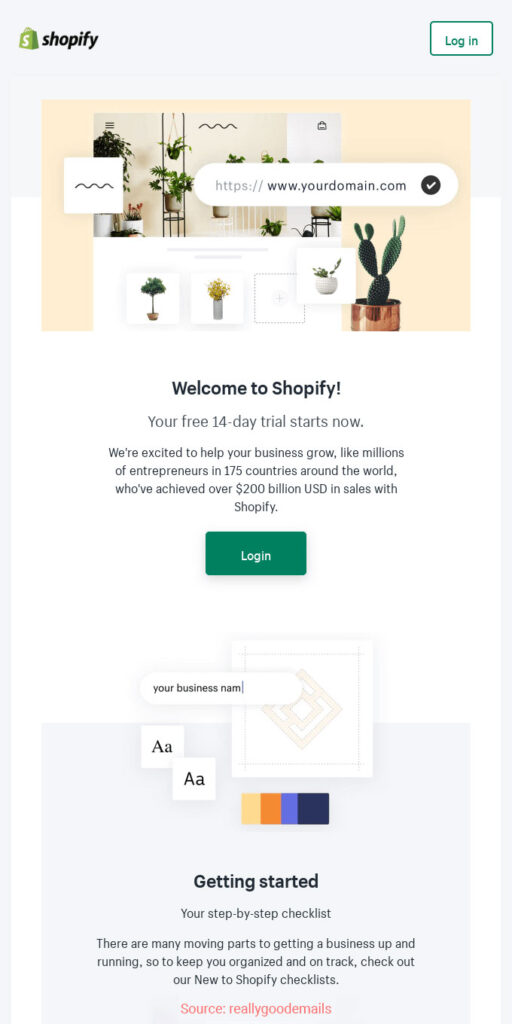
Welcome email templates are what you use to greet new subscribers and make a strong first impression. Contrary to what’s commonly believed, a welcome email isn’t just a single greeting message. It’s a series of emails that introduces a fresh subscriber to your brand in phases over the first 14 days.
Here are key elements to cover across your welcome series:
- Introduce your brand and what makes it unique
- Tell your brand’s origin story
- Request subscribers add you to their “safe sender” list
- Highlight what differentiates you from competitors
- Repeat the reasons why you’ll send them emails
- Showcase your best product categories and current offers
- Invite them to follow you on social media
Top 3 welcome email templates to set up:
- New Customer Welcome (Email 1): Brand intro + first-purchase discount code (10-15% off)
- Brand Story (Email 2): Founder story, mission, what you stand for
- Bestsellers (Email 3): Top-rated products + social proof
2. Promotional Email Templates
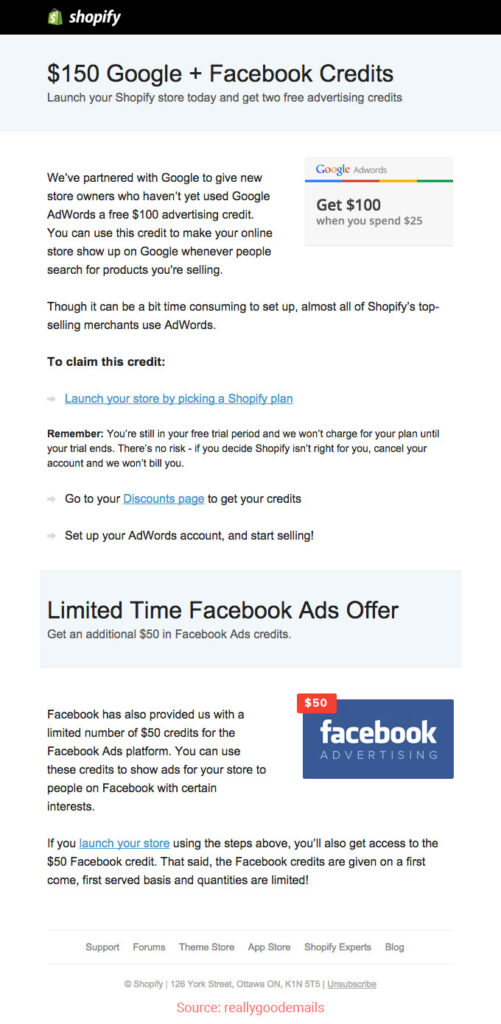
Promotional emails are built to acquire new or repeat buyers, speed up the buying process, or push contacts toward a favorable action. They inform customers and prospects about existing products or new arrivals. They also announce exclusive content, limited-time offers, and special deals.
When writing a promotional email, define a single goal and stick to it. This sharpens the call-to-action you want recipients to take and keeps your copy focused on that outcome.
Remember that not every promotional email needs to be a sales pitch. Occasionally include something that nurtures the relationship rather than asking for a transaction.
Top 3 promotional templates:
- New Product Launch: Hero product reveal + early-access offer for subscribers
- Flash Sale (24-hour): Urgency-driven with countdown timer
- Limited-Edition Drop: Scarcity-focused for exclusive collections
3. Transactional Email Templates

Transactional emails are what you send after you’ve driven sales through your promotional emails. These should include information customers actually need after placing an order. They have significantly higher open rates than promotional emails because customers actively look forward to receiving them. For a deep dive on the most important one, see our guide on shopify order confirmation email templates.
Here are the key elements every transactional template should include:
- Order confirmation details
- Purchase line items and totals
- Details of how you’ll proceed with fulfillment
- Shipment confirmation with carrier and tracking
- Contact information for questions or issues
- A clear link to track the purchase
Top 3 transactional templates:
- Order Confirmation: Receipt + estimated delivery + cross-sell recommendations
- Shipping Notification: Tracking link + carrier info + delivery window
- Order Delivered: Confirmation + review request setup + how-to-use content
4. Abandoned Cart Email Templates
Ecommerce stores face abandoned carts every single day. The average cart abandonment rate across all industries is 69.57% according to Baymard Institute. Shopify stores can recover most of these abandoned carts by sending abandoned cart emails that remind recipients of the items they left behind. Strong marketing automation turns this into a reliable revenue lever rather than an occasional reminder.
The best abandoned cart automation uses a 3-email sequence with this timing:
- Email 1 (1 hour after abandonment): Soft reminder. “You left something behind.” No discount yet.
- Email 2 (24 hours after abandonment): Add urgency. “Your cart is expiring soon.” Optional small incentive.
- Email 3 (72 hours after abandonment): Final push with stronger incentive. “Last chance, 10% off your cart.”
5. Review Request Email Templates
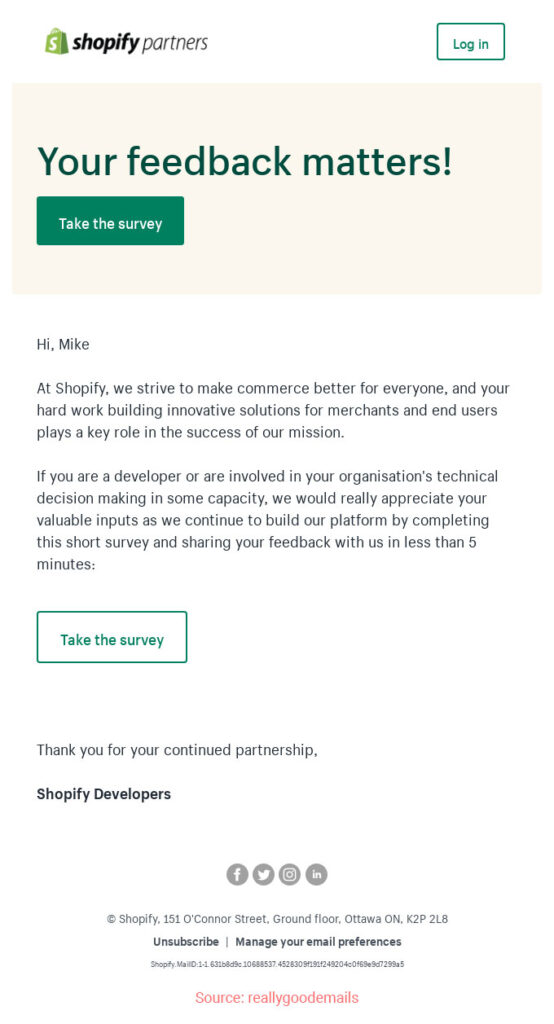
Reviews are some of the highest-impact pieces of user-generated content (UGC) for ecommerce. Potential buyers rely on them to decide whether to purchase. But most buyers don’t leave reviews on their own. They need a gentle nudge through a well-timed review request email.
The Shopify email template for review requests should be well-written and direct. Timing matters significantly. Here are the right moments to send a review request:
- 7-10 days after purchase (delivery confirmed)
- When a customer makes a reorder of the same product
- When a customer has mentioned your brand on social media
- Soon after a positive customer service interaction
Top 3 review request templates:
- Standard Review Request: 7-10 days post-delivery with star rating widget
- Incentivized Review: “Leave a review and get 10% off your next order”
- Photo Review Request: “Share a photo for $5 store credit”
6. Seasonal Email Templates
Festive times like Christmas, New Year, Diwali, Mother’s Day, Father’s Day, Valentine’s Day, and similar holidays create real sales opportunities for ecommerce businesses. Shopify stores can capitalize on these moments by sending well-designed seasonal email templates.
Seasonal campaigns get attention from customers and leads when they’re already in a buying mindset for gifts or self-purchase moments.
While seasonal emails often announce discounts and new arrivals, they can also serve as indirect promotions. Subtle marketing messages include holiday gift guides, gift suggestions by recipient type, budget reminders, and messages of gratitude for customer relationships built over the year.
Start with seasonal greetings before going into the body, and sign off with “best wishes” or “regards” that feel warm rather than transactional.
Top 3 seasonal templates:
- Black Friday / Cyber Monday: Sale announcement with biggest discount of the year
- Holiday Gift Guide: Curated product picks by recipient type (for him, for her, for kids)
- Last-Minute Shipping Cutoff: Urgency reminder before holiday delivery deadlines
7. Newsletter Email Templates
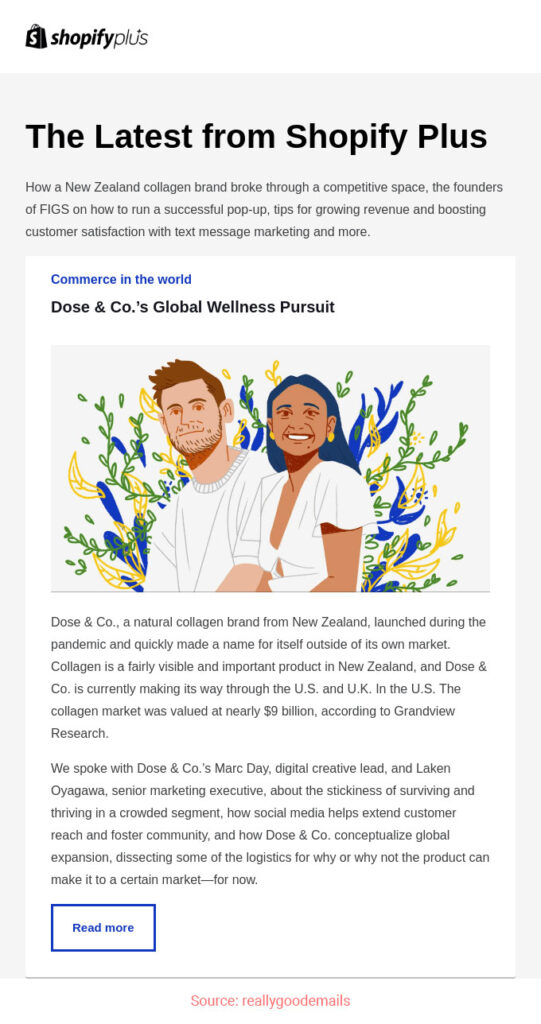
Email newsletters are sent to inform or update subscribers about company news, latest products, updates, or industry tips. They can take the form of weekly content digests, quarterly updates, or new product promotions. Your newsletters should focus on building customer loyalty through genuinely useful content rather than only pushing sales.
Make sure the content you include is relevant and useful to your audience. It should keep readers interested, connected, and updated on what’s new in your company or category.
Top 2 newsletter templates:
- Weekly Content Digest: Blog roundup + product highlights + industry news
- Monthly Brand Update: Behind-the-scenes content + new product reveals + community highlights
8. Event Invitation Email Templates
An event invitation email invites subscribers to register for and attend your event. Whether you’re hosting virtually or in-person, your invitation needs to stand out in a crowded inbox. Beyond having an attractive design, it should highlight the benefits of attending and what the audience will take away.
Include the event name, date and time, duration, location, and brief bios of the hosts and speakers. Specifics help recipients decide whether the event matches their interests.
Explain clearly how recipients can book a spot, register, or RSVP. State the process in the email or direct them to a landing page where they can find the details. Make sure your CTA is clear and action-oriented rather than vague.
Top 2 event invitation templates:
- Webinar/Virtual Event: Topic + speakers + register button + calendar add-on
- In-Person Pop-Up: Location details + RSVP + what to expect
9. Special Occasion Email Templates
Automated anniversary emails help target subscribers more precisely, strengthen the relationship, and lift returns on your Shopify email marketing investment. A heartfelt thank you email on these moments can drive higher engagement than most promotional sends because they feel personal.
These “anniversary” wishes can take many shapes including birthdays, wedding anniversaries, newsletter signup anniversaries, first purchase anniversaries, and more. For wedding-related messages, consider matching elegant typography that fits the tone, such as careful wedding fonts for a personal visual touch.
In your message, wish or congratulate the subscriber on the anniversary and offer a discount or coupon to help them celebrate. For wedding-themed campaigns where the recipient might be shopping for an upcoming event like semi-formal wedding attire, this lets them associate your brand fondly with their milestones.
Top 3 special occasion templates:
- Birthday Email: Personalized greeting + birthday discount code
- First Purchase Anniversary: “It’s been a year since you joined us”
- Loyalty Milestone: “You’ve reached VIP status” with exclusive perks
How to Customize Shopify Email Templates with Liquid Code
Shopify uses Liquid, its native templating language, to power email customization. Here’s the step-by-step process for editing default Shopify email templates:
- Go to Settings → Notifications in your Shopify Admin
- Select the email template to edit (order confirmation, shipping notification, etc.)
- Click “Edit code” to access the HTML and Liquid markup
- Modify HTML structure, CSS styling, and Liquid variables per your brand
- Preview the email before saving
- Send a test email to your own inbox to verify rendering
- Save and activate the customized template
Personalization with Liquid (Code Example)
Add the customer’s first name dynamically:
{% if customer.first_name %}
  Hello {{ customer.first_name }},
{% else %}
  Hello,
{% endif %}
Common Customizations
- Adding your logo image at the header
- Changing brand colors and fonts via CSS
- Adding social media follow links in the footer
- Personalizing subject lines with first name
- Adding dynamic product recommendations using Shopify Liquid loops
- Including review widgets or UGC sections
Best Shopify Email Template Apps in 2026
If you need richer template libraries than Shopify defaults, here are the leading email marketing platform options for Shopify in 2026:
- Nvecta: Multi-channel platform with AI-powered templates, CDP foundation, and pre-built workflows for every Shopify use case
- Klaviyo: Deep Shopify integration with extensive template gallery and behavioral automation
- Omnisend: Email + SMS combo with pre-built ecommerce templates
- Privy: Shopify-native template library, strong for popups + emails
- Mailchimp: Free template marketplace with industry-specific designs
- Stripo: Drag-drop builder with hundreds of customizable templates
- BEE Free: Free template marketplace, easy export to any ESP
High-Converting Subject Line Examples by Template Type
Strong subject lines are what determine whether your beautifully designed template ever gets opened. Here are proven subject lines for each template type:
Welcome Emails
- “Welcome to {{brand}} — here’s 10% off”
- “Glad you’re here, {{first_name}} 👋”
- “Your {{brand}} journey starts now”
Abandoned Cart
- “You left something behind 👀”
- “Still thinking about it, {{first_name}}?”
- “Your cart is expiring soon”
Order Confirmation
- “Your order is confirmed!”
- “Order #{{order_number}} — we got it”
- “Thanks {{first_name}}, your order is on the way”
Review Request
- “How was your {{product_name}}?”
- “Quick favor, {{first_name}}?”
- “Share your experience and get 10% off”
Win-Back / Special Occasion
- “We’ve missed you, {{first_name}}”
- “Happy birthday from {{brand}} 🎂”
- “Come back for 20% off”
Real Shopify Brand Email Examples
Some of the best email design inspiration comes from studying how top Shopify brands approach their templates:
- Allbirds: Clean minimal design with strong lifestyle photography and sustainability messaging
- Glossier: Bold typography, friendly conversational tone, community-driven content
- Bombas: Strong CTAs paired with mission-driven messaging about their “buy one, give one” model
- Chubbies: Witty copy, casual brand voice, strong personality across every email
- Casper: Sleep-focused content + product education + customer stories
- Warby Parker: Try-at-home program emphasis and clear customer journey
- Brooklinen: Lifestyle imagery + product reviews + bedding-care tips
AI in Shopify Email Templates 2026
AI has reshaped Shopify email templates in 2026. Strong personalization strategy built on AI is what separates winning Shopify stores from average ones in the current landscape. Modern AI capabilities in Shopify email include:
- AI-generated subject line variations for automatic A/B testing
- AI personalization per recipient based on browsing and purchase history
- Dynamic product recommendations embedded inside templates
- AI image generation for promotional email visuals
- Predictive send-time optimization per subscriber
- AI-driven A/B testing automation at scale
- Agentic AI workflows that autonomously manage post-purchase, win-back, and loyalty campaigns
The catch worth stating clearly: AI only works on clean data. Adding AI to fragmented Shopify data creates worse outcomes faster, not better ones. A unified customer data platform sitting underneath your email tools is what makes AI personalization actually work at scale.
Mobile-Responsive Shopify Email Design Best Practices
Over 60% of Shopify store emails are opened on mobile devices in 2026. Mobile-first design is essential, not optional. Key best practices:
- Single-column layout for easy scrolling on mobile screens
- Large tap targets (44px minimum) for CTAs and links
- Body font size 14-16px minimum for readability
- Hero image under 100KB for fast loading on cellular data
- CTA buttons full-width on mobile
- Subject lines under 50 characters for full visibility on mobile preview
- Test on iOS Mail, Gmail app, and Outlook mobile before sending
Final Words
You’ve just explored 25 Shopify email templates across 9 categories. Use them as a foundation for building stronger subscriber relationships and promoting your offering through email marketing that actually drives revenue rather than just sends.
There are many more template types worth adding over time including demo booking emails, NPS survey emails, post-purchase educational sequences, and loyalty milestone celebrations. You can find a wide library of Shopify-friendly email marketing templates on Nvecta Email marketing software that includes AI-powered personalization, multi-channel orchestration, and pre-built automation flows built specifically for ecommerce.
Frequently Asked Questions
What are Shopify email templates?
Shopify email templates are pre-designed email layouts for transactional and marketing emails that Shopify merchants use to engage customers. Categories include welcome emails, abandoned cart recovery, order confirmation, shipping notifications, review requests, seasonal promotions, newsletters, event invitations, and anniversary emails. The best templates come from Klaviyo, Omnisend, Stripo, Privy, and the Shopify App Store, with Liquid code customization available for advanced merchants.
Why does email marketing matter for Shopify stores?
Email marketing matters for Shopify stores because it delivers the highest conversion rate at 4.29% according to Shopify research, compared to other marketing channels. With email driving an average ROI of $36-42 per $1 spent, Shopify stores that don’t actively use email marketing leave significant revenue on the table. Email also costs significantly less per acquisition than paid social or search ads.
What are the benefits of email marketing for Shopify?
Email marketing is affordable and personal. It reaches customers faster and at better economics than paid ads. It supports automation, makes cross-selling and upselling easier, enables precise targeting based on customer behavior, and can be continuously optimized based on real data rather than guesses. For Shopify stores specifically, native integrations with email platforms make setup straightforward.
Why use Shopify email templates?
Shopify email templates eliminate the need to design and write emails from scratch every time. They save time and effort, lift productivity, and give you proven patterns to start from. You also get inspiration on email marketing approaches you might not have tried yet. The best templates pair design with proven copy frameworks for each use case.
Where can I find free Shopify email templates?
Free Shopify email templates are available through Klaviyo’s template gallery (free with platform signup), Omnisend’s free template library, Stripo’s free Shopify templates, BEE Free’s marketplace, MailerLite’s template gallery, and Shopify’s own template marketplace. Each offers different design styles and customization depth, so try a few to find what fits your brand best.
How do I customize Shopify email templates?
To customize Shopify email templates, go to Settings → Notifications in your Shopify Admin, select the template to edit, click “Edit code” to access the HTML and Liquid, modify the design (HTML, CSS, Liquid variables), preview the result, send a test email, then save and activate. For deeper customization beyond what Shopify’s default editor allows, use platforms like Klaviyo, Omnisend, or Nvecta with their drag-and-drop editors.
Can I use Liquid code in Shopify emails?
Yes, Shopify emails use Liquid as their templating language for dynamic content. You can use Liquid for customer personalization (first name, last order), conditional content (different sections for first-time vs returning customers), dynamic product recommendations, order details rendering, and loops through cart items. Liquid is Shopify’s native language and works across both transactional and marketing email templates.
What are the best Shopify email marketing templates?
The best Shopify email marketing templates include welcome series, abandoned cart recovery (3-email sequence), order confirmation, shipping notification, post-purchase thank you, review request, win-back campaigns, birthday emails, and seasonal promotions. These nine template types cover most of the customer lifecycle and drive measurable revenue when set up as automated flows rather than manual sends.
How do I create a welcome email in Shopify?
To create a welcome email in Shopify, install an email marketing app like Klaviyo, Omnisend, or Nvecta, set up a welcome series automation that triggers when someone subscribes, design the first email with brand introduction and first-purchase incentive, build follow-up emails for brand story and bestsellers, then activate the flow. Most platforms offer pre-built welcome series templates that you can customize in under an hour.
What is the best Shopify email template app?
The best Shopify email template app depends on your needs. Nvecta is strong for multi-channel orchestration with AI templates. Klaviyo wins for deep ecommerce behavioral automation. Omnisend is best for email + SMS combos. Privy excels at Shopify-native popups and basic email flows. Mailchimp suits small businesses starting out. Most top apps offer free plans so you can test before committing to a paid tier.
Are Shopify default email templates customizable?
Yes, Shopify’s default email templates are customizable through Settings → Notifications. You can edit HTML, CSS, and Liquid markup for all standard transactional emails including order confirmation, shipping notifications, and account creation. For deeper marketing email customization, third-party apps like Klaviyo, Omnisend, and Nvecta offer drag-and-drop editors plus pre-built template libraries.
How do I make Shopify emails mobile-responsive?
To make Shopify emails mobile-responsive, use single-column layouts, large tap targets (44px+), body font 14-16px minimum, hero images under 100KB, full-width CTA buttons on mobile, subject lines under 50 characters, and test on iOS Mail, Gmail app, and Outlook mobile before sending. Most modern email platforms automatically apply mobile-responsive design to their templates, so picking the right starting template often handles this for you.
What’s the difference between Shopify transactional and marketing emails?
Shopify transactional emails are triggered by specific customer actions (order confirmation, shipping notification, account creation, password reset). They’re sent through Shopify’s native email system and don’t require subscribers to have opted in to marketing. Marketing emails (newsletters, promotional campaigns, win-back) require explicit consent and are typically managed through third-party apps like Klaviyo, Omnisend, or Nvecta with their own templates and automation logic.
How does AI change Shopify email templates in 2026?
AI changes Shopify email templates in 2026 through AI-generated subject line variations, AI personalization per recipient based on behavior, dynamic product recommendations embedded in templates, AI image generation for promotional visuals, predictive send-time optimization per individual, automated A/B testing at scale, and agentic AI workflows that autonomously manage entire campaign lifecycles. The result is significantly higher engagement and conversion rates with less manual work.
What’s the average ROI of Shopify email marketing?
The average ROI of Shopify email marketing is $36-42 per $1 spent according to DMA and Litmus benchmarks, making it one of the highest-ROI channels in ecommerce. Specific email types perform differently: post-purchase emails average 4x revenue per send vs promotional emails, abandoned cart emails recover 10-15% of lost carts, and welcome series emails drive 320% more revenue than other promotional emails.
Also Read:
