














 Email
Email SMS
SMS Whatsapp
 Web Push
 App Push
 Audience Sync for Ads
 Popups
 Channel A/B Testing
  Control groups Analysis
 Frequency Capping
 Funnel Analysis
 Cohort Analysis
 RFM Analysis
 Signup Forms
 Surveys
 NPS
NPS Landing pages personalization
  Website A/B Testing
  PWA/TWA
 Heatmaps
 Session Recording
 Wix
Wix Shopify
 Magento
 Woocommerce
 eCommerce D2C
  Mutual Funds
 Insurance
 Lending
  Recipes
  Knowledgebase
 Developer Docs
 Product Updates
 App Marketplace
 Academy
 Ebooks
 Case Studies
 Blog
Blog Templates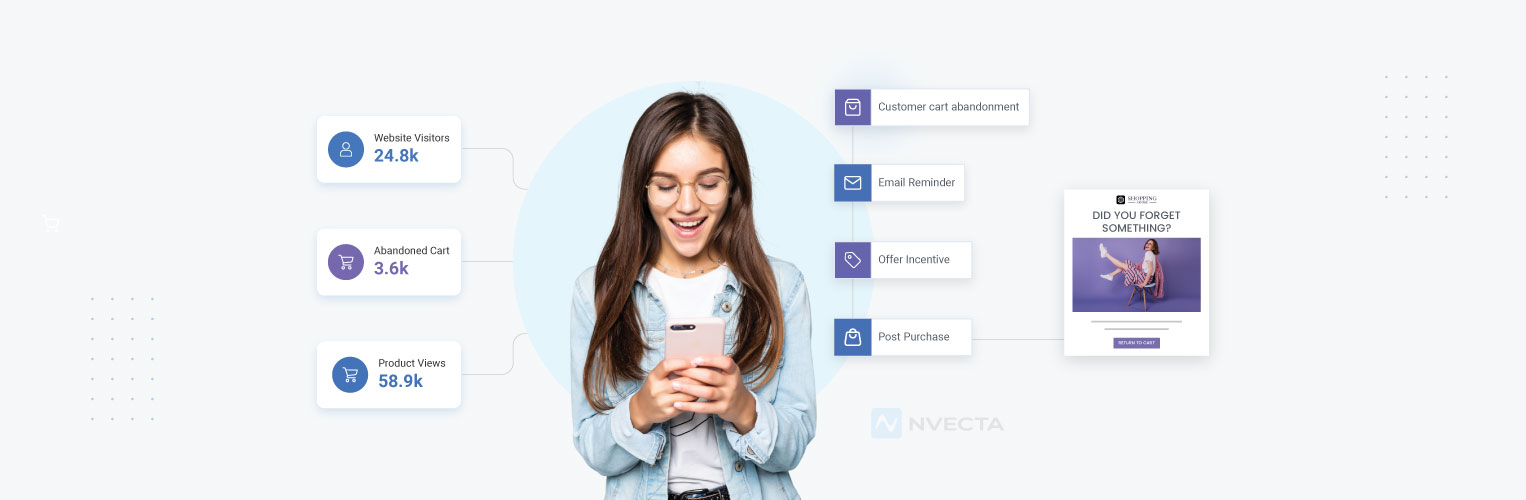
 Afreen Sheikh
Selling online is no longer just about having a good product or an impressive website. Every customer interacts with a brand through multiple channels, such as scrolling through products, comparing product prices, abandoning carts, returning after weeks, or responding to a sale notification. Each of these actions impacts how customers perceive a brand. When these interactions are handled manually, it becomes a time-consuming process and brands often miss opportunities to engage customers
Modern eCommerce journeys are quite complex and rarely follow a straight path. Customers may browse on mobile, purchase on desktop, and expect follow-ups on email or WhatsApp without repeating themselves. Manual campaigns struggle to react to these real-time behaviours, which leads to delayed messages, generic communication, and lost conversions.
Marketing automation workflows are especially useful in this situation. eCommerce marketing automation allows brands to respond instantly at the right moments, personalise communication, and maintain consistency at scale.
When done correctly, automation promotes growth while maintaining customer experience—especially when powered by a Customer Data Platform that unifies customer insights and enables more accurate, real-time decision-making.
In this blog, we will explore how eCommerce brands can use marketing automation workflows to build smarter, more effective customer journeys.
We’ll also see how NVECTA helps eCommerce brands automate and scale these workflows.
Understanding Marketing Automation Workflows for eCommerce Success
Marketing automation workflows in eCommerce are automated journeys that respond to how customers interact with a brand.
Instead of sending one-time campaigns, eCommerce brands build workflows that automatically engage users based on what they do or do not do on a website or app.
Key Components of eCommerce Marketing Automation Workflows
Every effective eCommerce marketing automation workflow is built on three essential elements that work together to guide customer journeys–
Triggers
Triggers are the events that start a workflow. These are specific customer actions or behaviours, such as:
- Signing up for an account or newsletter
- Viewing a product or category page
- Adding items to the cart
- Completing a purchase
- Becoming inactive for a certain period
Once a trigger occurs, the workflow is activated automatically.
Conditions
Conditions determine how the workflow should proceed after it is triggered. They help brands create smarter, more relevant journeys by asking simple questions like:
- Is the user a first-time visitor or a returning customer?
- Has the customer purchased before?
- Did the user abandon the cart or just browse?
- Which product category did they interact with?
Based on the answers, customers are guided down different paths within the workflow.
Actions
Actions are the messages or responses sent to the customer. These can include:
- Sending a welcome email or SMS
- Showing a push notification or on-site message
- Recommending products based on browsing behaviour
- Triggering reminders or follow-ups at the right time
Everyday eCommerce Workflow Examples
To understand how these elements work together, consider a few common ecommerce scenarios:
- When a new user signs up, a welcome workflow automatically introduces the brand and highlights trendy products.
- When a shopper browses multiple products but leaves without adding anything to the cart, a browse abandonment workflow sends a gentle reminder.
- When a customer adds items to the cart but doesn’t complete the purchase, an abandoned cart workflow follows up with timely nudges to bring them back.
Thus, combining triggers, conditions, and actions helps eCommerce brands deliver timely, relevant, and personalised experiences without any manual effort.
Key Benefits of Automated Workflows for eCommerce Brands
Automated workflows help eCommerce brands stay connected with customers without constant manual effort. They make it easier to respond to customer actions, deliver relevant messages, and create smooth shopping experiences at scale.
When used thoughtfully, automation supports growth while keeping communication personal and timely.
Faster Response to Customer Actions
Automated workflows react instantly when a customer browses, adds items to the cart, or completes a purchase. This ensures messages reach customers at the moment their interest is highest.
Personalised Experiences at Scale
Automation allows eCommerce brands to tailor messages based on behaviour, preferences, and past interactions. Customers receive communication that feels relevant without brands needing to manage everything manually.
Consistent Communication Across Channels
Automated workflows help maintain a unified experience across email, SMS, push notifications, WhatsApp, and on-site messages. Customers get consistent messaging no matter where they interact with the brand.
Higher Conversion Rates
Timely follow-ups, such as cart reminders and product suggestions, encourage customers to complete purchases. These well-timed interactions often lead to better conversion outcomes.
Improved Customer Retention
Post-purchase and re-engagement workflows help brands stay connected beyond the first sale. Regular, relevant communication builds stronger relationships and encourages repeat purchases.
Reduced Manual Effort for Marketing Teams
Automation handles repetitive tasks in the background, allowing teams to focus on strategy and creativity. This makes marketing operations more efficient without sacrificing quality.
Better Use of Customer Data
Automated workflows turn customer behaviour and data into meaningful actions. Brands can make smarter decisions by responding to real insights rather than assumptions.
Scalable Growth Without Added Complexity
As an eCommerce business grows, automated workflows scale easily. Brands can manage more customers and interactions without increasing workload or losing personalisation.
Best Marketing Automation Workflows Templates for eCommerce Brands
Not every automation workflow delivers the same results. Some workflows help drive quick conversions, while others focus on building long-term relationships with customers.
The most successful eCommerce brands use a blend of both to support the entire customer journey.
Below are the most effective marketing automation workflows every eCommerce brand can use to drive results. Here is a quick overview before we look at each one in detail:
| Workflow | Trigger | Primary Goal |
|---|---|---|
| Welcome Series | New sign-up | Introduce the brand and drive the first purchase |
| Abandoned Cart Recovery | Items added to cart but not purchased | Recover lost sales and lift conversions |
| Browse Abandonment | Products viewed but none added to cart | Nurture interest and stay top of mind |
| Post-Purchase Engagement | Completed purchase | Improve satisfaction and encourage repeat orders |
| Cross-Sell & Upsell | Recent purchase | Increase order value with relevant recommendations |
| Re-Engagement | Customer inactivity | Win back lapsing customers and extend lifetime value |
| Loyalty & VIP | Purchase frequency, spend, or engagement | Recognise and reward high-value customers |
| Price Drop & Back-in-Stock | Price change or restock on a viewed item | Convert high-intent shoppers in real time |
| Seasonal & Sale Campaign | Sale period or seasonal event | Stay consistent and responsive during peak traffic |
Welcome Series Workflow for New Users
The welcome workflow is often the first interaction a customer has with an eCommerce brand after signing up. Its main intention is to introduce your brand and create a positive first impression.
A strong welcome series helps customers see what makes a brand different and why they should invest their trust.
This workflow helps the brand in many ways—
- Introduce your story and values in a simple, friendly way
- Highlight popular or best-selling products to incite interest
- Build trust using social proof, such as reviews
- Gently encourage the first purchase with an incentive or offer
By guiding new users from the initial stage, eCommerce brands can boost conversions while starting the relationship on the right note.
Abandoned Cart Recovery Workflow
Cart abandonment is one of the most common issues in eCommerce. Shoppers often leave due to disinterest, confusion, or price concerns.
An abandoned cart workflow helps bring these customers back before they change their minds.
Instead of relying on a single reminder, effective cart recovery workflows use a well-timed sequence of messages to engage customers.
For WooCommerce stores, WooCommerce abandoned cart recovery can be automated with a sequence of reminder emails designed to bring shoppers back and recover potentially lost sales.
This workflow helps brands to:
- Remind shoppers about products left in their cart
- Uses personalised product images and names to refresh customers’ interest
- Motivate action without sounding pushy
When done correctly, abandoned cart workflows can recover lost revenue and gradually increase conversion rates.
Browse Abandonment Workflow
Not every shopper adds products to the cart right away. Many users browse, compare prices or options, and leave without taking action. Browse abandonment workflows are designed to re-engage these users and keep the brand visible on time.
This workflow focuses on nurturing interest rather than pushing for immediate sales.
Key benefits of browse abandonment workflows:
- Reminds users about products they viewed recently
- Shares helpful information such as benefits, reviews, or use cases
- Reduces uncertainty by answering unspoken questions
- Builds familiarity before asking for a purchase
By staying helpful and informative, this workflow encourages shoppers to return when they’re ready.
Post-Purchase Engagement Workflow
The customer journey doesn’t end once a purchase is completed. Post-purchase workflows play an important role in improving satisfaction and encouraging repeat purchases.
These workflows focus on supporting customers after checkout and strengthening the relationship.
What post-purchase workflows include:
- Order confirmation and delivery updates for reassurance
- Product usage tips or setup guides to improve experience
- Care instructions to reduce returns and support longevity
- Review and feedback requests sent at the right time
A strong post-purchase workflow helps customers feel supported and valued, increasing trust and loyalty.
Cross-Sell and Upsell Automation Workflow
After a purchase, customers are often open to recommendations that add value. Cross-sell and upsell workflows help eCommerce brands increase order value without being overly promotional.
The goal is to suggest products that naturally complement what the customer has already purchased.
How these workflows add value:
- Recommend relevant add-ons or accessories
- Use purchase history and browsing behaviour for accuracy
- Focus on usefulness instead of aggressive discounts
- Enhance the overall shopping experience
When implemented thoughtfully, cross-sell and upsell workflows feel helpful and improve revenue without additional acquisition costs.
Re-Engagement Workflow for Inactive Customers
Not all customers remain active over time. Some may stop opening emails, visit the site less frequently, or pause purchases altogether. Re-engagement workflows help bring these users back without overwhelming them.
The first step is identifying inactivity based on engagement or purchase behavior.
How re-engagement workflows work:
- Gradually reintroduce the brand with value-driven messages
- Highlight new arrivals, updates, or useful content
- Test different approaches, such as reminders or limited offers
- Avoid immediate sales pressure
Over time, these workflows help recover interest and extend customer lifetime value.
Loyalty and VIP Customer Workflow
Loyal customers deserve special attention. Loyalty and VIP workflows help eCommerce brands recognise and reward their most valuable customers.
These workflows are usually triggered by purchase frequency, total spend, or consistent engagement.
What loyalty workflows focus on:
- Early access to sales or product launches
- Exclusive offers or rewards for repeat buyers
- Personalised messages that show appreciation
- Building emotional connections beyond transactions
By automating loyalty experiences, brands can scale recognition while keeping communication personal and meaningful.
Price Drop and Back-in-Stock Alerts
Few messages convert better than those sent when purchase intent is already high. Price drop and back-in-stock alerts target customers who showed interest but didn’t buy due to pricing or availability.
These workflows respond instantly when conditions change.
Why are these alerts effective?
- Notify customers the moment a product is available again
- Alert users when prices drop on items they viewed
- Create urgency without applying pressure
- Increase conversion chances through real-time timing
Clear messaging and limited availability cues help customers make faster decisions while maintaining trust.
Seasonal and Sale Campaign Automation
Sales periods and seasonal events bring high traffic and high expectations. Managing these campaigns manually can lead to missed opportunities and inconsistent communication.
Seasonal workflows help brands stay organised and responsive during peak times.
How seasonal workflows support campaigns:
- Automate pre-sale announcements and reminders
- Send launch-day and last-chance alerts on time
- Use countdowns and limited-time messaging effectively
- Segment audiences for more relevant communication
During busy sales periods, eCommerce marketing automation ensures consistency, reduces manual workload, and improves overall campaign performance.
How NVECTA Helps eCommerce Brands Build Smarter Automation Workflows
eCommerce brands grow faster when they quickly learn what customers want and respond. If customer information is scattered across different tools, it’s hard to provide timely and relevant experiences.
NVECTA brings data, engagement, and automation together in one platform, helping eCommerce brands build smarter marketing automation workflows that respond to real customer actions and support scalable eCommerce marketing automation.
Below are seven key NVECTA features that help brands create smarter and more effective processes.
Unified Customer Profiles Across Touchpoints
NVECTA processes all data from websites, apps, campaigns, and interactions into one unified customer profile.
This complete view helps eCommerce brands design each marketing automation workflow around real customer behaviour rather than treating actions as separate events.
Real-Time Customer Behaviour Tracking
NVECTA tracks actions such as product views, browsing activity, and cart updates in real time.
This allows automation workflow to trigger instantly, helping brands engage customers at the exact moment interest is highest and intent is strongest.
Omnichannel Automation from One Platform
NVECTA offers e-commerce brands the ability to manage email, SMS, push notifications, WhatsApp, and on-site messages from one dashboard.
Centralised control helps in delivering consistent and connected experiences across all customer touchpoints.
AI-Powered Dynamic Segmentation
NVECTA uses AI to create customer segments that update automatically based on behaviour and engagement.
Such advanced segmentation allows automation workflow to stay relevant as customer preferences change, without the need for frequent manual list updates.
Behaviour-Based Personalisation at Scale
NVECTA personalises messages using real-time customer actions instead of static rules. Content, product recommendations, and timing adjust automatically, allowing every automated workflow to feel personal even as e-commerce audiences grow.
No-Code Workflow Builder for Marketing Teams
NVECTA offers a simple drag-and-drop builder that allows marketing teams to create, test, and optimise any automation workflow without technical skills. This helps teams move faster and continuously improve automation performance.
Scalable Automation for Growing eCommerce Brands
NVECTA supports marketing automation workflows that scale smoothly as e-commerce businesses grow.
Increased traffic, expanding customer journeys, and complex workflows are handled efficiently without affecting personalisation or overall system performance.
Conclusion
The e-commerce sector continues to grow, and brands that readily adjust to customer behaviour stay one step ahead of the competition. Automation helps businesses respond quickly, stay relevant, and deliver consistent experiences without increasing manual effort. When customer interactions are handled at the right time with the right message, the entire shopping experience becomes smoother and more engaging.
Well-structured automation strategies help improve engagement, encourage repeat purchases, and create long-term customer value. From first-time visits to repeat orders, automation supports every stage of the customer lifecycle while allowing teams to focus on growth and innovation.
If you want to simplify customer journeys and turn everyday interactions into measurable results, now is the time to take action. Start building powerful eCommerce marketing automation workflows with NVECTA today and create personalised experiences that drive conversions and long-term growth.
Book your demo now.
FAQs
What are marketing automation workflows in eCommerce?
Marketing automation workflows are pre-built sequences that automatically send messages or trigger actions based on customer behavior. For example, a customer who abandons a cart may receive a reminder email without any manual effort. These workflows help online stores save time, improve customer experience, and increase sales.
Which marketing automation workflow generates the highest ROI?
Abandoned cart recovery workflows are often considered one of the highest-performing automations for eCommerce brands. Customers have already shown purchase intent, so a timely reminder can recover lost sales. Many businesses see quick results from this workflow compared to broader awareness campaigns.
How does an abandoned cart workflow work?
An abandoned cart workflow is triggered when a shopper adds products to a cart but leaves without completing the purchase. The workflow typically sends reminder emails, product details, and sometimes a limited-time offer. The goal is simple: bring the customer back and complete the sale.
What tools can be used to build eCommerce automation workflows?
Popular platforms include Shopify, WooCommerce, Klaviyo, Omnisend, HubSpot, ActiveCampaign, and customer data platforms such as NVECTA. The right tool depends on business size, automation needs, and how much customer data needs to be unified across channels.
How can businesses measure the success of marketing automation workflows?
Success should be measured using metrics tied to business growth. Key indicators include conversion rate, recovered revenue, customer lifetime value, repeat purchase rate, click-through rate, and return on investment. Tracking these metrics helps identify which workflows contribute the most revenue.
