














 Email
Email SMS
SMS Whatsapp
 Web Push
 App Push
 Audience Sync for Ads
 Popups
 Channel A/B Testing
  Control groups Analysis
 Frequency Capping
 Funnel Analysis
 Cohort Analysis
 RFM Analysis
 Signup Forms
 Surveys
 NPS
NPS Landing pages personalization
  Website A/B Testing
  PWA/TWA
 Heatmaps
 Session Recording
 Wix
Wix Shopify
 Magento
 Woocommerce
 eCommerce D2C
  Mutual Funds
 Insurance
 Lending
  Recipes
  Knowledgebase
 Developer Docs
 Product Updates
 App Marketplace
 Academy
 Ebooks
 Case Studies
 Blog
Blog Templates
 Aparupa Saha
When you interact with a business, subscribe to a blog, or download a podcast, you expect to receive confirmation. Sometimes this comes in pop-up form, but it’s best to get a confirmation email. Not only are they an integral part of the shopping experience, keeping your customers engaged, but they also achieve an incredible open rate.
We’ve therefore created 16 different types of confirmation email templates to help you.
At-a-Glance Template Index
Jump straight to the template you need. Each is designed for a specific use case and pairs subject line guidance with a copy-paste body. We’ve grouped the 28 templates by category for quicker scanning:
| # | Template | Best For | Key Element |
|---|---|---|---|
| 1 | Order Confirmation | Ecommerce | Order summary table |
| 2 | Booking Confirmation | Hotels, services | Reservation details |
| 3 | Registration Confirmation | Events, apps | Next-step guidance |
| 4 | Subscription Confirmation | Newsletters, lists | Double opt-in link |
| 5 | Feedback Confirmation | Support teams | Response timeline |
| 6 | Referral Confirmation | Growth campaigns | Referral status |
| 7 | Welcome Email | New signups | Personal touch |
| 8 | Cancellation Confirmation | Refund handling | Refund timeline |
| 9 | Webinar Confirmation | Online events | Add-to-calendar CTA |
| 10 | Event Registration | Conferences | Venue details |
| 11 | Reservation Confirmation | Restaurants, hotels | Time + location |
| 12 | Flight Confirmation | Airlines, travel | Itinerary table |
| 13 | Venue Booking | Event venues | Guest count + date |
| 14 | Signup Confirmation | SaaS, apps | Activation link |
| 15 | Double Opt-in | Email lists | Confirm-email button |
| 16 | Shipping Confirmation | Ecommerce | Tracking number |
| 17 | Payment Confirmation | Any transaction | Receipt details |
| 18 | Refund Confirmation | Returns processing | Refund timeline |
| 19 | Appointment Confirmation | Healthcare, salons | Reminder details |
| 20 | Meeting Confirmation | B2B sales, internal | Agenda + link |
| 21 | Interview Confirmation | HR, recruiting | Format + duration |
| 22 | RSVP Confirmation | Private events | Guest count |
| 23 | Account Verification | SaaS, fintech | OTP or magic link |
| 24 | Quote Confirmation | B2B services | PDF attachment |
| 25 | Reschedule Confirmation | Bookings, meetings | Old vs new time |
| 26 | Order Status Update | Ecommerce | Status change note |
| 27 | Newsletter Confirmation | Publishers, blogs | Welcome content |
| 28 | Password Reset Confirmation | All accounts | Security note |
If you’re new to writing these emails, our companion guide on how to write a confirmation email covers the 8-element anatomy and the 10-step process worth bookmarking before you customize any template below.
What Is a Confirmation Email?
A confirmation email is an automatic response email triggered by customer actions.
The main purpose of a confirmation email is to confirm that the transaction was successful. Whether it’s a purchase, a blog subscription, or a registration form submission, a confirmation email will reassure your customers that their action is complete.
1. Order Confirmation email
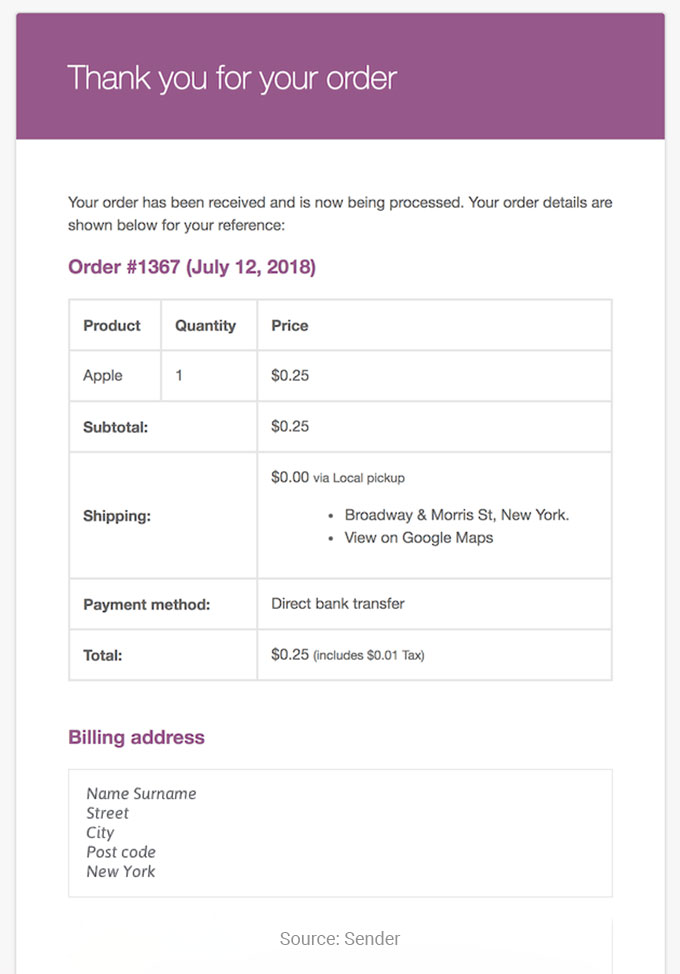
One of the most common confirmation email templates is order confirmation email. An order confirmation email is one of the most common emails. When customers pay and order, it’s important that they feel confident that their purchase was successful.
An order confirmation email should include at least the following:-
- Product Purchased
- Order number
- Allocated costs and expenses
- Delivery and Shipping information
- Information regarding canceling, modifying, or query regarding your order
The subject line of this email should be very short and clear.
2. Booking Confirmation email
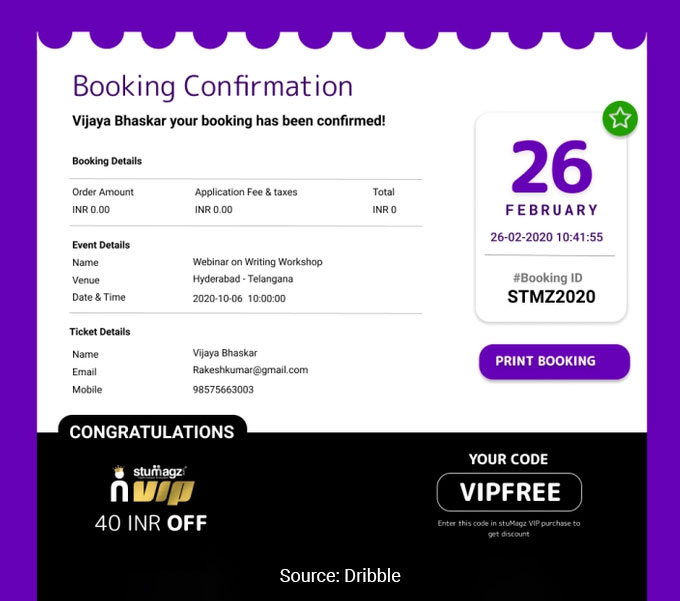
The next email template on our list is the Booking Confirmation email. A Booking Confirmation Email creates a thank you email, which is sent to customers after confirming their order online.
It will help you build a strong relationship with your customers when they choose your services. That relationship usually starts at a single touchpoint, which is why investing in well-designed lead generation forms often pays back faster than any other top-of-funnel work.
Emergency contact information and Booking information should be included in a Booking Confirmation Email.
3. Registration confirmation email
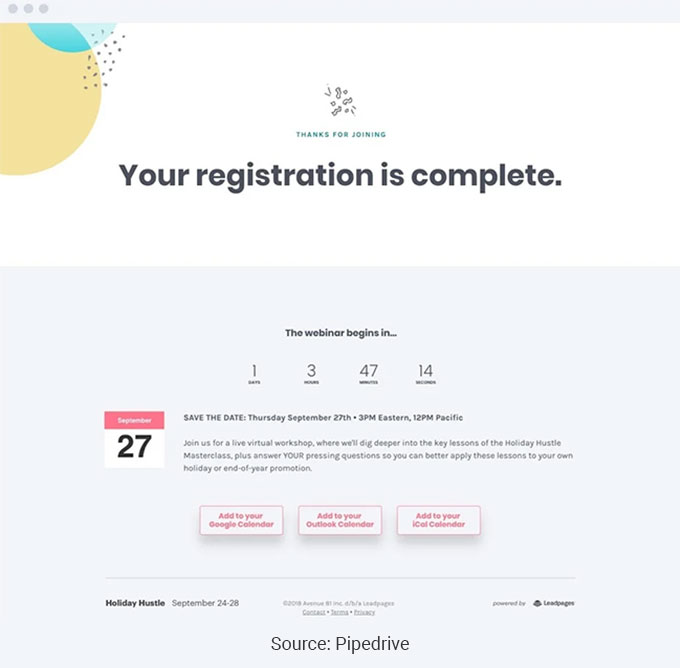
The registration confirmation email is very important for people who want to know whether the registration was successful.
These emails work really well for nudging people toward whatever comes next — signing up for a webinar, downloading an app, or completing an online registration. They give your audience a clear direction instead of leaving them guessing, which is why they’re so common in event and product workflows. Pairing them with email automation makes the whole process hands-off, so the right message goes out at the right moment without you manually hitting send every time.
This email from AirBnB provides a great starting point for anyone looking to become a host.
It clearly and succinctly explains the steps involved and provides a concise explanation even for beginners.
4. Subscription Confirmation Email
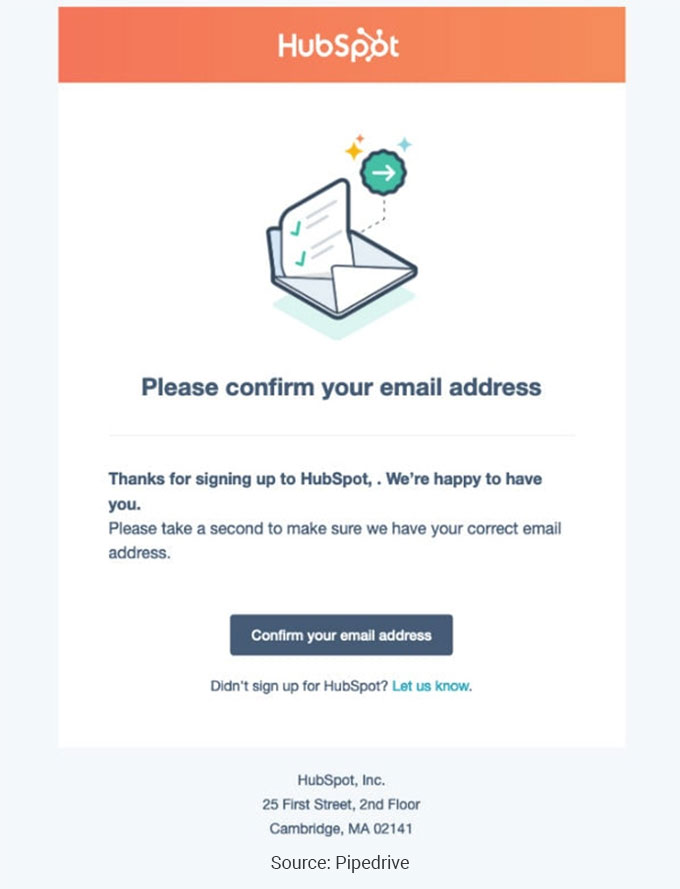
One of the best confirmation email templates is the Subscription Confirmation Email. A subscription confirmation email is generated when a visitor signs up for your mailing list. It is more important to double-check the confirmation email to confirm that you have the correct email address for the double opt-in.
A double opt-in system is worth setting up if you want subscribers who actually stick around. When someone confirms their subscription a second time, they’re telling you they genuinely want to hear from you — which means your emails and promotions are far less likely to end up ignored or marked as spam. It also pairs well with a strong follow up email strategy, since confirmed subscribers tend to open and engage at much higher rates.
5. Feedback Confirmation Email
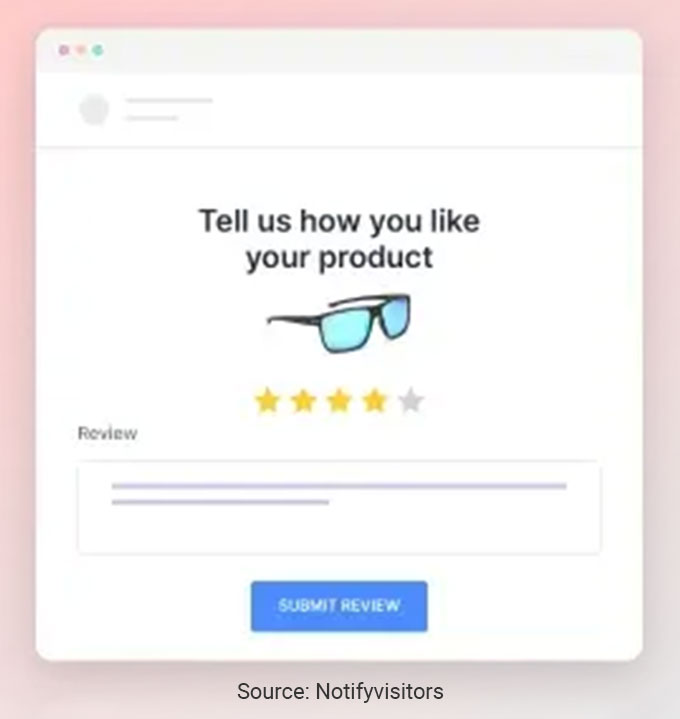
The next email template on our list is Feedback Emails. Feedback emails are sent to users when they contact the company.
Nobody likes sending a message into the void and wondering if anyone actually saw it. These emails exist to close that gap — they let the customer know their query or feedback landed and someone will get back to them. It’s a small gesture that prevents unnecessary frustration and repeat messages clogging up your support queue. Getting this right from the start ties into how you handle your opt in email examples too, because setting clear expectations early builds the kind of trust that keeps people engaged long term.
Ignoring feedback after someone took the time to share it sends the wrong message entirely. If a customer hears nothing back, they assume you didn’t read it — or worse, that you don’t care. A quick confirmation email fixes that. It doesn’t need to be fancy, just a simple acknowledgment that their input landed and you appreciate it. Having a ready-made template for this saves time and keeps the experience consistent. It’s a small touch, but it fits right into a broader lead nurturing approach where every interaction either builds trust or chips away at it.
6. Referral Email Confirmation
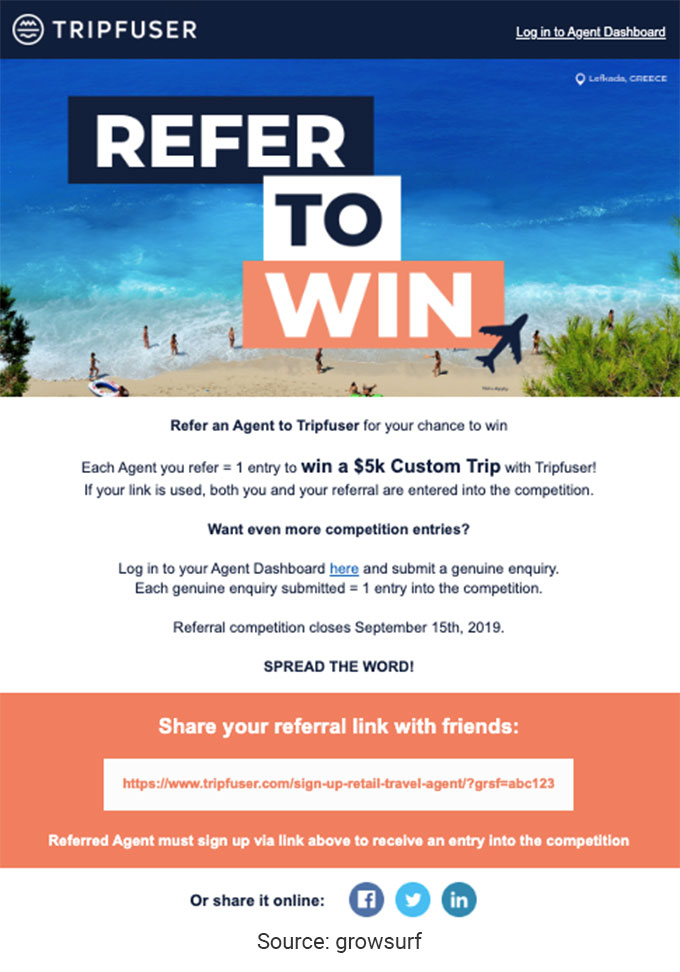
Referrals are one of the most powerful ways to bring in new customers because people trust recommendations from someone they know far more than any ad. Yet most businesses never actually ask for them. They just hope it happens on its own, which it rarely does. Setting up triggered email campaigns that automatically request a referral after a positive experience takes the guesswork out of it and catches customers at the exact moment they’re most likely to say yes.
Instead of just telling your customers that “your order is confirmed,” take the opportunity to get new clients and customers by asking for referrals.
7. Welcome Email (and Confirmation)
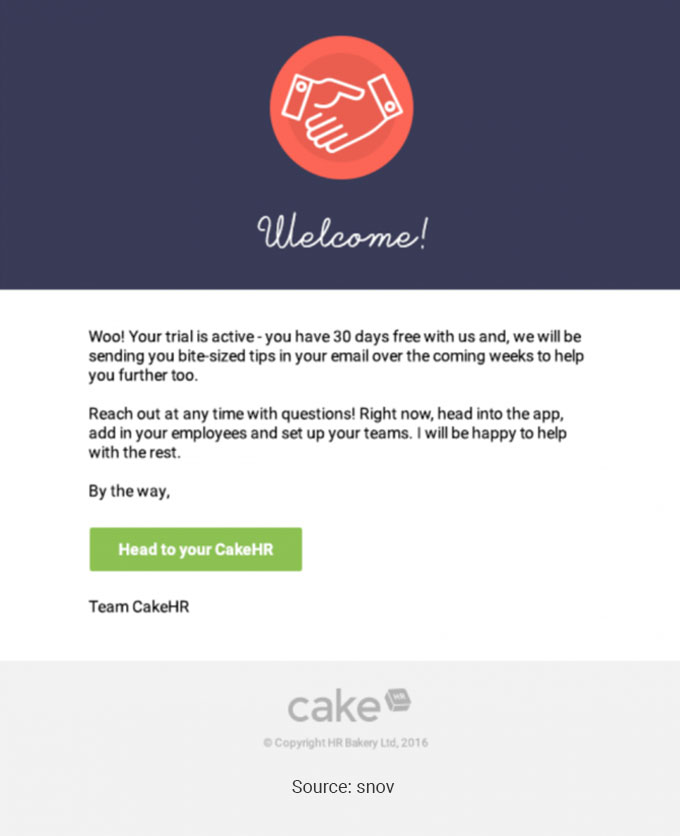
This template is great when someone signs up as a member of your email list or is a product user.
What makes this email work is that it feels like a real person wrote it, not a marketing team. That personal tone lowers people’s guard and makes them far more likely to actually hit reply instead of archiving it. And once someone responds, you’re in a genuine conversation — which is always closer to a sale than a one-way broadcast. The same principle applies to transactional messages like a Shopify order confirmation email, where adding a human touch turns a routine receipt into another chance to build the relationship
This welcome email is a great opportunity to start a relationship with a lead because you already know there is a better chance of your email being read than any other email.
8. Cancellation Confirmation email
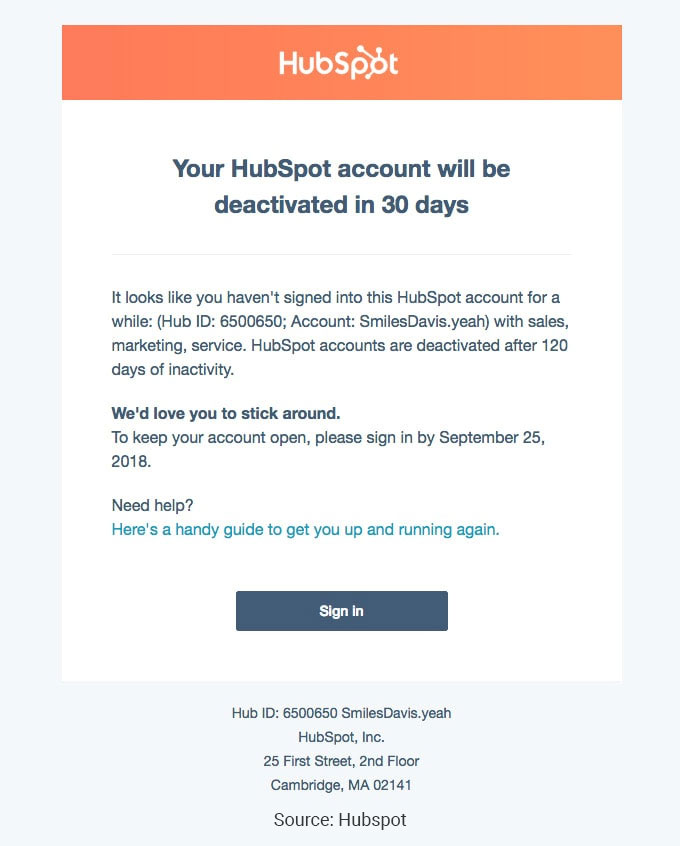
A Cancellation confirmation email lets someone know you have canceled their order or delivery. Creating emails like this is extremely important because you don’t want anyone to think you forgot about the cancellation or refund process.
9. Webinar Confirmation Email
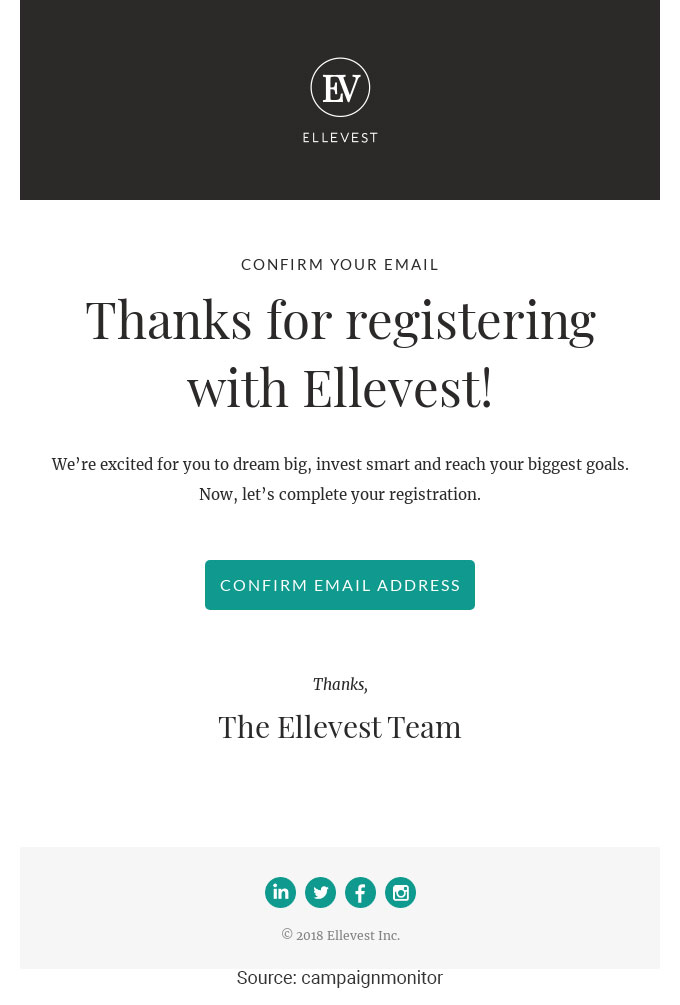
The user who registers for the webinar will receive a confirmation email stating the event to be held and the time and date.
These emails don’t need fancy design work — clean and simple does the job. The CTA button is the star here, usually an “Add to Calendar” link that’s impossible to miss. Everything else just supports that one action. It’s the same less-is-more thinking that makes a good thank you email effective — strip out the clutter and make the next step obvious.
It encourages the user to set a reminder date on their calendar to be notified so they can attend all the events.
10. Confirmation of event registration by email
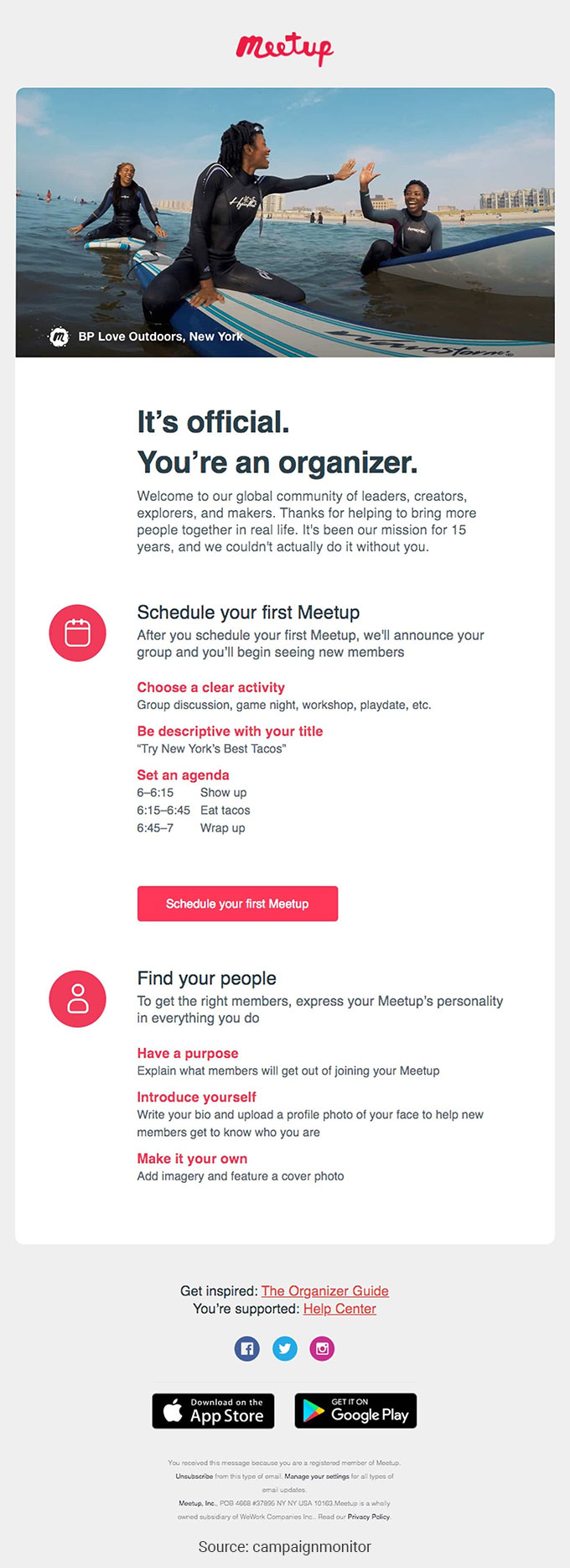
The next email confirmation template on our list is the Event Registration Email. As the name suggests, the email contains information about an event. It usually contains the event’s time, location, and directions. It helps avoid misunderstandings. In the vibrant landscape of event registration, Expo Pass alternatives certainly offer a robust range of advantages, from seamless integrations with leading CRM platforms to customizable attendee experiences. Email registration software ensures that event organizers can focus on creating stellar events, knowing that the backend processes are taken care of.
11. Reservation confirmation email
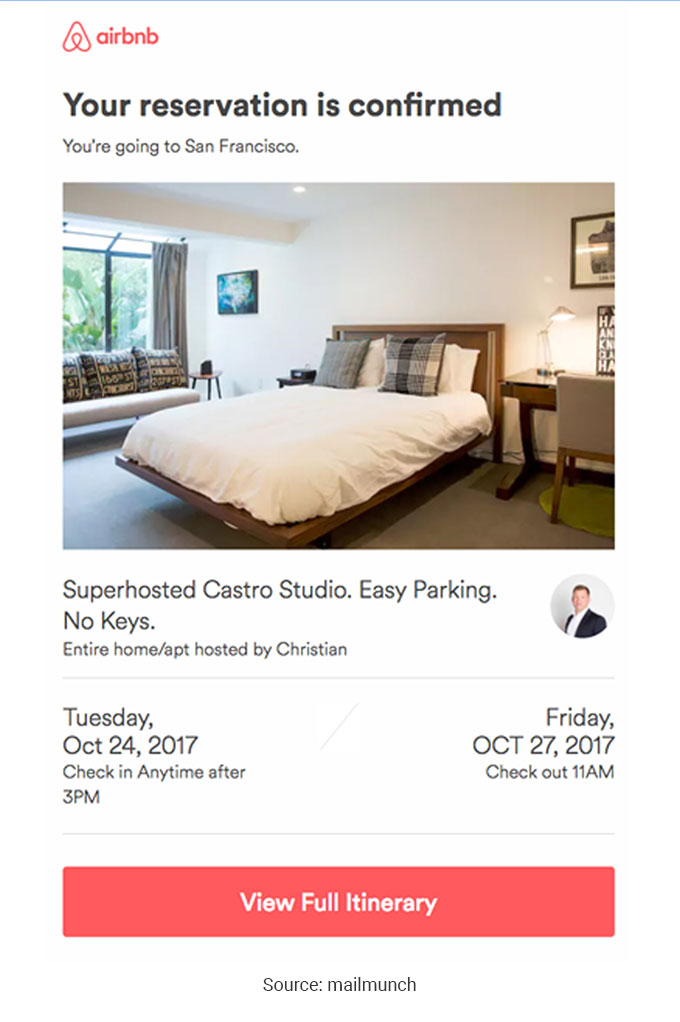
The successful reservation of the customer is guaranteed by sending an email confirming the restaurant or hotel reservation. It contains important information about the time and place of the booking.
This email template is simple and usually consists of date, time and destination information. It also has a CTA that directs the customer accordingly.
12. Flight confirmation email
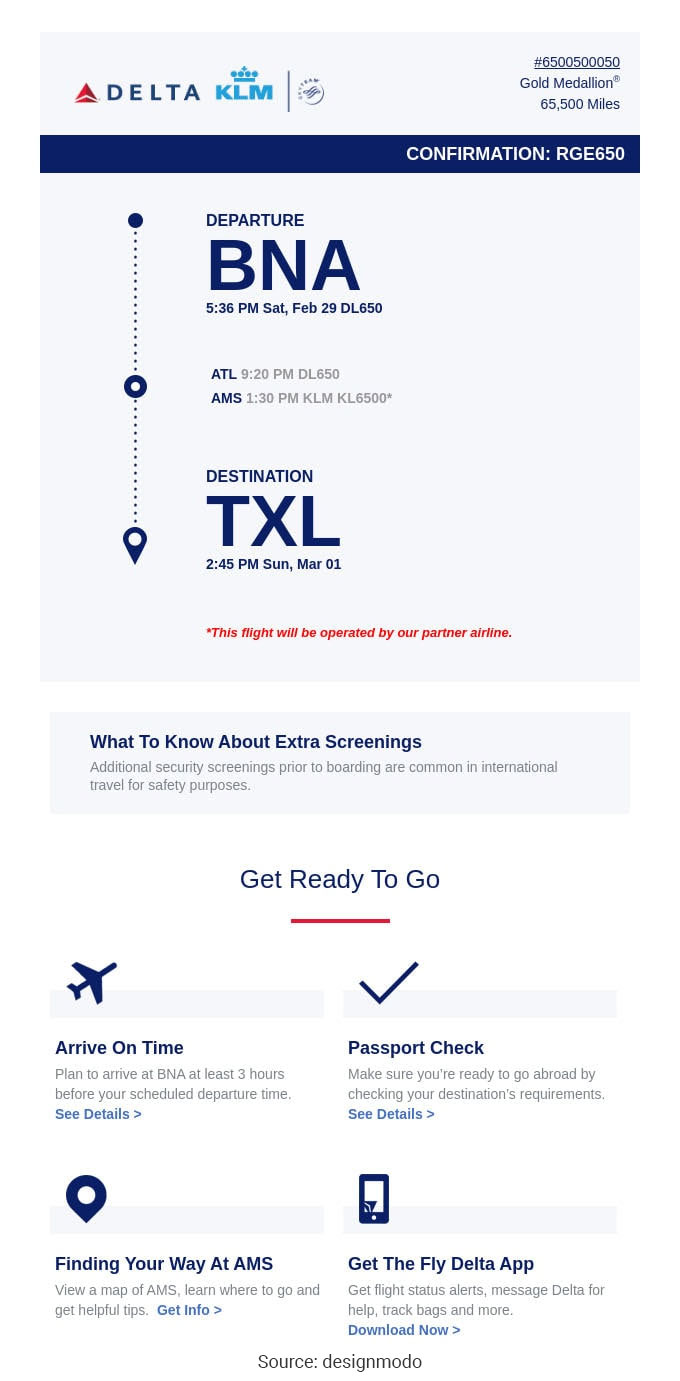
A customer who has booked a flight from point A to point B expects a flight confirmation email that includes flight details such as date, time of departure, date, terminal, etc.
The email copy usually starts with a simple greeting and confirms the traveller’s name. The payment method is mentioned, and the number of reserved tickets is shown along with the payment amount.
13. Venue Booking email
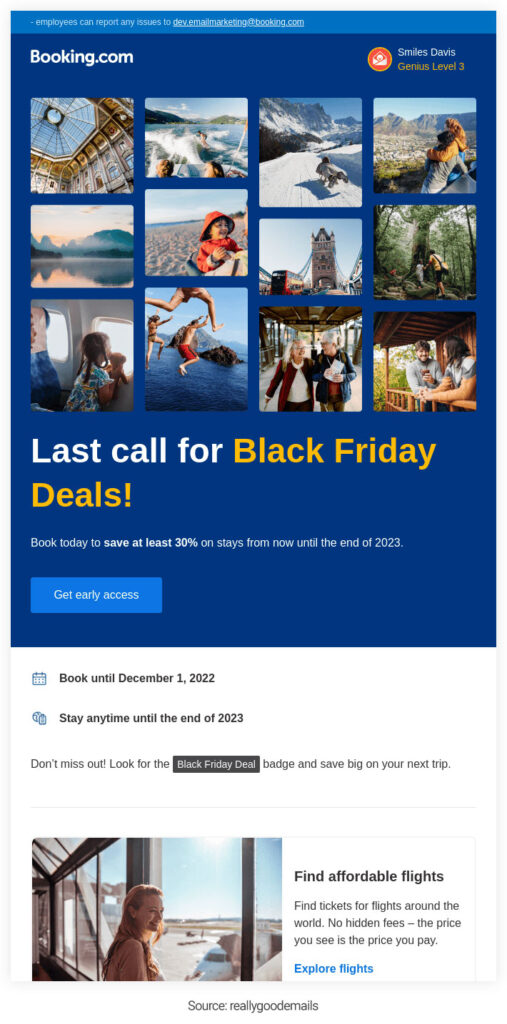
Venue reservations are confirmed by email with booking details such as the customer’s name, number of guests, and date and time of booking. In addition, you can add the option of modifying or canceling the booking. You can also add personalized messages and a strong CTA in such emails.
14. Signup confirmation email
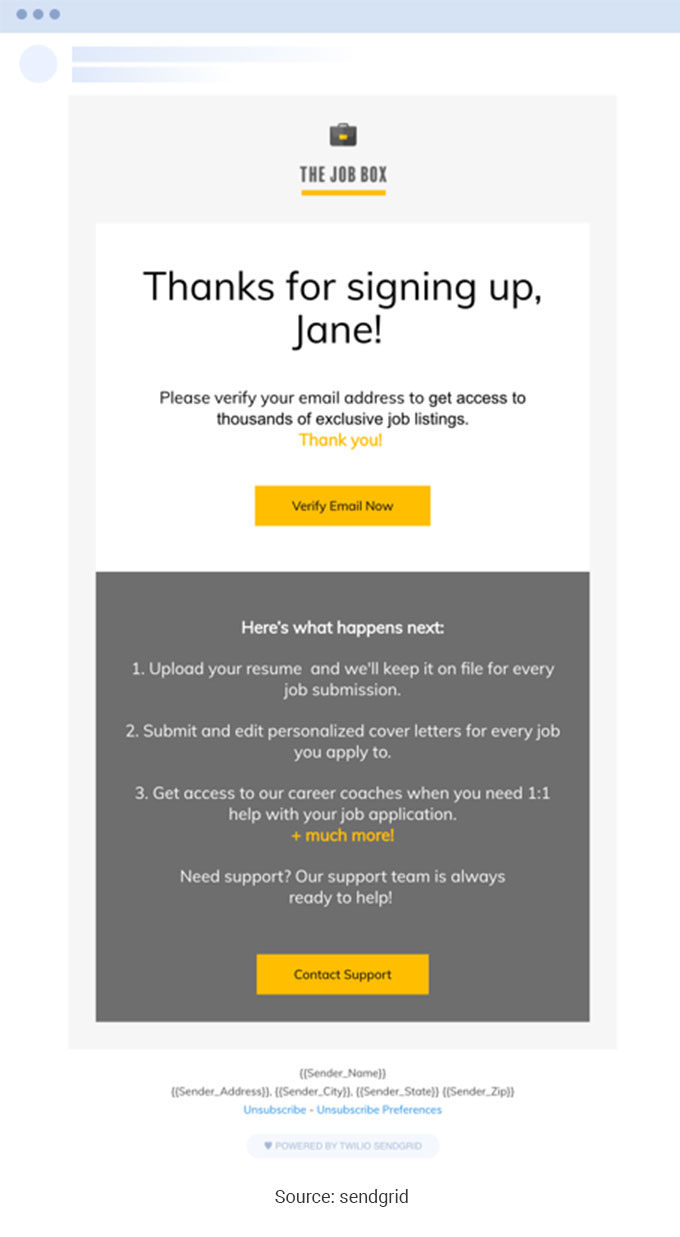
Another interesting email confirmation template is a Signup Confirmation email. Brands may incorporate either single opt-in or double opt-in. If your company has used double opt-in for signups, the subscriber will receive an email confirming their email address.
Usually, a link is mentioned to sign up, and the moment you click on the link, you land on the signup page.
15. Double opt-in confirmation email
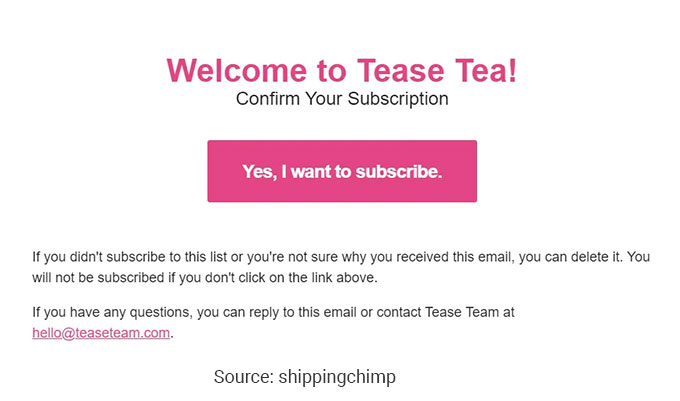
To increase the number of subscribers, you can set up a double subscription system. It ensures that people confirm that they want to subscribe, making them more likely to be receptive to your future posts and promotions. Such emails are usually simple, with a catchy subject line.
16. Shipping Confirmation Email
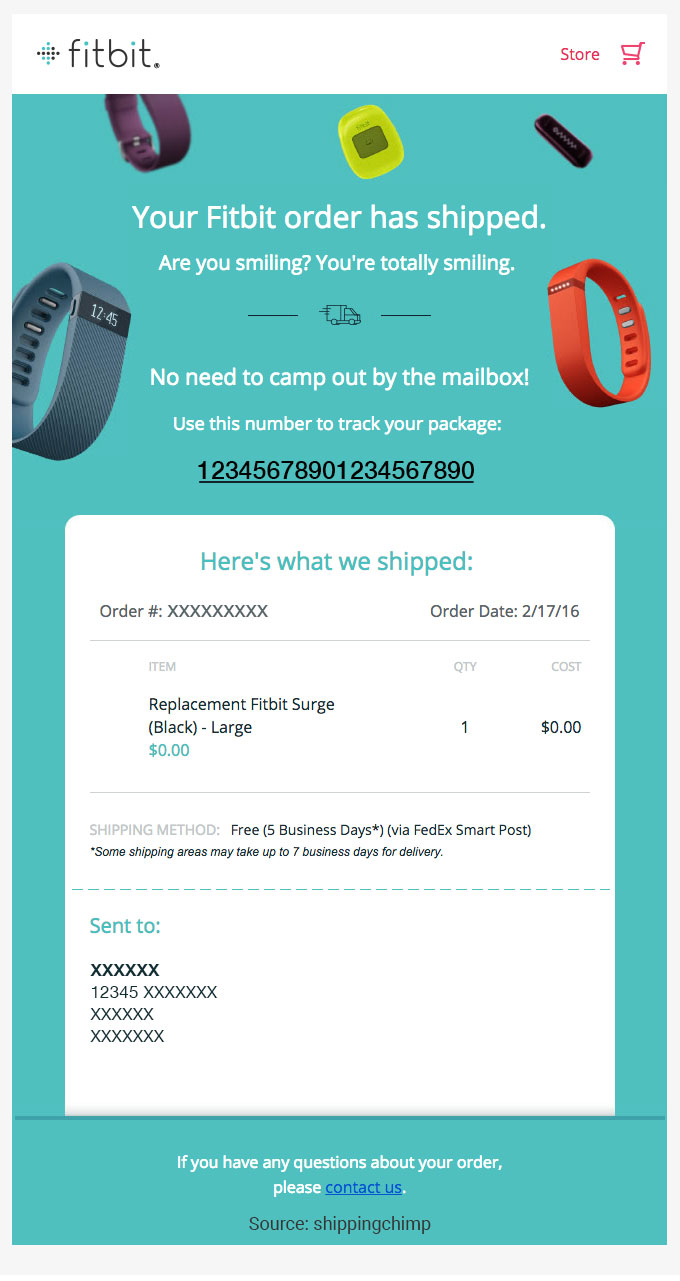
Last but not least template on our list is the shipping confirmation email. This type of email provides all the requisite information about your order. It includes the details of your order, package numbers, the company delivering the package and the address. A strong CTA is also mentioned to track your order.
12 More Confirmation Email Templates (Copy & Paste)
The 16 templates above cover the most common scenarios. The next 12 fill in the gaps for situations that come up regularly across SaaS, services, ecommerce, and B2B contexts. Each is written to fit the 8-element confirmation email anatomy and stay readable on mobile.
17. Payment Confirmation Email
Subject: Payment received: $[AMOUNT] for invoice #[INVOICE_NUMBER]
Hi [FIRST_NAME],
We’ve received your payment of $[AMOUNT] on [DATE]. Your account is up to date and your receipt is attached as a PDF.
Payment method: [METHOD] ending in [LAST_4]
Reference: [TRANSACTION_ID]
Next billing date: [DATE]
Questions about this charge? Reply directly or visit your billing dashboard.
18. Refund Confirmation Email
Subject: Your refund of $[AMOUNT] is on its way
Hi [FIRST_NAME],
We’ve processed your refund for order #[ORDER_NUMBER]. The amount of $[AMOUNT] should land in your account within 5-10 business days, depending on your bank.
If you don’t see it after 10 days, reply to this email and we’ll investigate. We’re sorry the order didn’t work out and appreciate you giving us a try.
19. Appointment Confirmation Email
Subject: Appointment confirmed for [DATE] at [TIME]
Hi [FIRST_NAME],
Your appointment with [PROVIDER] is confirmed.
Details:
Date: [DATE]
Time: [TIME] ([TIMEZONE])
Location: [ADDRESS]
Duration: [MINUTES] minutes
Please arrive 5-10 minutes early. To reschedule, use the link below at least 24 hours in advance.
[CTA: Reschedule appointment]
20. Meeting Confirmation Email
Subject: Confirming our meeting on [DATE] at [TIME]
Hi [FIRST_NAME],
Confirming our meeting on [DATE] at [TIME] ([TIMEZONE]) to discuss [TOPIC].
Where: [VIDEO_LINK or LOCATION]
Duration: [DURATION]
Agenda: [3-4 bullet points]
If anything changes on your end, just let me know. Otherwise, talk soon.
21. Interview Confirmation Email
Subject: Interview confirmed for [ROLE] at [COMPANY]
Hi [CANDIDATE_NAME],
Confirming your interview for the [ROLE] position.
Date: [DATE]
Time: [TIME] ([TIMEZONE])
Format: [In-person / Video]
Link / location: [DETAILS]
Interviewer(s): [NAMES]
Duration: [MINUTES] minutes
If you have portfolio pieces or work samples, please send them ahead of the call. Looking forward to speaking with you.
22. RSVP Confirmation Email
Subject: RSVP received: see you at [EVENT_NAME]
Hi [FIRST_NAME],
Got your RSVP. Glad you’re coming.
Event: [EVENT_NAME]
Date: [DATE]
Time: [TIME]
Venue: [LOCATION]
Your party: [GUEST_COUNT]
Dress code: [IF_APPLICABLE]
Plans change? Update your RSVP using the link below. No awkward emails needed.
23. Account Verification Email
Subject: Verify your [BRAND] account
Hi [FIRST_NAME],
To finish setting up your [BRAND] account, verify your email by clicking the button below. The link expires in 24 hours.
[CTA: Verify my email]
If you didn’t create an account, you can safely ignore this email. We won’t activate the account without verification.
24. Quote Confirmation Email
Subject: Your quote from [COMPANY] is ready
Hi [FIRST_NAME],
Thank you for the opportunity. Your quote for [PROJECT/SERVICE] is attached as a PDF.
Quote summary:
Total: $[AMOUNT]
Valid through: [EXPIRY_DATE]
Estimated start: [DATE]
Quote reference: [QUOTE_NUMBER]
Happy to walk through any line item or adjust scope based on your priorities. Just reply to this email or schedule a call.
25. Reschedule Confirmation Email
Subject: Your appointment has been rescheduled
Hi [FIRST_NAME],
Your appointment with [PROVIDER] has been moved.
Previous: [OLD_DATE_TIME]
New: [NEW_DATE_TIME]
Location: [ADDRESS]
If the new time doesn’t work, reply to this email and we’ll find another slot. Otherwise, your booking is confirmed for the new date.
26. Order Status Update Confirmation
Subject: Update on your order #[ORDER_NUMBER]
Hi [FIRST_NAME],
A quick update on your order. Status changed from [PREVIOUS_STATUS] to [NEW_STATUS].
What this means: [PLAIN_LANGUAGE_EXPLANATION]
Estimated delivery: [DATE]
Tracking: [LINK]
You’ll get the next update once your order [NEXT_MILESTONE]. Reply if anything looks off.
27. Newsletter Subscription Confirmation
Subject: You’re in. Welcome to [NEWSLETTER_NAME].
Hi [FIRST_NAME],
Thanks for joining [NEWSLETTER_NAME]. You’ll get [FREQUENCY] updates with [WHAT_TO_EXPECT].
While you wait, here are three of our most popular pieces:
1. [LINK_1]
2. [LINK_2]
3. [LINK_3]
Replies go straight to a real human. Tell us what you’d like to read and we’ll work it in.
28. Password Reset Confirmation Email
Subject: Your password has been changed
Hi [FIRST_NAME],
Just confirming that your [BRAND] password was successfully changed on [DATE] at [TIME].
If this was you, no further action is needed. If you didn’t make this change, secure your account immediately by clicking the link below and contacting support.
[CTA: Secure my account]
5 Real-World Confirmation Email Examples from Top Brands
Templates are a starting point. The brands below have spent years refining their confirmation emails based on customer behavior data, and there’s a lot to borrow from each:
Amazon (Order Confirmation)
Amazon’s order confirmation leads with the delivery date in the subject line, not the brand. The body shows a thumbnail of every item ordered with the price next to it. The single CTA “View or manage order” sits at the top right where mobile thumbs naturally land. No marketing fluff. No upsell crowding the receipt. The takeaway: customers want the receipt to look like a receipt, not a promotion.
Airbnb (Booking Confirmation)
Airbnb opens with a single hero photo of the property the guest just booked. Below it: check-in time, check-out time, address, and the host’s first name. The “View full itinerary” button leads to a single source of truth that works offline. What stands out is what’s missing: no cross-sell, no related listings, no marketing block. They’ve earned the booking and they protect the trust.
Stripe (Payment Receipt)
Stripe’s payment receipts are studied across the industry as the gold standard. Every transaction shows: amount, date, payment method (last 4 digits), description, and a downloadable PDF. The HTML version is plain-text-clean. The receipts arrive within 2-5 seconds of the charge. They’ve optimized for the one moment a customer might need to find a receipt months later: search.
Calendly (Meeting Confirmation)
Calendly’s meeting confirmations include a one-click “Add to calendar” button that works across Google, Outlook, and Apple. The body shows the timezone of both parties, which prevents the most common scheduling failure. There’s a “Reschedule” link, a “Cancel” link, and the meeting link itself. Three actions, clearly labeled.
Eventbrite (Event Registration)
Eventbrite confirmations include a QR code prominently in the email itself, so the attendee can present it at the door without opening a separate app. They also send a follow-up reminder 24 hours and 2 hours before the event with the same QR code. The repetition isn’t wasteful, it’s user-centered.
8 Confirmation Email Design Principles
Good design here is mostly about restraint. Confirmation emails are not the place for hero images, multiple offers, or extensive editorial copy. The reader is looking for one thing: proof their action worked. The 8 principles below come up across every effective confirmation flow we’ve audited:
- Scannable layout. Most readers spend 3-5 seconds on a confirmation email. Use short paragraphs, generous spacing, and clear section breaks.
- Visual hierarchy. Confirmation statement first. Key details second. CTA third. Support contact fourth. Anything else can wait or be cut.
- Mobile-first design. Single-column layout, 14-16px body text, 44px+ tappable buttons. About 60% of opens happen on phones.
- Brand consistency. Colors, logo placement, and typography should match the rest of your customer-facing surfaces. Inconsistency triggers phishing suspicion.
- One primary CTA. Track order, view receipt, add to calendar — pick one. Multiple buttons dilute clicks and create decision friction.
- Accessible color contrast. WCAG AA contrast minimum (4.5:1 for body text). Color-blind safe palettes for status indicators.
- Plain-text fallback. Every HTML email needs a text version. Some clients still default to text, and accessibility tools rely on it.
- Dark mode considerations. Test how your email renders against dark backgrounds. Logos with transparent backgrounds break in dark mode if not designed for it.
20+ Pre-Header & Preview Text Examples
Pre-header text is the 30-90 character preview that shows next to your subject line in the inbox. It’s the most underused real estate in confirmation emails. A good pre-header complements the subject line by surfacing details the subject couldn’t fit. Here are pairings by use case:
Order & Shipping (5)
- “Order #1234 confirmed” → “Estimated delivery: Tuesday, May 12”
- “Your order is on its way” → “Tracking: 1Z999AA1234567890”
- “Thanks for your purchase” → “3 items, total $89.50, full receipt below”
- “Receipt for your purchase” → “Save this email for your records”
- “Order shipped” → “Arriving by Wednesday with FedEx”
Booking & Appointment (5)
- “Booking confirmed” → “May 15, 2pm at 123 Main St”
- “Your appointment is set” → “30 min with Dr. Patel on Thursday”
- “You’re booked” → “Reservation #4892. Add to calendar inside.”
- “Reservation confirmed” → “Table for 4 on Friday at 7:30pm”
- “Booking received” → “Confirmation #BX-2840. Manage anytime.”
Sign-Up & Subscription (5)
- “Confirm your email” → “One quick click to finish setup”
- “Welcome to [BRAND]” → “Verify your email to unlock all features”
- “Subscription active” → “Pro plan, billed monthly. Renews June 1.”
- “You’re in” → “Three reads to start with, hand-picked for you”
- “Verify your account” → “Link expires in 24 hours”
Payment & Refund (5)
- “Payment received” → “$89.00 charged to Visa ending 4242”
- “Refund processed” → “$45 returning to your account in 5-10 days”
- “Receipt for invoice #482” → “PDF attached. Saved to your account.”
- “Subscription renewed” → “Next billing: June 15. Manage anytime.”
- “Quote ready” → “$2,450 total. Valid through May 30.”
One pattern worth noting: the pre-header should answer the question the subject line raises. If the subject says “Booking confirmed,” the pre-header should say when and where. If the subject says “Payment received,” the pre-header should say how much and on what card. The reader gets the gist before opening.
Mobile Preview & Best Practices
Roughly 60% of confirmation emails are opened on a phone. Designing desktop-first and hoping it scales down is the most common reason confirmation emails fail at the worst possible moment, when the customer is checking on a recent purchase from a coffee shop or train.
- Width: 600px max for the email body. Anything wider gets clipped on iPhone SE and older Android devices.
- Font sizes: 14-16px body text minimum. Apple’s Human Interface Guidelines recommend 17px. Anything below 14px requires a pinch-zoom to read.
- Button sizes: 44×44 pixels minimum tap target (Apple’s accessibility standard). Padding around the button should leave 8px of clearance to avoid mis-taps.
- Image strategies: Use system fonts and HTML-rendered tables for key information. Images should be supplementary, not load-bearing. Many corporate inboxes block images by default.
- Single-column layout: Multi-column layouts almost always break on mobile. Stick to a single column with consistent spacing.
- Test in real apps: Gmail, Outlook for iOS, Apple Mail, and Yahoo Mail render emails differently. Test in the actual apps, not just a screenshot tool.
Industry-Specific Confirmation Email Tips
The fundamentals stay the same across industries, but each vertical has specifics worth tailoring for. Here’s what to add or emphasize for the four most common scenarios:
Ecommerce
Order confirmations should include itemized totals (subtotal, shipping, tax), a delivery estimate range (not a single date), and a clear refund or returns policy link. Cart-recovery flows that send a follow-up confirmation within an hour can recover 8-12% of abandoned purchases. Read more on this in our piece on best order confirmation emails.
SaaS & Apps
Signup confirmations should focus on the activation step. Include a magic link or OTP that works for 24 hours, the plan they signed up for, and one clear next action (“Connect your first integration,” “Set up your team”). Skip the welcome marketing tour at the confirmation stage, save it for a follow-up.
Services & Hospitality
Reservation and booking confirmations should include a map link, parking notes, dress code if applicable, and the cancellation policy. Restaurants benefit from including a “Modify reservation” button that doesn’t require login. Healthcare and salon bookings should include both an SMS reminder option and a “Reschedule” link that works without re-authentication.
Events & Conferences
Event registration confirmations should include a QR code or barcode for at-door check-in, the venue address with a map embed, parking and transit details, and the agenda or speaker lineup. For virtual events, include the join link, system requirements, and a backup link in case the primary one fails.
How to Customize These Templates for Your Brand
Templates are starting points, not finished products. Most teams that copy a template verbatim end up with something that feels off-brand and underperforms. The customization checklist below covers the high-impact changes worth making before launch:
- Brand voice. Read the body aloud. If it doesn’t sound like the rest of your customer communication, rewrite the wording (not the structure). The structure works because it matches reader expectations.
- Colors and logo. Use your hex codes, not the template defaults. Place the logo at the top with at least 24px padding. Avoid stretching it across the full email width.
- Dynamic content. Replace placeholder fields ([FIRST_NAME], [ORDER_NUMBER]) with merge tags from your platform. Test that they render correctly when fields are missing.
- Sender name and address. Send from a real domain you own with SPF, DKIM, and DMARC configured. Avoid no-reply@. Use a recognizable sender name (e.g., “Sarah from [Brand]” rather than “[Brand]” alone).
- A/B testing. Test subject lines, CTA copy, and pre-headers separately. Even a 5% lift on a transactional email scales meaningfully when the email volume is high.
- Localization. If you serve multiple regions, translate the body but not the technical fields (order numbers, transaction IDs). Date formats should match the recipient’s locale.
If you’re managing high volumes of confirmation emails across multiple use cases, Nvecta’s email automation platform handles trigger setup, template management, deliverability infrastructure (SPF, DKIM, DMARC), and reporting in one place. For more on the broader email strategy these confirmations fit into, see our guides on transactional email and email marketing strategy.
Wrapping Up
After reading this blog on confirmation email examples and templates you may get some ideas to start writing your emails. We’ve highlighted why they’re important and how they can help you.
If you want to leverage confirmation emails for your business, then we recommend you try our product for free. To know more about our product and pricing, schedule a free demo.
Frequently Asked Questions
1. What is a confirmation email template?
A confirmation email template is a pre-built email format you can customize and reuse for similar transactional events — orders, bookings, signups, payments, registrations.
Good templates include the 8 confirmation-email elements (subject line, pre-header, greeting, confirmation statement, key details, CTA, support contact, footer) so you can swap in dynamic fields and ship without rewriting from scratch.
2. Why are confirmation emails important?
Confirmation emails are important because they include critical information and give directions for further action. They reassure the recipient that their action was successful and reduce support tickets.
Confirmation emails consistently have some of the highest open and click-through rates of any email type.
3. What should an event confirmation email template include?
An event confirmation email template should be straightforward and include:
- Event Title
- Event Description
- Event Date
- Time of the event
- Venue or join link
Add a calendar invite (.ics file) and a clear next step so attendees can prepare without searching for details.
4. What makes a good confirmation email?
A good confirmation email has a catchy subject line, an attractive greeting, clearly states the objective or purpose of the email, and lists all the details properly.
It should be scannable, mobile-friendly, and include a single primary call-to-action.
5. What’s the best confirmation email format?
The best confirmation email format follows an 8-element anatomy:
- Clear subject line under 50 characters
- Complementary pre-header
- Personalized greeting
- One-sentence confirmation statement
- Scannable list of key details
- Single primary CTA
- Support contact info
- Clean footer
Mobile-first, single-column layout works best since 60%+ of opens happen on phones.
6. Are these confirmation email templates free to use?
Yes, the templates above are free to use and adapt.
Most email platforms (Mailchimp, Klaviyo, Brevo, Postmark) also include free transactional template libraries inside their dashboards. For HTML-coded templates, Stripo and Really Good Emails offer free starter templates that work in most ESPs.
7. How do I customize a confirmation email template?
Customize a template by:
- Replacing placeholder fields with merge tags from your platform
- Swapping in your brand colors and logo
- Rewriting body copy in your brand voice (keeping the structure intact)
- Setting up your sending domain with SPF/DKIM/DMARC records
- Testing the rendering in Gmail, Outlook, and Apple Mail before going live
8. What’s the best confirmation email template for ecommerce?
The best confirmation email template for ecommerce is a hybrid order + shipping confirmation that includes:
- Itemized line items
- Shipping cost
- Tax
- Total
- Estimated delivery range
- Tracking link
- Returns policy link
Amazon’s order confirmation is the most-studied example and is worth modeling for layout and tone.
9. Should I send HTML or plain-text confirmation emails?
Both. Send HTML emails with a plain-text fallback included as a multipart/alternative.
HTML allows for branding and clear visual hierarchy. Plain text is essential for accessibility tools, dark mode renderings that break, corporate inboxes that strip HTML, and improved deliverability with major mailbox providers like Gmail and Outlook.
10. How do I make confirmation emails mobile-friendly?
To make confirmation emails mobile-friendly:
- Use a single-column layout with 600px max width
- Set body text to 14–16px minimum
- Make CTA buttons at least 44×44 pixels
- Avoid load-bearing images (use HTML tables for key data)
- Test rendering in actual Gmail, Outlook, and Apple Mail apps before launch
11. What makes a good confirmation email subject line?
The best confirmation email subject lines lead with what was confirmed and stay under 50 characters. Examples:
- Your order #1234 is confirmed
- Booking confirmed for May 15
- Payment received: $89
- You’re registered for [event]
Avoid curiosity gaps — they work for marketing email but actively hurt confirmation email trust and deliverability.
12. How do I automate confirmation emails?
Automating confirmation emails takes 5 steps:
- Identify trigger events (purchase, signup, booking)
- Set up your sender domain with SPF/DKIM/DMARC records
- Build reusable templates with merge tags from your platform
- Test the full flow in a sandbox environment
- Monitor delivery rate, open rate, and bounce rate after launch
Most email automation platforms handle the technical infrastructure so your team can focus on content and copy.
