














 Email
Email SMS
SMS Whatsapp
 Web Push
 App Push
 Audience Sync for Ads
 Popups
 Channel A/B Testing
  Control groups Analysis
 Frequency Capping
 Funnel Analysis
 Cohort Analysis
 RFM Analysis
 Signup Forms
 Surveys
 NPS
NPS Landing pages personalization
  Website A/B Testing
  PWA/TWA
 Heatmaps
 Session Recording
 Wix
Wix Shopify
 Magento
 Woocommerce
 eCommerce D2C
  Mutual Funds
 Insurance
 Lending
  Recipes
  Knowledgebase
 Developer Docs
 Product Updates
 App Marketplace
 Academy
 Ebooks
 Case Studies
 Blog
Blog Templates
 Stella
Quick answer: Trigger emails are automated messages sent based on a customer’s specific behavior or event rather than on a fixed schedule. According to Omnisend, trigger emails generate 320% more revenue per email than promotional broadcasts and average 71% higher click-through rates. The most common trigger types include welcome, cart abandonment, post-purchase, re-engagement, birthday, and behavioral triggers. This guide walks through 15 types, real brand examples, workflow templates, and the AI-driven approaches winning in 2026.
Think of your email list as a segmented group of customers with different needs and timelines. Your job is to meet those needs and exceed expectations at every opportunity. One of the highest-leverage ways to do that is by sending triggered emails based on specific customer behaviors instead of bulk broadcasts.
Done right, this approach lets you send highly personalized messages that match exactly where each subscriber sits in their buyer journey. The numbers reflect the payoff: higher open rates, sharper click-through rates, and conversion lifts that compound across quarters.
To get you started, here’s everything about trigger emails worth knowing in 2026, with real examples, workflow templates, and the AI-driven shifts changing how the best brands are running these programs today.
Let’s start with the basics.
What Are Trigger Emails?
Trigger emails land in your customers’ inboxes because of something they did. Most trigger-based emails fall into two categories: event-based and segment-based.
Event-based emails fire when a customer takes a specific action inside or outside your app at a precise moment. For instance, a customer gets a confirmation email the second they complete a purchase, or a cart abandonment email an hour after they left items behind.
Segment-based emails fire when customers enter a defined set of conditions, like attributes, plan tier, or activity patterns. If a customer signs up for your “Enterprise Plan,” you might trigger customer-only email campaigns designed specifically for enterprise brands rather than blasting the whole list.
The category covers a wide range of messages, but the common thread is that the email is reacting to something specific rather than going out on a fixed schedule. That responsiveness is exactly what makes trigger emails outperform broadcast campaigns by such wide margins.
Why Trigger Emails Matter in 2026
The case for trigger emails is genuinely strong. According to Omnisend, trigger emails generate 320% more revenue per email than promotional broadcasts. Mailchimp data shows automated triggered emails have 71% higher click-through rates than non-triggered ones. Litmus reports that welcome triggers earn open rates between 50% and 86%, which is 3-4x the average for marketing emails.
Klaviyo research adds another layer: cart abandonment triggers alone recover 10-15% of otherwise-lost revenue. Epsilon found that behavioral triggers drive 75% of all email-attributed revenue in mature programs. The math compounds quickly once a real trigger strategy is in place.
What this means in practice: brands that invest in proper trigger email infrastructure consistently outperform brands relying on broadcast-only sends, even when the broadcast brands have larger lists. Quality of timing beats quantity of sends.
Pairing trigger emails with broader marketing automation infrastructure is what makes scaling these programs realistic without a dedicated marketing operations team.
How Trigger Emails Work (Trigger, Condition, Action)
Every trigger email runs on the same three-part framework. Once you understand these three pieces, building any campaign becomes much easier:
Trigger: The event that fires the email. Common triggers include a new signup, a completed purchase, an abandoned cart, a page visit, a date matching a birthday, or a behavioral threshold like browsing the same category three times in a week.
Condition: The rules that determine which variant fires. Once the trigger goes off, conditions check things like the recipient’s segment, plan tier, location, language, or past behavior. The same trigger can lead to different emails depending on who the recipient actually is.
Action: What happens once the conditions resolve. The most common action is sending an email, but actions can also include waiting a specific number of days, moving the recipient to a new segment, or coordinating with other channels like SMS or push. A customer journey orchestration layer is usually what coordinates these actions across channels rather than running each one as an isolated workflow.
15 Different Types of Trigger Emails
Below are the most common trigger types worth deploying. Each one solves a specific moment in the customer journey, and the brands that win at email tend to run several of these in parallel rather than relying on just one or two. Pair them with thoughtful customer segmentation underneath and the results compound quickly across marketing campaigns.
1. Welcome Emails
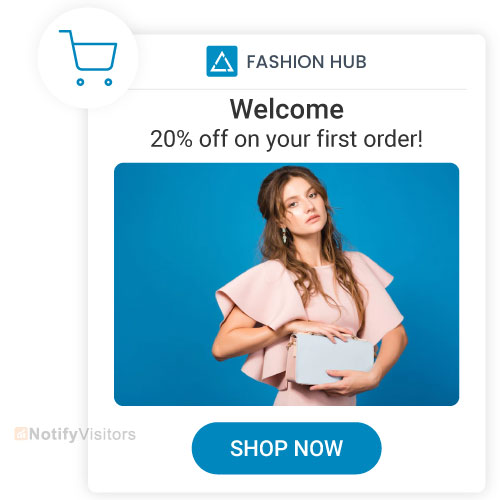
The customer relationship effectively begins with the welcome email. It introduces the subscriber to the brand and sets the tone for everything that follows. Always be genuine in welcoming new users when they sign up for your products or services, and surface a clear next step they can act on within seconds of reading. For inspiration, see real welcome series email examples covering different industries and use cases.
2. Onboarding Emails
An onboarding email helps new customers learn and get value out of your product faster. These emails surface resources, offer guidance through the activation steps, and point out the next actions worth taking.
Onboarding emails are critical for long-term engagement because the first 7-14 days after signup heavily predict whether a user sticks around. Customer onboarding emails done right reduce churn measurably across SaaS and subscription businesses.
3. Early Activation
These emails target subscribers who showed initial interest but haven’t activated their account yet. Send automated emails with a lead magnet, free guide, or special discount to nudge these users into actually using the product. The window for activation closes quickly, so timing matters a lot here.
4. Reactivation Emails
When someone goes quiet on your list for two or three months, a reactivation email is your last shot at pulling them back before they’re gone for good. It’s a simple concept — reach out to subscribers who’ve stopped opening or clicking anything and give them a reason to care again. Usually that means dangling a lead magnet or an exclusive offer they can’t get elsewhere. The timing matters though. Send it too early and you seem needy, too late and they’ve already forgotten you exist. Brands that nail this also tend to be the ones who got the basics right from day one, starting with a solid Shopify order confirmation email that set expectations and kept people engaged from the very first purchase.
For deeper coverage on re-engagement messaging that actually works, see our guide on we miss you emails, which breaks down the timing, subject lines, and psychological triggers behind the highest-converting win-back campaigns.
5. Personal Event Emails
These emails recognize personal occasions like birthdays, work anniversaries, and account milestones. They signal that you actually pay attention to your customers, which builds a positive brand image over time. A small discount or bonus offer attached to the message can lift conversion meaningfully without feeling like a hard sell.
6. Milestone Emails
Milestone emails celebrate when subscribers hit a meaningful threshold with your brand. First purchase anniversary, 100th workout completed, 50 emails sent through your tool. Pair these with a special offer to deepen loyalty and give customers a reason to stay engaged beyond pure utility.
7. Remarketing Emails (Cart Abandonment)
Shopping cart abandoned emails remind shoppers who added items to their cart but didn’t complete the purchase. Cart abandonment emails work incredibly well in ecommerce because customers often just need one more nudge to finish what they started.
Adding scarcity or urgency cues like “Hurry, only 3 left!” or “Offer ends tonight” lifts completion rates noticeably without feeling manipulative when the scarcity is genuine.
8. Transactional Emails
Confirmation emails deliver important transactional information. Transactional emails verify orders, share purchase receipts, send shipping notifications, and surface delivery updates. For copy and structure that works across categories, check our breakdown of best confirmation email templates.
This is one of the most underrated trigger categories. These emails give customers peace of mind, keep them informed, and earn open rates that promotional emails dream about. They’re an opportunity hiding in plain sight.
9. Account Emails
Account emails fire whenever account details change. New phone number, updated email, password reset, security alert. These messages help users keep accounts secure and confirm that important changes actually happened. They’re not glamorous, but they’re essential for trust.
10. Real-time Triggers
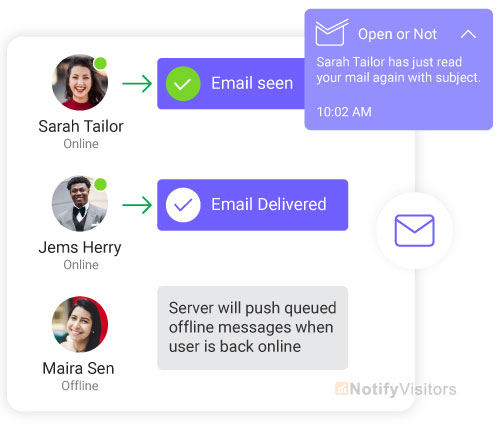
Real-time triggered emails fire based on real-world events around the subscriber: weather, local happenings, geolocation. For example, you can notify customers about a nearby physical store when they arrive at a specific location, or surface relevant content based on current weather conditions. Done well, these feel useful rather than creepy.
11. Browse Abandonment
Browse abandonment fires when a customer looks at a product or category but doesn’t add anything to the cart. Brands like Sephora and ASOS use these to gently surface products that caught the customer’s attention, often paired with social proof like reviews or stock alerts. The trigger is less aggressive than cart abandonment but covers a larger audience.
12. Review Request
Review request emails fire 7-14 days after delivery confirmation. The timing matters because customers need to actually use the product before they can give an honest review. Amazon, Yelp, and most major DTC brands rely on these heavily because reviews drive future conversions and the request itself reinforces the relationship.
13. Cross-sell / Upsell
Cross-sell and upsell triggers fire based on past purchase behavior. If someone bought running shoes, an automated email two weeks later might suggest matching socks, a fitness tracker, or a related accessory. Amazon and Best Buy have turned this into a science, and the underlying logic works just as well for SMB ecommerce when paired with clean purchase data.
14. Restock Alerts
Restock alerts fire when an item that was out-of-stock becomes available again, specifically for customers who showed interest while it was unavailable. Glossier and most modern ecommerce brands use these to capture demand that would otherwise be lost. They convert at extremely high rates because the recipient has already shown explicit intent.
15. Trial Expiration and Subscription Renewal
For SaaS and subscription businesses, trial expiration and renewal triggers are revenue-critical. The sequence typically starts 3-5 days before the trial ends, with a follow-up the day before and another at the moment of expiration. Netflix, Spotify, and most major SaaS platforms run sophisticated versions of this to maximize conversion at the decision moment.
6 Trigger Email Campaign Setups Worth Building
1. Send a Welcome Email When Someone Subscribes
One of the highest-impact ways to lift mailing list engagement is to send trigger emails the moment someone subscribes. Every business should have this set up, and the welcome email is the place to start.
When someone joins your list, fire the welcome email automatically. This makes sure every subscriber feels welcomed and acknowledged for signing up. It’s also a chance to introduce yourself and the brand so new subscribers actually understand what they signed up for and what they’ll get next.
The triggered welcome creates an immediate, personalized connection between you and the subscriber. It significantly improves the odds of long-term retention and ongoing engagement with your content.
Whether someone signs up for a newsletter or opts in for promotional emails, sending out trigger welcome messages is one of the best ways to create positive interactions with new subscribers right from the start.
Adding triggered welcomes when someone subscribes shows that you value their decision and starts building brand loyalty immediately. It also turns into a quiet retention engine that compounds across hundreds and then thousands of subscribers.
Send a welcome email when someone subscribes. It just makes good business sense. Strengthens new subscriber relationships, lifts engagement with the existing list, and starts the relationship on solid ground from day one.
2. Send an Email When Someone Abandons Their Shopping Cart
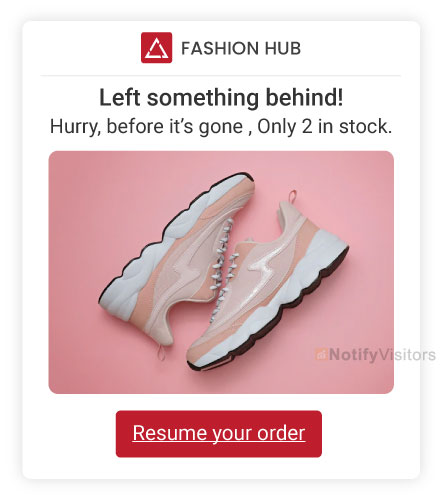
Abandoned shopping carts are one of the biggest sources of lost revenue for online stores. By setting up a follow-up email sequence after a cart gets abandoned, brands can recover meaningful revenue and keep customers engaged with the brand even after the failed checkout attempt.
When designing the post-abandonment sequence, timing and approach matter equally. The first reminder should go out within 15-30 minutes of abandonment to lift the chance of recovery. Including product photos or limited-time offers tied to items left in the cart can push hesitant shoppers over the line.
If the first email doesn’t land a sale, follow up with subsequent emails spaced a few days apart, layering in additional discounts or incentives. Most successful cart abandonment programs run 3 emails over 5-7 days, after which diminishing returns kick in hard.
A solid email follow-up strategy after abandoned carts does more than recover immediate sales. It also builds longer-term customer relationships and creates brand loyalty that compounds across future purchases.
By proactively following up with cart abandoners, brands can deliver a better shopping experience while measurably lifting revenue. It’s one of the rare cases where great customer service and stronger business outcomes align perfectly.
Sending emails when someone abandons their cart is one of the highest-ROI moves any ecommerce brand can make. The potential for additional profits and stronger customer loyalty means cart abandonment should be a top priority in any ecommerce email strategy.
3. Send a Happy Birthday Email with a Discount Code
Nothing says happy birthday like an unexpected discount. Birthday emails take the hassle out of gift selection while giving your brand a reason to show up in the customer’s inbox at a moment when they’re feeling generous about themselves. The combination is genuinely powerful.
Beyond just acknowledging the birthday, attaching a real reward (an exclusive discount code, a free gift with purchase, free shipping for the week) turns a thoughtful gesture into a measurable sales lift. Sephora’s birthday program is the gold standard worth studying.
The other beauty of birthday triggers is how easy they are to set up. Once the date is captured at signup, the workflow runs itself forever. Send the email, watch the conversion happen, and the customer feels remembered without any ongoing effort on your team.
4. Send an Email When Someone Makes a Purchase
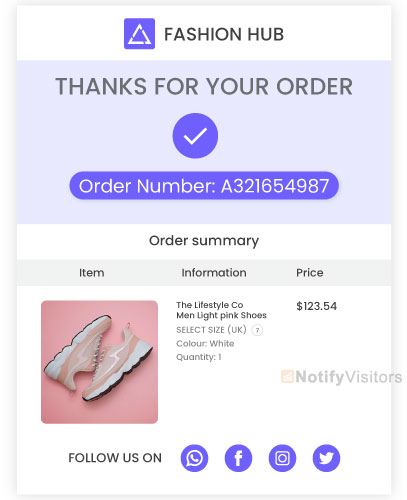
For businesses that rely on digital sales, trigger emails are a genuinely powerful way to keep customers connected after the purchase. Unlike traditional marketing emails sent to the whole list at once, trigger emails respond to specific events defined by the brand’s criteria. In this case, the trigger is the purchase itself.
Physical stores thank shoppers as they walk out with their purchases. Trigger emails do the same job for online buyers. An email thanking them for the purchase, sharing delivery dates and tracking, and surfacing helpful next steps builds a stronger relationship between the customer and the brand than a generic confirmation ever could.
It’s an efficient way to make customers feel acknowledged after a purchase, which is key for retention and repeat orders. Trigger emails do require some setup work on the technical side, but that effort pays off many times over once the system is running properly.
They provide the kind of personalized attention modern customers have come to expect, without requiring anyone on your team to remember to send each message individually.
5. Send an Email When Someone Leaves a Positive Review
Reviews are one of the strongest drivers of sales and brand trust. They give useful feedback that helps you sharpen the product, and they create word-of-mouth advertising at zero acquisition cost. A simple way to thank customers for positive reviews is by emailing them directly.
Thank them for taking the time to write the review and let them know it’s genuinely appreciated. The small gesture goes a long way toward building stronger customer relationships. These emails also act as a gentle reminder of your brand the next time the customer is ready to make a purchase.
Sending an email whenever someone leaves a positive review strengthens relationships, builds loyalty, and gently lifts repeat purchase rates, all without requiring much effort on your side. A few minutes of setup, then the workflow runs on autopilot for years.
6. Send an Email When Someone Refers a Friend
Referral programs are one of the most efficient ways to acquire new customers because they leverage existing customer trust. When people refer a friend, it means they believe in your service or product enough to put their personal credibility behind the recommendation. That kind of endorsement is genuinely rare.
A great way to thank customers for promoting you is by emailing them when one of their referrals actually makes a purchase. This affirms the impact of their effort and creates an opening for them to reach out and reconnect with the friend they referred.
Sending these emails reinforces the bond between customers and your brand and helps build deeper relationships across the network.
The emails also make customers feel appreciated, which encourages more referrals over time. By running a referral program and reinforcing it with trigger emails, you create a base of advocates who actively spread the word about your business without any ad spend behind it.
AI-Powered Trigger Emails in 2026
The biggest shift in trigger email strategy heading into 2026 is the move from rule-based triggers to AI-driven decisioning. The old approach fired emails based on hand-coded triggers and fixed delays. The new approach watches behavior continuously and predicts the optimal moment, channel, and content variant per individual recipient.
Modern trigger email platforms include predictive intent detection that spots buying signals before traditional triggers fire, AI-generated subject lines tested continuously against engagement signals, send-time optimization per recipient rather than averages, and behavioral pattern recognition that surfaces churn risk early enough to act on it.
For brands looking to take advantage of these capabilities, modern AI agents can dynamically swap content, adjust delays, and choose between multiple workflow paths without manual configuration. The result is higher engagement, lower fatigue, and personalization at the individual level rather than the segment.
The catch with all of this AI capability: it only works on clean recipient data and well-structured workflows. Adding AI to a fragmented setup just generates bad decisions faster. The foundation has to come first, then AI optimization compounds on top.
7 Triggered Email Best Practices
Below are the best practices that consistently lift trigger email performance across categories. None of these are revolutionary on their own, but together they separate trigger programs that deliver real ROI from programs that just look busy in dashboards.
1. Determine Your Data Sources
The first step is figuring out where to gather information about your subscribers. Once that’s clear, you can use the data to curate relevant content and personalize campaigns properly. Useful data signals to capture include:
- Where did they sign up for your list, and what does that tell you about their interests?
- Which products and web pages do they view on your website?
- Do they engage with your content across multiple platforms?
- Which products have they actually purchased?
2. Segment Your Subscriber List

To build more specific automated campaigns, segment your subscribers based on demographic and behavioral factors:
- Location
- Engagement level and recent activity
- Gender
- Age
- Parental status
- Work status
- Work title and role seniority
These are just the common starting points. The more precise your segmentation, the higher your engagement metrics tend to run.
3. Set One Explicit Goal Per Triggered Campaign
Do you want the subscriber to purchase your product? Visit a specific landing page? Register for an event? Reply to a survey?
Setting one explicit goal per campaign keeps your content focused and the message simple. If you branch out into multiple goals in a single email, your subscribers get overwhelmed and end up taking no action at all. One ask per email is the rule that consistently beats every alternative.
4. Optimize Every Email
Transactional emails have 8x higher open rates and 6x higher conversion rates than other marketing campaigns. If you haven’t optimized your confirmation and shipping emails, you’re leaving real revenue on the table. You also need to deliver a customer experience that meaningfully exceeds what your competitors are doing.
Add engaging copy and personalized calls to action. Show real gratitude to customers for their purchase and suggest related products they might want to add to their order. Also surface social handles or community links so customers can stay connected on the channels they actually use, whether that’s Twitter, Instagram, Facebook, or somewhere else entirely.
5. Carefully Schedule Your Campaigns
45% of subscribers say they unsubscribe from mailing lists because they get too many emails or too many messages from a single brand. The data is brutal here, and over-emailing is one of the fastest ways to burn a list you spent years building.
Schedule your triggers carefully with frequency caps in place. Space messages out across days or weeks rather than firing several in a single 24-hour window. Since the content is relevant and timely, drawing out the cadence will leave subscribers wanting more rather than reaching for the unsubscribe button.
6. Monitor Results and Adjust Tactics
Reviewing your metrics regularly tells you which automated campaigns actually deliver and which need work.
Are new subscribers opening your emails? If not, the subject lines need rework. Are they opening but not clicking through? The copy or CTA probably needs to be tightened. Treat every trigger as a hypothesis worth testing, then let the data guide what changes.
7. Integrate Your Trigger Campaigns Across Channels
Subscribers are active on multiple online channels, not just email. Are you integrating your triggers across email, SMS, push, and in-app messaging to actually meet customers where they are?
Add Facebook or Yelp review snippets when promoting products through email. Surface WhatsApp or live chat options so customers can text questions easily. Coordinate triggers across channels so a subscriber who didn’t open the email gets a push notification next, not another email.
Find where your subscribers actually spend time online and meet them there with thoughtful engagement.
Trigger Email KPI Benchmarks by Type
Different trigger types deliver very different baseline performance. Knowing the benchmarks lets you spot underperformers quickly without comparing across mismatched categories:
- Welcome triggers: 50-70% open rate, 10-25% CTR, 5-15% conversion. Highest engagement window in the entire customer journey.
- Cart abandonment: 40-50% open rate, 8-15% CTR, 10-15% recovery rate. The single highest-revenue trigger in ecommerce.
- Post-purchase / transactional: 35-60% open rate, 5-12% CTR. Underrated category with huge upsell potential.
- Re-engagement: 20-35% open rate, 3-8% CTR, 2-5% reactivation. Lower numbers but still profitable on otherwise-dead segments.
- Birthday triggers: 35-50% open rate, 8-15% CTR, 3-10% purchase rate. Easy to set up, consistently profitable.
- Behavioral triggers: Highly variable depending on signal quality. Strong programs see 25-40% open and 5-10% CTR.
Common Trigger Email Mistakes
Six mistakes show up over and over in trigger email programs that underperform. Catching them early is usually faster than rebuilding workflows from scratch later:
The first mistake is triggers that fire too slowly. A welcome email sent 6 hours after signup is functionally useless. A cart abandonment email sent 24 hours after the abandonment misses 80% of its potential recovery. Fast triggers convert. Slow ones get ignored.
The second mistake is no segmentation underneath the trigger. The trigger fires, the email goes out, but every recipient gets the same content regardless of who they are or what they’ve done before. Segmentation is what makes triggers actually feel personal.
The third mistake is multiple competing triggers firing to the same person on the same day. Three triggered emails in a single 24-hour window will get you marked as spam regardless of how good the individual messages are. Frequency caps matter.
The fourth mistake is no clear next step in the email itself. A trigger email without a specific CTA becomes a “checking in” message that nobody acts on. Always end with one concrete next step that the recipient can take in seconds.
The fifth mistake is static workflows that never refresh. Customer behavior shifts constantly. A trigger sequence built two years ago probably doesn’t match how today’s customers actually behave. Review and refresh every 6-12 months minimum.
The sixth mistake is no measurement plan per trigger. Aggregate metrics hide which triggers are actually moving revenue and which are quietly underperforming. Track each trigger independently so you know where to invest optimization effort.
Frequently Asked Questions
What is a trigger email?
A trigger email is an automated message sent based on a customer’s specific behavior or event rather than on a fixed schedule. Common examples include welcome emails after signup, cart abandonment emails after a checkout fails, and post-purchase confirmations. The defining feature is that the email reacts to something specific rather than going out as a broadcast.
What are the types of triggered emails?
The 15 most common types of triggered emails are welcome, onboarding, early activation, reactivation, personal event (birthday or anniversary), milestone, remarketing (cart abandonment), transactional, account, real-time, browse abandonment, review request, cross-sell or upsell, restock alerts, and trial expiration. Most successful programs run several of these in parallel rather than relying on just one or two.
What are triggered email campaigns?
Triggered email campaigns are automated email workflows that fire based on customer behavior, events, or attributes. Each campaign has a trigger (the event that starts the workflow), conditions (rules that determine which variant fires), and actions (the actual emails sent plus any follow-up steps). Examples include welcome series, cart abandonment sequences, and post-purchase nurture flows.
What is trigger email marketing?
Trigger email marketing is the practice of sending automated emails based on customer behavior, events, or attributes rather than on a fixed schedule. The approach delivers higher engagement, better conversion, and stronger ROI than broadcast email marketing because every email is responding to something specific the recipient just did.
What is triggered email marketing?
Triggered email marketing is functionally the same as trigger email marketing. Both terms describe the same practice: sending automated emails based on customer behavior, events, or attributes. The terms are used interchangeably across most platforms and articles, with no meaningful difference between them.
What are some trigger email examples?
Common trigger email examples include a welcome email sent immediately after signup, a cart abandonment email sent 30 minutes after a checkout fails, a birthday discount email sent the morning of a customer’s birthday, a re-engagement email sent after 60 days of no activity, a post-purchase thank-you email sent right after order confirmation, and a restock alert email sent when a previously out-of-stock item becomes available.
What’s the difference between trigger and transactional emails?
Transactional emails are a specific subset of trigger emails. They confirm a transaction or share required transactional information (order confirmations, shipping updates, password resets, account changes). Trigger emails are the broader category that includes transactional plus marketing-driven triggers like welcome series, cart abandonment, and birthday emails. All transactional emails are triggered, but not all triggered emails are transactional.
How do you set up trigger emails?
Setting up trigger emails follows a 5-step process: pick the trigger event (signup, purchase, cart abandon, date, behavior), define your audience and conditions, build the email content with subject line and CTA, configure the timing and any follow-up steps, then measure and iterate based on real performance. Most teams start with welcome and cart abandonment triggers because they deliver the fastest ROI.
What are the best practices for trigger emails?
The seven core best practices for trigger emails are: determine your data sources, segment your subscriber list, set one explicit goal per campaign, optimize every email for engagement, schedule sends carefully with frequency caps, monitor results and adjust tactics, and integrate trigger campaigns across email plus SMS plus push channels. Doing several of these well consistently beats doing one perfectly.
How does AI improve trigger emails?
AI improves trigger emails through predictive intent detection that spots buying signals before traditional triggers fire, AI-generated content variants tested continuously, send-time optimization per individual recipient rather than averages, and behavioral pattern recognition that surfaces issues early. The result is higher engagement, lower fatigue, and personalization at the individual level rather than the segment.
What is trigger-based email marketing?
Trigger-based email marketing is the practice of using customer behavior, events, or attributes to automatically fire personalized emails at the right moment. It’s the opposite of broadcast email marketing, where everyone gets the same message at the same time. The trigger-based approach consistently outperforms broadcasting on every metric that matters (open rate, click rate, conversion, revenue per email).
What is a trigger-based onboarding flow?
A trigger-based onboarding flow is a series of triggered emails that walks new users through key product activation steps based on what they have or haven’t done yet. Each email fires based on user actions (or inaction) rather than on a fixed day-by-day schedule. The result is onboarding that adapts to each user’s pace and surfaces the most relevant next step at exactly the right moment.
What are event-triggered emails?
Event-triggered emails fire when a customer takes a specific action inside or outside your app at a specific time. Examples include purchase confirmations triggered by a completed checkout, cart abandonment emails triggered by leaving items in the cart, or password reset emails triggered by clicking a “forgot password” link. The defining feature is the event-based timing rather than schedule-based timing.
Wrap Up
Email is still one of the most effective marketing channels available, but knowing how to write an email that actually delivers results is a real skill. This guide covered the fundamentals of trigger emails: what they are, why they work, the 15 most common types, real workflow patterns, the seven best practices, and the AI shifts changing how the best brands are running these programs in 2026.
Trigger emails drive deeper engagement with your brand by delivering relevant information or special offers at exactly the right moment. By understanding what makes trigger emails successful, you can build campaigns that generate measurably more leads and sales than broadcast emails ever will.
Pick one or two trigger types that match your business, ship them well, and let the data guide what to build next. The brands that win at trigger emails aren’t running the most complex setups. They’re running the most disciplined ones.
Also Read:
