


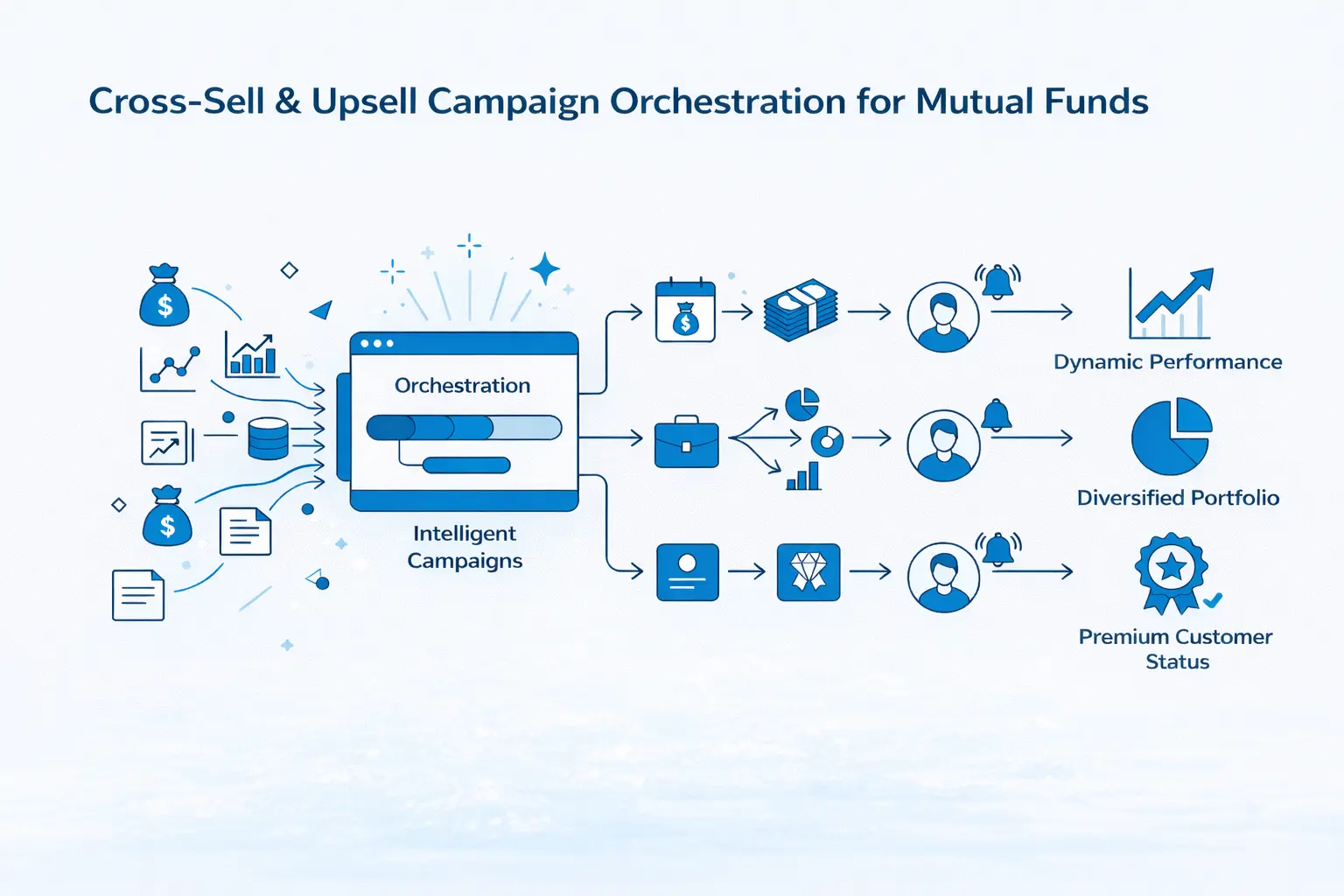
This recipe walks you through creating automated, recurring cross-sell and upsell campaigns using NVECTA for mutual fund platforms. These campaigns are designed to deepen investor portfolios, drive product diversification, increase AUM (Assets Under Management), and boost customer lifetime value, all through intelligent, data-driven campaign orchestration.
Campaign Goals
Mutual fund investors rarely explore the full breadth of products available to them. By analysing investment behaviour, portfolio composition, and transaction patterns, you can surface timely, relevant opportunities that help investors grow, while growing your business.
This recipe supports four strategic campaign categories:
| Use Case | Goal |
|---|---|
| Cross-Sell: New Product Category | Introduce investors to fund categories they haven’t explored (e.g., SIP-only investors → Lumpsum, Equity-only → Debt/Hybrid) |
| Upsell: Increase Investment Value | Encourage existing investors to invest more, such as higher SIP amounts, step-ups, more frequent lumpsums |
| Upsell: Upgrade Plan/Tier | Migrate investors to better options — Regular → Direct plans, Dividend → Growth option, Basic → Premium tier |
| Cross-Sell + High Value: Premium Offerings | Target HNI/loyal investors for premium products like PMS/AIF, Advisory services, or International funds |
Required Data & Attributes
Below is the complete list of user attributes, events, and enriched data that power cross-sell and upsell campaigns. You don’t need all of them upfront; the specific attributes and events required depend entirely on which segments and use cases you choose to implement. Start with the data you already have, build the corresponding segments, and expand over time as more data becomes available. Each segment in the table below clearly mentions which attributes and events it requires, so you can pick and choose based on your priorities.
User Attributes
- investment_type — SIP, Lumpsum, or Both
- fund_categories — List of fund categories invested in (Equity, Debt, Hybrid, ELSS, Sectoral, International, etc.)
- plan_type — Regular or Direct
- option_type — Growth or Dividend
- number_of_schemes — Count of unique schemes invested in
- number_of_amcs — Count of unique AMCs invested in
- has_minor_folio — Boolean (Yes/No)
- has_sip_stepup — Boolean (Yes/No)
- has_stp — Boolean (Yes/No)
- has_swp — Boolean (Yes/No)
- total_aum — Current total portfolio value
- customer_tier — Standard, Premium, HNI
- age_group — For life-stage based targeting
- has_children — Boolean (for minor folio cross-sell)
Events
- transaction_success — Completed purchase/investment (used for high-value identification)
- sip_registered — New SIP registration
- lumpsum_invested — Lumpsum purchase event
- fund_screener_used — User explored fund screener tool
- watchlist_add — User added a fund to watchlist
- calculator_used — User used SIP/SWP/STP calculator
- switch_executed — Fund switch event
- redemption_completed — Fund redemption event
- session_start — App/web login session
- email_opened — Email engagement tracking
- push_clicked — Push notification click
Third-Party / Enriched Data (Optional but Recommended)
- Credit bureau score
- Tax filing data (for ELSS targeting)
- Pin-code affluence index
- Life-event data (marriage, retirement, new child)
Segment Definitions
These are the primary segments that drive cross-sell and upsell opportunities. Each segment is defined by specific portfolio or behavioural criteria and maps to a clear campaign opportunity.
Cross-Sell Segments
| Segment Name | Definition | Opportunity | Required Data |
|---|---|---|---|
| SIP-Only Investors | Users who performed sip_registered in last 365 days AND did not perform lumpsum_invested in last 365 days | Lumpsum at market dips | Event: sip_registered, lumpsum_invested |
| Lumpsum-Only Investors | Users who performed lumpsum_invested in last 365 days AND did not perform sip_registered in last 365 days | SIP registration | Event: lumpsum_invested, sip_registered |
| Equity-Only Investors | Users who have attribute fund_categories equals Equity | Debt/Hybrid diversification | Attribute: fund_categories |
| Debt-Only Investors | Users who have attribute fund_categories equals Debt | Equity/Hybrid for growth | Attribute: fund_categories |
| Single-Scheme Investors | Users who have attribute number_of_schemes equals 1 | Portfolio diversification | Attribute: number_of_schemes |
| Single-AMC Investors | Users who have attribute number_of_amcs equals 1 | Multi-AMC diversification | Attribute: number_of_amcs |
| No-ELSS Investors | Users who have attribute fund_categories does not contain ELSS | ELSS for tax saving | Attribute: fund_categories |
| No-International Exposure | Users who have attribute fund_categories does not contain International | International funds | Attribute: fund_categories |
| No-Sectoral/Thematic | Users who have attribute fund_categories does not contain Sectoral AND does not contain Thematic | Thematic funds | Attribute: fund_categories |
| No-STP Investors | Users who have attribute has_stp equals False AND have attribute investment_type equals Lumpsum | STP to equity | Attributes: has_stp, investment_type |
| No-SWP Investors | Users who have attribute has_swp equals False AND have attribute customer_tier in [Premium, HNI] | SWP for income | Attributes: has_swp, customer_tier |
| No-Minor-Folio | Users who have attribute has_children equals True AND have attribute has_minor_folio equals False | Children’s investments | Attributes: has_children, has_minor_folio |
Upsell Segments
| Segment Name | Definition | Opportunity | Required Data |
|---|---|---|---|
| Regular-Plan-Only | Users who have attribute plan_type equals Regular | Direct plan migration | Attribute: plan_type |
| SIP-No-StepUp | Users who have attribute investment_type equals SIP AND have attribute has_sip_stepup equals False | SIP step-up | Attributes: investment_type, has_sip_stepup |
| Dividend-Payout Only | Users who have attribute option_type equals Dividend | Growth option switch | Attribute: option_type |
Step-by-Step Process
To create personalised and automated cross-sell/upsell campaigns, we’ll follow this two-step process:
- Define Targeted User Segments — Create precise audience segments based on portfolio composition and investment behaviour.
- Design Personalised Campaigns — Set up campaigns with personalised messaging based on segment criteria.
Step 1: Create User Segments
To create a segment, navigate to the Segments section, select the segments tab, and click on Create New Segment. Then select the “Actions with User Properties” option to enter the segment creation interface.
We’ll walk through one example in detail: Segment: “SIP-Only Investors” mentioned in the table above, and you can replicate this approach for all other segments.
Example: SIP-Only Investors
Objective: Identify investors who have active SIPs but have never made a lump-sum investment in the past 12 months. These users are prime candidates for lump-sum investment campaigns.
Condition 1 — User Property (Active SIP):
Click the “Add User Property” button. From the attribute dropdown, select investment_type. Set the condition to “include” and the value to “SIP”.
This filters for users whose current investment type is SIP-only.
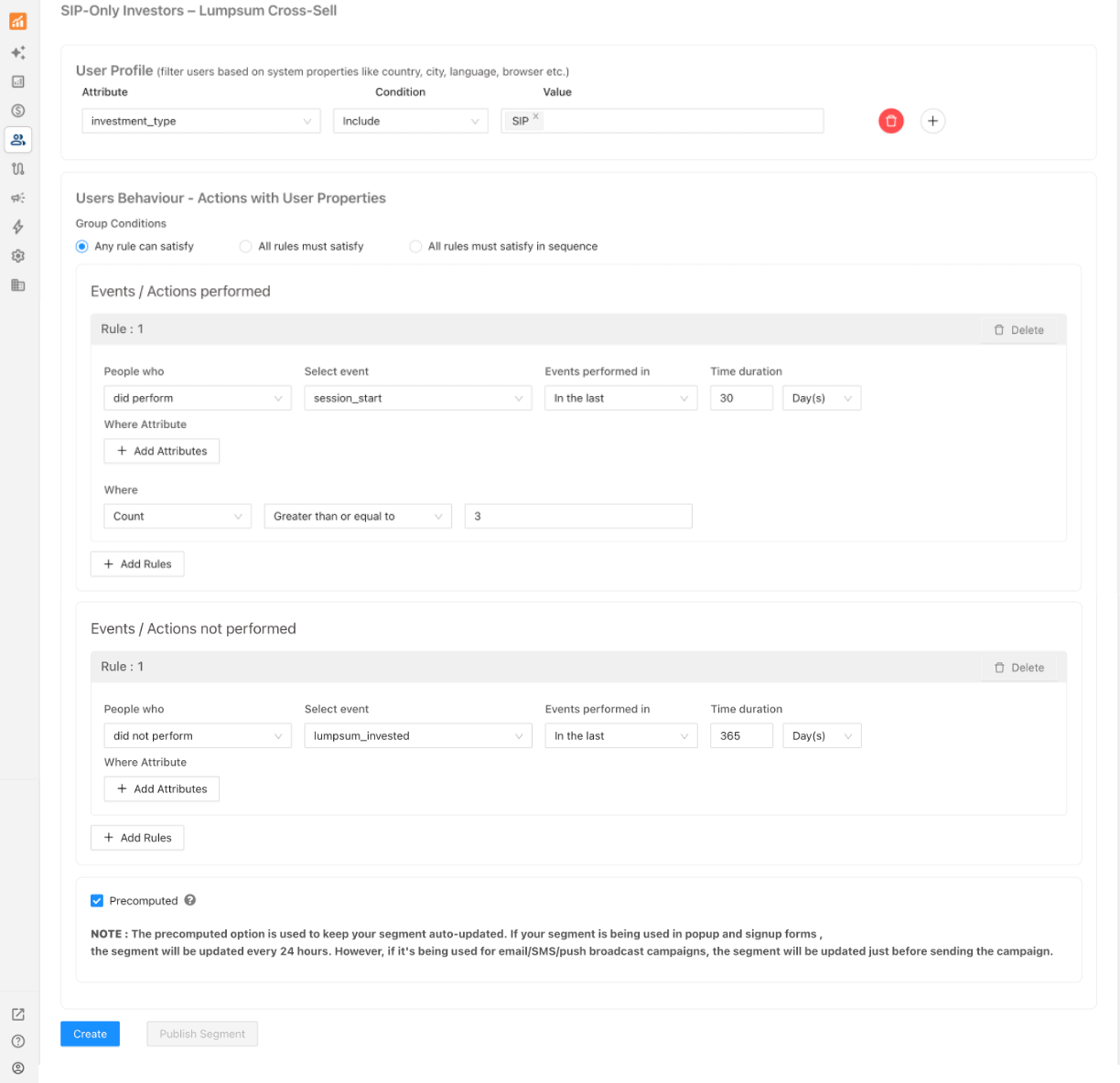
Condition 2 — Event-Based Behaviour (No Lumpsum Activity):
Now add a behaviour condition to confirm these users haven’t made any lump-sum investment recently.
- Click “Add Event/Action performed”.
- Select Users who “did not perform”.
- Select event: lumpsum_invested.
- Time period: In the last 365 days.
This ensures we’re only targeting users who have had zero lumpsum activity in the past 12 months.
Condition 3 (Optional) — Engagement Filter:
To focus on active users who are more likely to convert, add an additional behavioural condition:
- Click “Add Event/Action performed”.
- Select Users who “did perform”.
- Select event: session_start.
- Time period: In the last 30 days.
- Count: Greater than or equal to 3.
This narrows the segment to users who have logged in at least 3 times in the last month, signaling they are engaged and receptive.
Enable Precomputed Segment:
For all segments, ensure the “Precomputed Segment” option is enabled. This keeps your audience up-to-date by automatically including new users who meet the criteria and removing those who no longer qualify.
Save and Publish:
After setting the rules, click Create. Name your segment clearly (e.g., “SIP-Only Investors – Lumpsum Cross-Sell”). Click Publish to activate the segment.
Replicating for Other Segments
Follow the same approach for each segment in the table above. The key pattern is:
- User Property conditions define “what the user currently has/doesn’t have” (e.g., fund categories, plan type, option type).
- Event-based conditions define “what the user has/hasn’t done” (e.g., no lumpsum in 12 months, no SIP registered).
- Optional engagement or value filters help prioritise active or high-value users.
For high-value targeting (e.g., HNI segments for PMS/AIF cross-sell), layer on a transaction filter:
- Select event: transaction_success
- Time period: In the last 90 days
- Count: Greater than or equal to 10
Step 2: Create Cross-Sell / Upsell Campaigns
After setting up your segments, the next step is to create campaigns that deliver targeted, personalised messages across your chosen channels.
Example Campaign: SIP-Only Investors → Lumpsum Cross-Sell
For this walkthrough, we’ll create a campaign for (“SIP-Only Investors – Lumpsum Cross-Sell”) to encourage lumpsum investments. We’ll use the email channel as our example, but the same approach applies to WhatsApp, SMS, and push notifications.
Creating the Campaign:
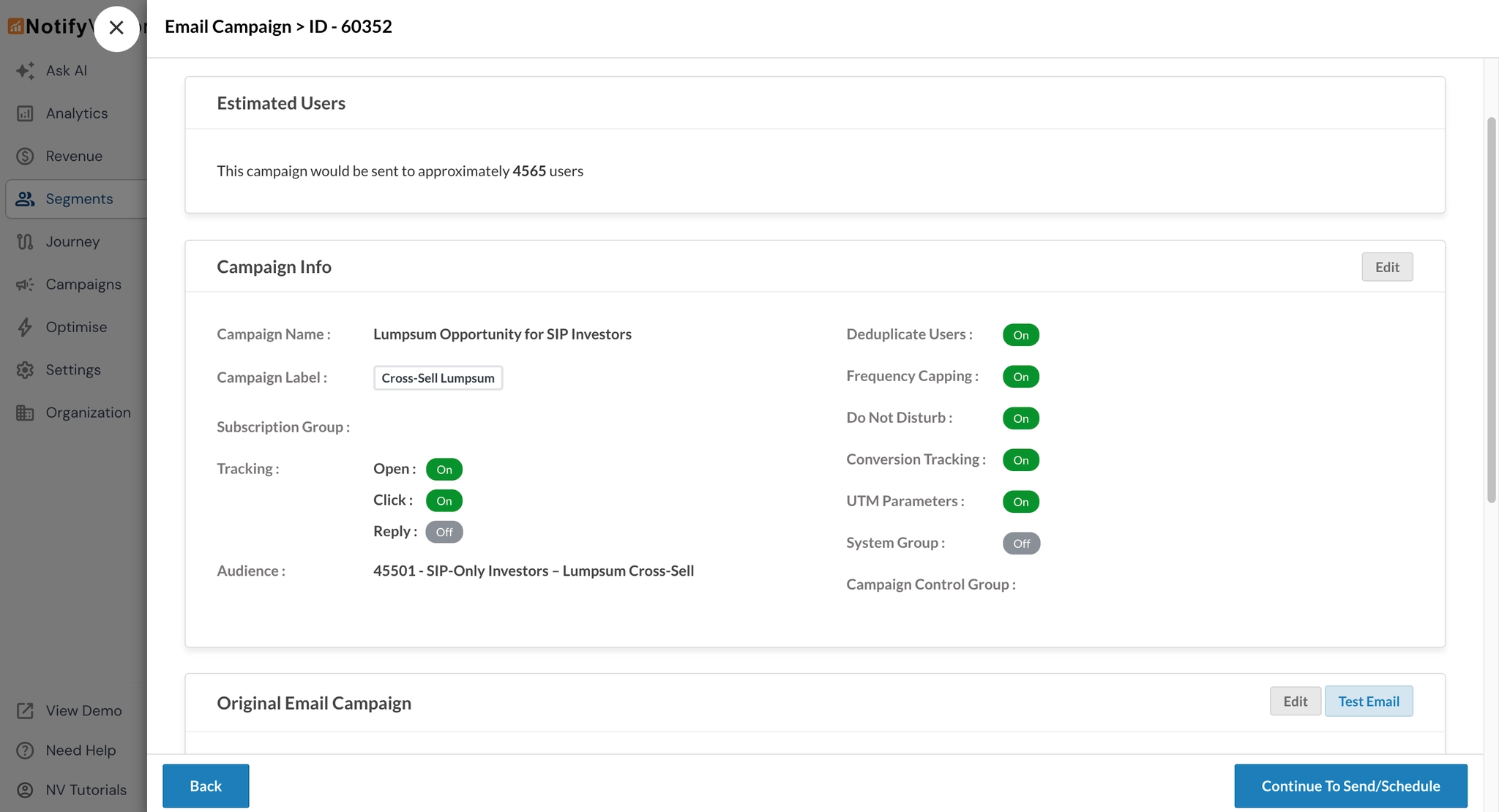
Navigate to the Segments section. Locate the segment “SIP-Only Investors – Lumpsum Cross-Sell”. Click on the three-dot menu next to your segment. Select “Campaigns” from the dropdown. Choose Email as your channel. This will open the campaign creation wizard.
Follow the steps below or click here for the detailed tutorial.
Tab 1 — Recipients:
Fill in the campaign details:
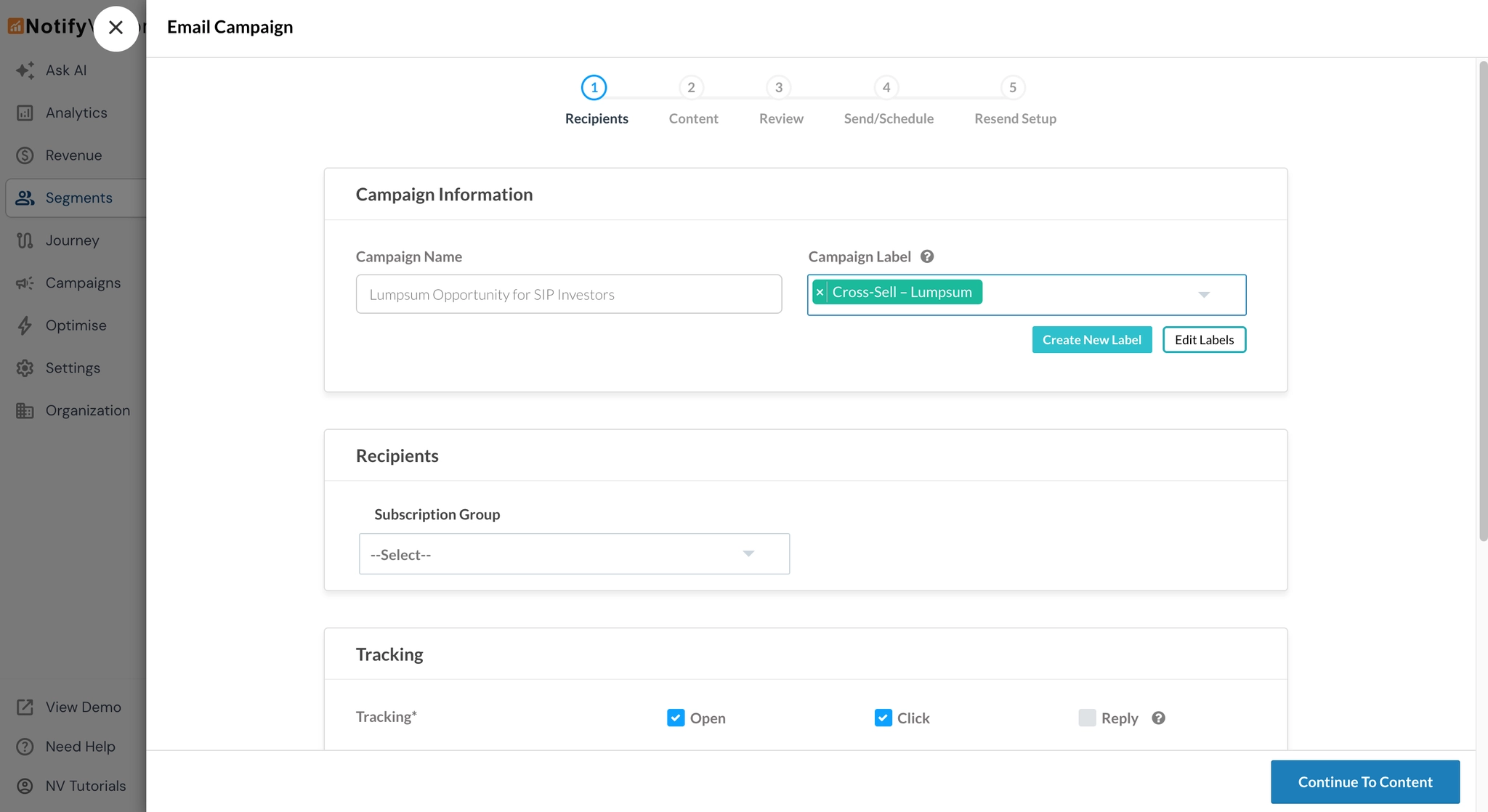
- Campaign Name: “Lumpsum Opportunity for SIP Investors”
- Label: “Cross-Sell – Lumpsum” (highly recommended; this label will be used to filter analytics later)
- Tracking Options: All relevant tracking options, such as opens, clicks, conversions are enabled by default. Keep as it is.
Tab 2 — Content:
Fill in the necessary details:
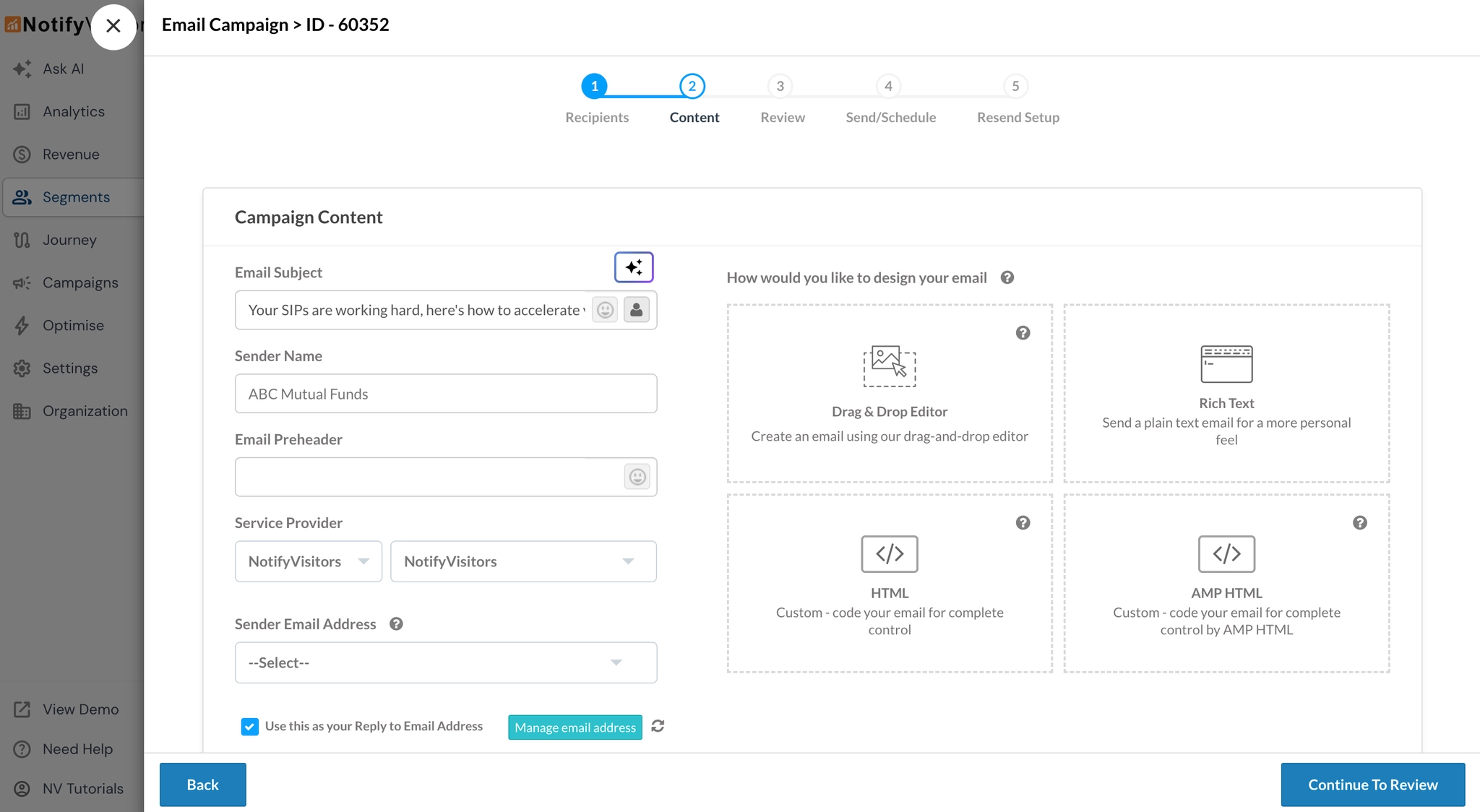
- Subject Line: “Your SIPs are working hard, here’s how to accelerate your wealth”
- Sender Name: Your platform/brand name
- Design Method: We recommend the drag-and-drop editor for ease and speed
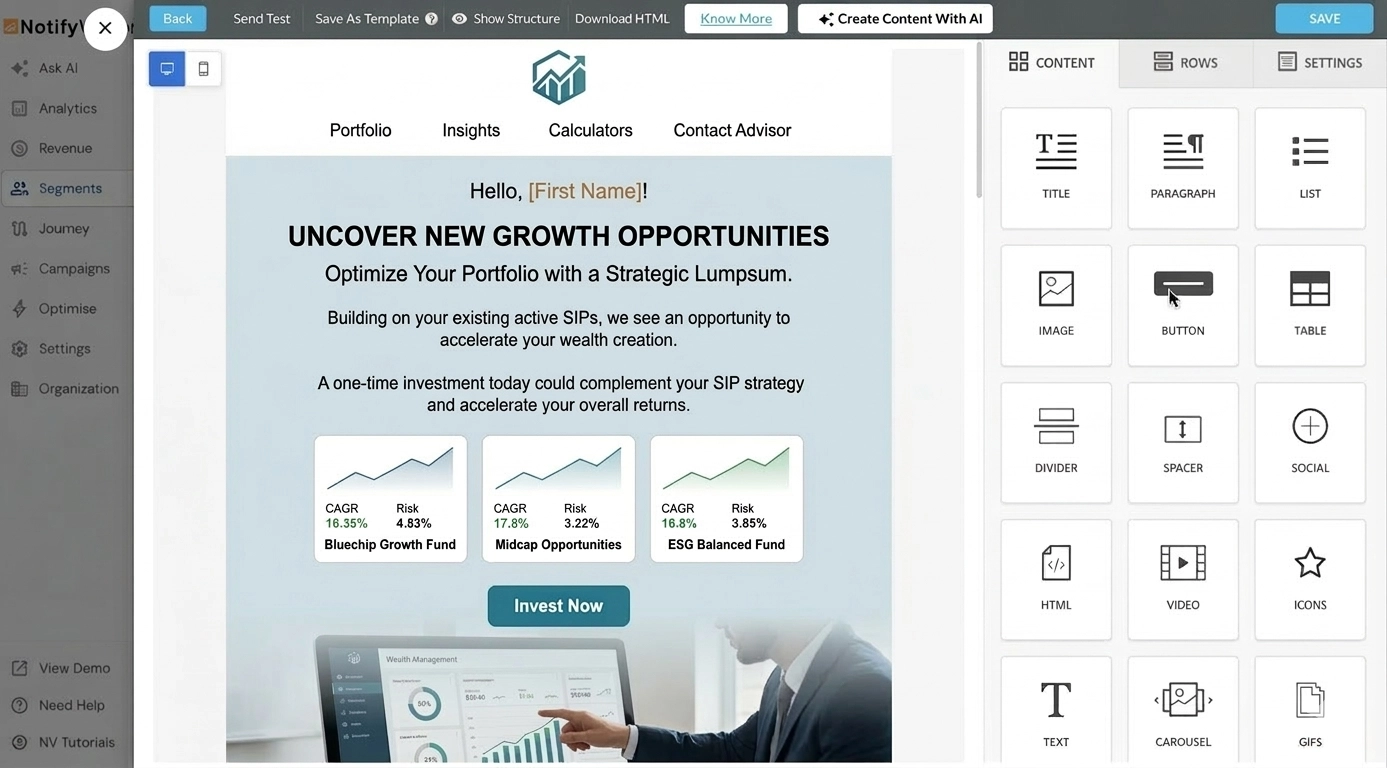
In the email body, focus on:
- Personalised greeting using the investor’s first name
- Portfolio context — reference their active SIPs to establish relevance
- The pitch — explain the benefit of lumpsum investing alongside SIPs (e.g., “Markets are offering attractive entry points. A one-time investment today could complement your SIP strategy and accelerate your returns.”)
- Curated fund recommendations — use the drag-and-drop editor’s product recommendation row to showcase 2–3 relevant funds. To learn how to set up personalised product recommendations, click here
- Clear CTA — “Invest Now” button linking directly to the investment flow
Tab 3 — Preview & Testing:
Review your campaign details before sending it out. Send a test email to yourself or your team to double-check the formatting, personalisation tokens, fund recommendations, and CTA links. Preview the email for both mobile and desktop to ensure it renders well on all devices.
Tab 4 — Send/Schedule:
Under Choose Campaign Type, select “One Time” to send the campaign as a single broadcast.
In the Schedule section, choose between Send Now (delivers immediately) or Schedule Later (lets you pick a specific date, time, and time zone for delivery).
You can also enable Campaign Distribution to stagger delivery across your audience. For example, setting it to send to 10% of subscribers with 1 hour apart ensures your emails are delivered in batches rather than all at once. This helps improve deliverability and reduces the risk of spam filters flagging a sudden burst of emails.
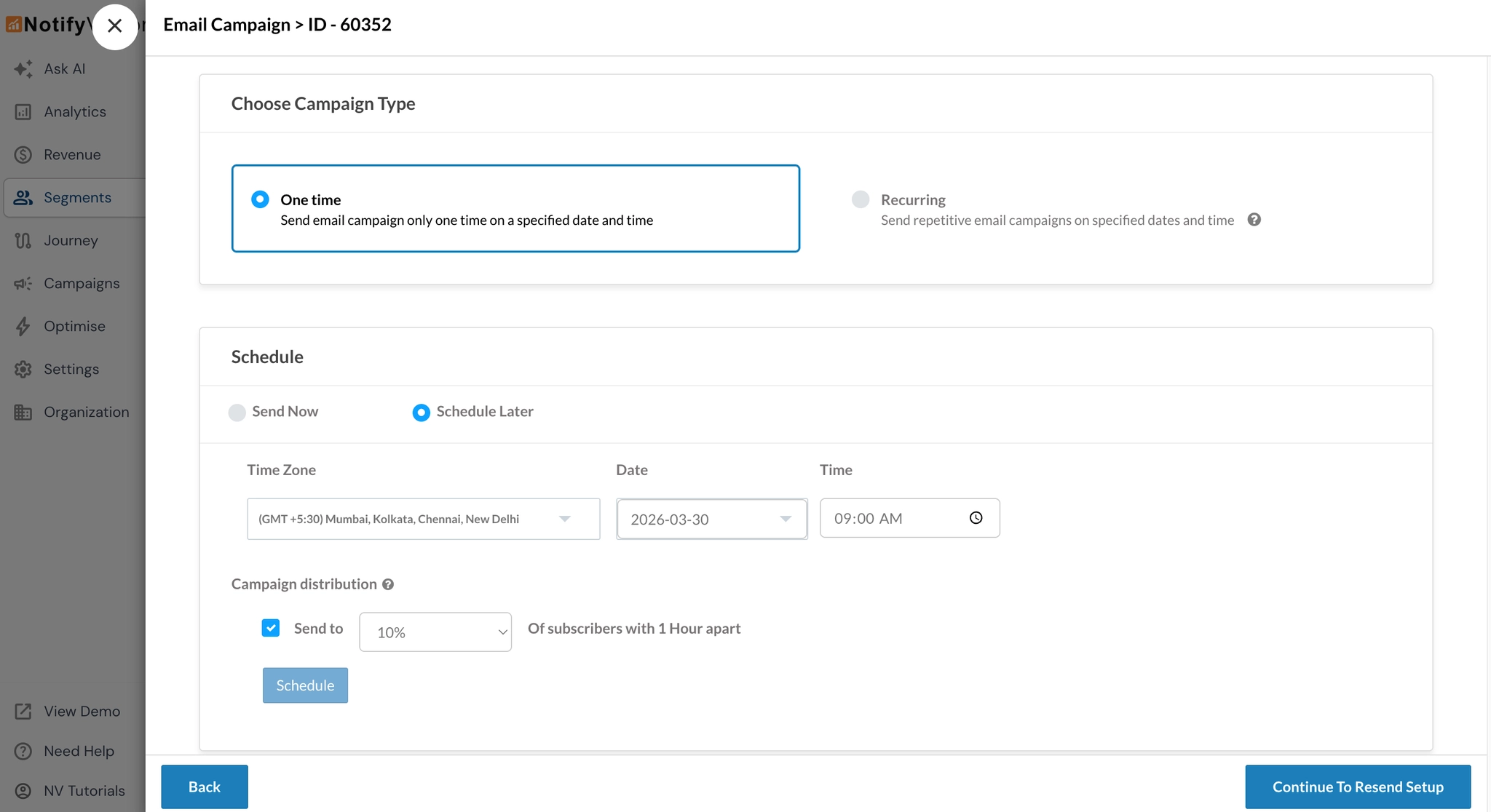
If your use case requires sending the same campaign on a regular schedule (e.g., weekly or monthly), you can select the “Recurring” option instead of One Time to set up automated, repetitive sends.
Tab 5 — Resend Setup:
After scheduling your campaign, you can configure an automatic Resend to re-engage users who missed or ignored the first send. This is useful for maximising reach without creating a separate campaign.
In the Resend Campaign dialog, select the conditions for resending:
- The user didn’t open the campaign — resend to users who never opened the email
- The user didn’t click on the campaign — resend to users who opened but didn’t click the CTA
Set the Send after duration (e.g., 1 day) and the delivery time (e.g., 09:00 AM) along with the appropriate time zone. Click Next and then Finish to complete the setup.
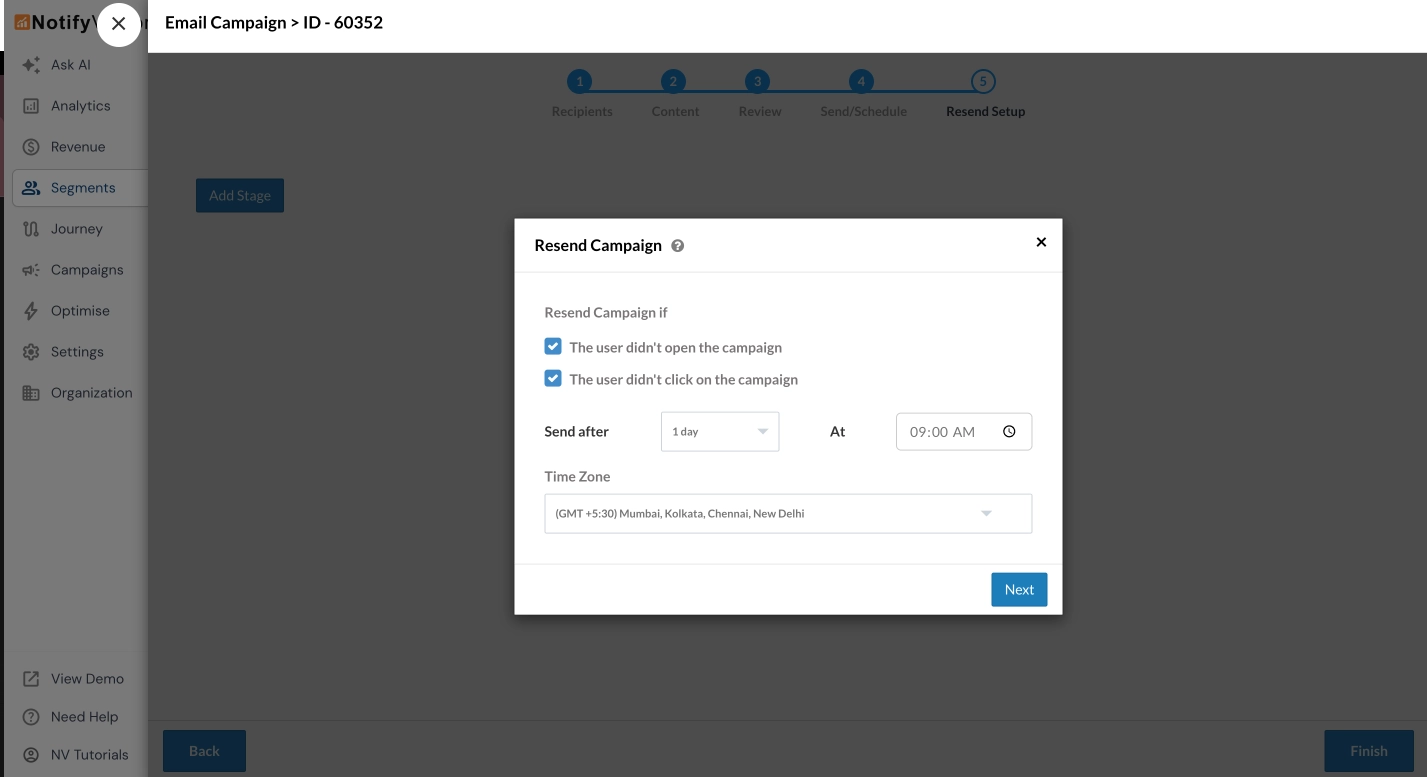
This ensures that investors who didn’t engage with the first email get a second chance to see your cross-sell message, improving overall campaign reach and conversion.
Monitoring Campaign Performance
Simply launching campaigns isn’t enough. Understanding how they perform is critical to optimising your cross-sell and upsell strategy.
Viewing Individual Campaign Analytics
To check the analytics for your email campaign, navigate to the Email Campaigns section. Click the three-dot action button next to your campaign (e.g., “Lumpsum Opportunity for SIP Investors”) and Select Analytics.
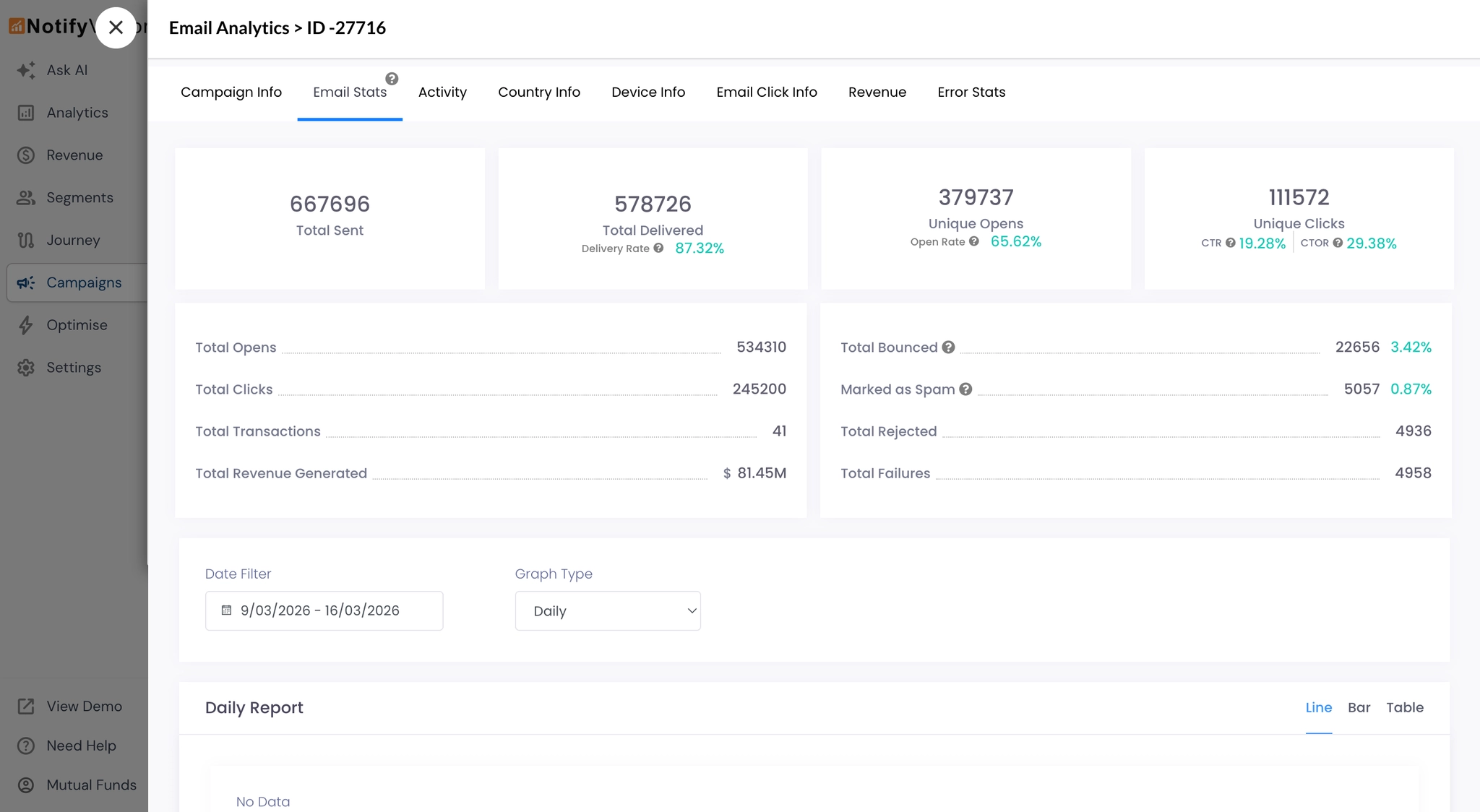
Click on the Email Stats tab to view key performance metrics:
- Sent — Total emails delivered
- Open Rate — Percentage of recipients who opened the email
- Click-Through Rate (CTR) — Percentage who clicked the CTA
- Conversion Rate — Percentage who completed an investment action
To dive deeper into email analytics, click here.
Channel-Specific Analytics
If you’re running campaigns across multiple channels, use these guides:
Unified Reporting: All Channels at a Glance
To get a consolidated view of all cross-sell and upsell campaigns across multiple channels:
- Go to the Campaigns > Overview section.
- Use the Label Filter and select the relevant tag (e.g., “Cross-Sell – Lumpsum”, “Upsell – SIP Step-Up”).
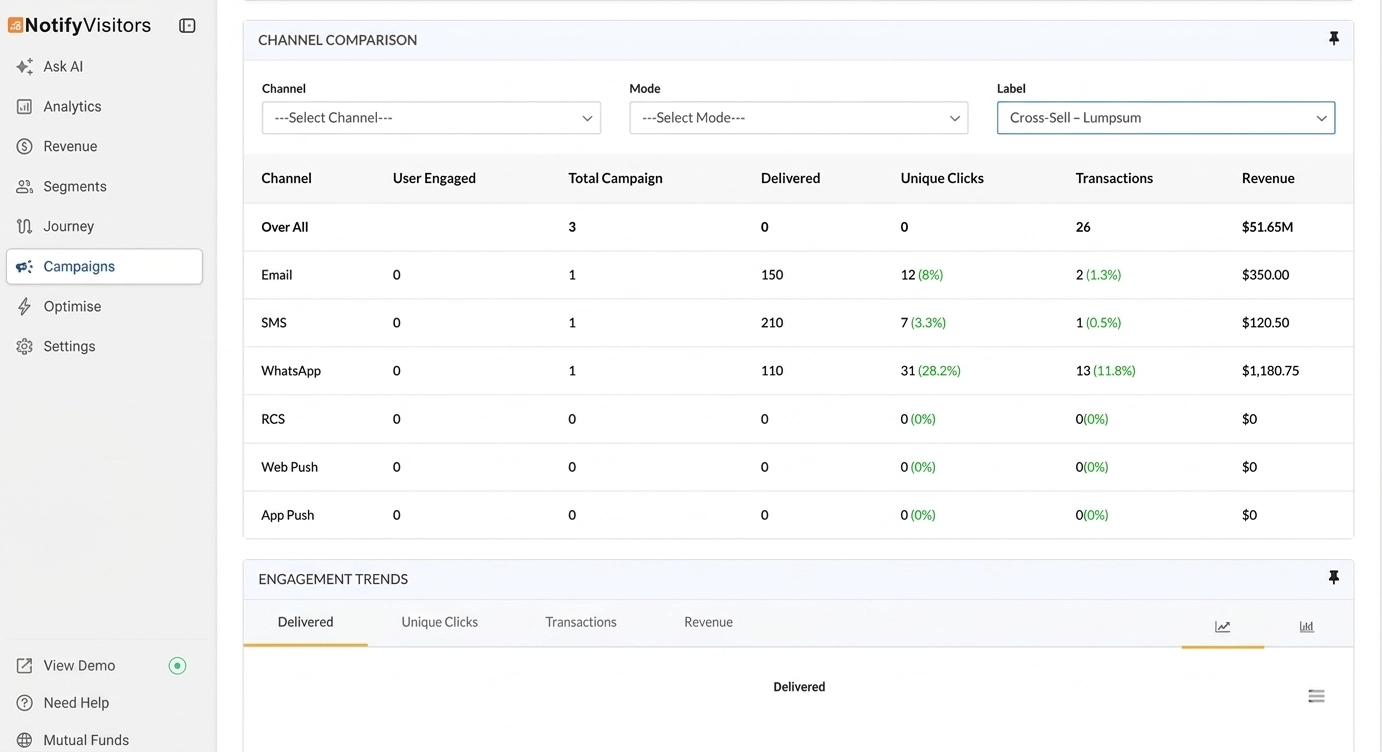
This filters analytics to show only campaigns with that label, giving you a unified report across Email, SMS, Push, and WhatsApp. The overview provides a side-by-side comparison of key metrics, including user engagement, number of campaigns, delivery rate, unique clicks, transactions, and revenue across different channels.
Below the summary table, a trend graph visually represents engagement data, including delivery volume, unique clicks, transactions, and revenue over time, all filtered for your selected campaign label.
Summary
Use this recipe to transform raw investor data into intelligent campaigns that surface the right opportunity to the right investor at the right time. Whether it’s nudging a SIP-only investor toward a lumpsum, guiding an equity-heavy portfolio toward diversification, or upgrading a regular-plan investor to direct, every campaign builds toward deeper engagement, higher AUM, and stronger customer lifetime value.