
Introduction
This guide provides an overview of the core concepts and processes behind our Customer Data Platform (CDP), designed to help you effectively collect, unify, analyze, segment, activate and sync customer data for impactful marketing campaigns and onsite personalization.
Overview of Core Concepts
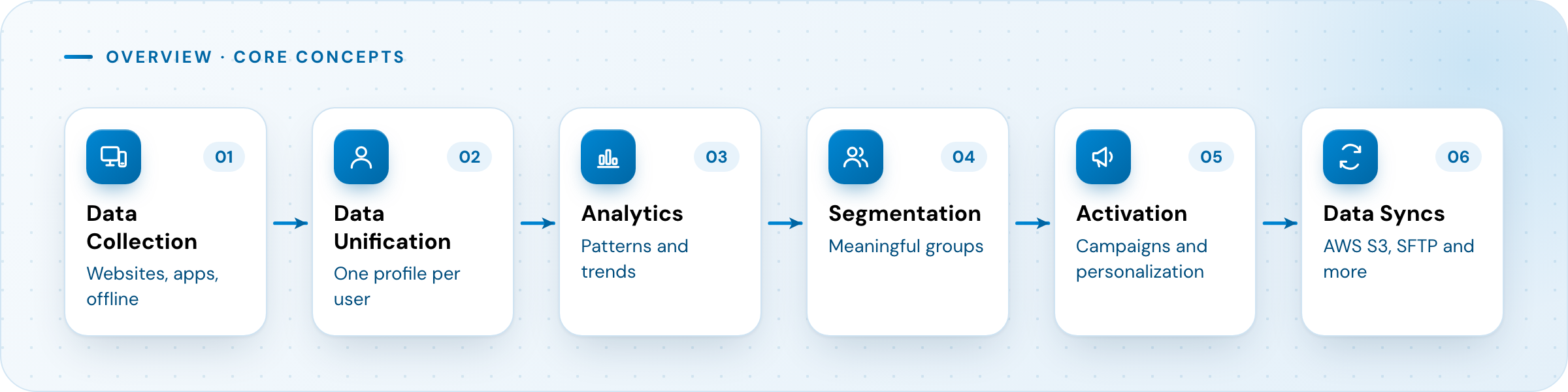
Customer data moves through NVECTA in six stages. It is collected from your websites, apps and offline systems, unified into one profile per user, analyzed, grouped into segments, and then activated through campaigns and onsite personalization or synced to your other systems.
Data Collection
Data Collection is the process of gathering user interactions and behaviors from various sources such as websites, mobile apps, and offline systems. This includes capturing detailed information about users’ actions, such as clicks, page views, transactions, and form submissions. To learn how data is sent to NVECTA, see Tracking Methods.
Data Unification
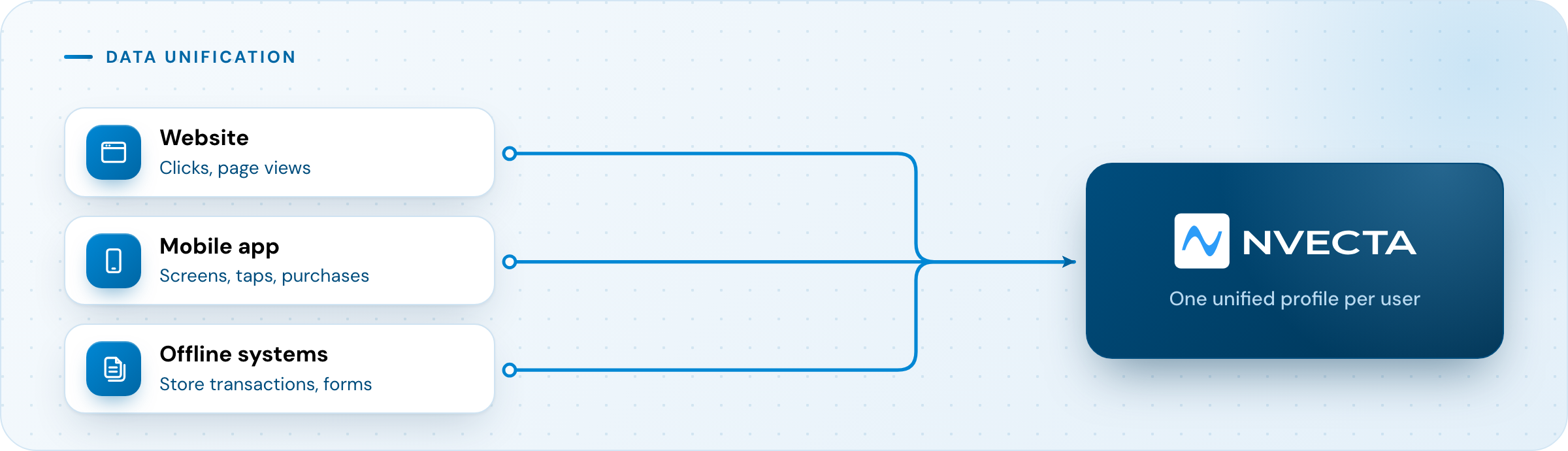
Data Unification consolidates collected data from multiple channels into a single, consistent user profile. This process ensures that data related to the same user is combined to create a holistic, accurate view, resolving duplicates and discrepancies. To learn how NVECTA identifies users and merges their profiles, see User Identification & Profile Merging.
Analytics
Analytics involves examining the unified data to uncover patterns, trends, and insights about customer behavior. Analytics powers data-driven decision-making, enabling marketers to understand engagement, conversion, and retention metrics.
Segmentation
Segmentation categorizes users into meaningful groups based on shared attributes or behaviors. This helps in targeting specific audiences precisely for personalized communication, campaigns, and experience customization. To learn how to build one, see How To Create A Segment.
Activation
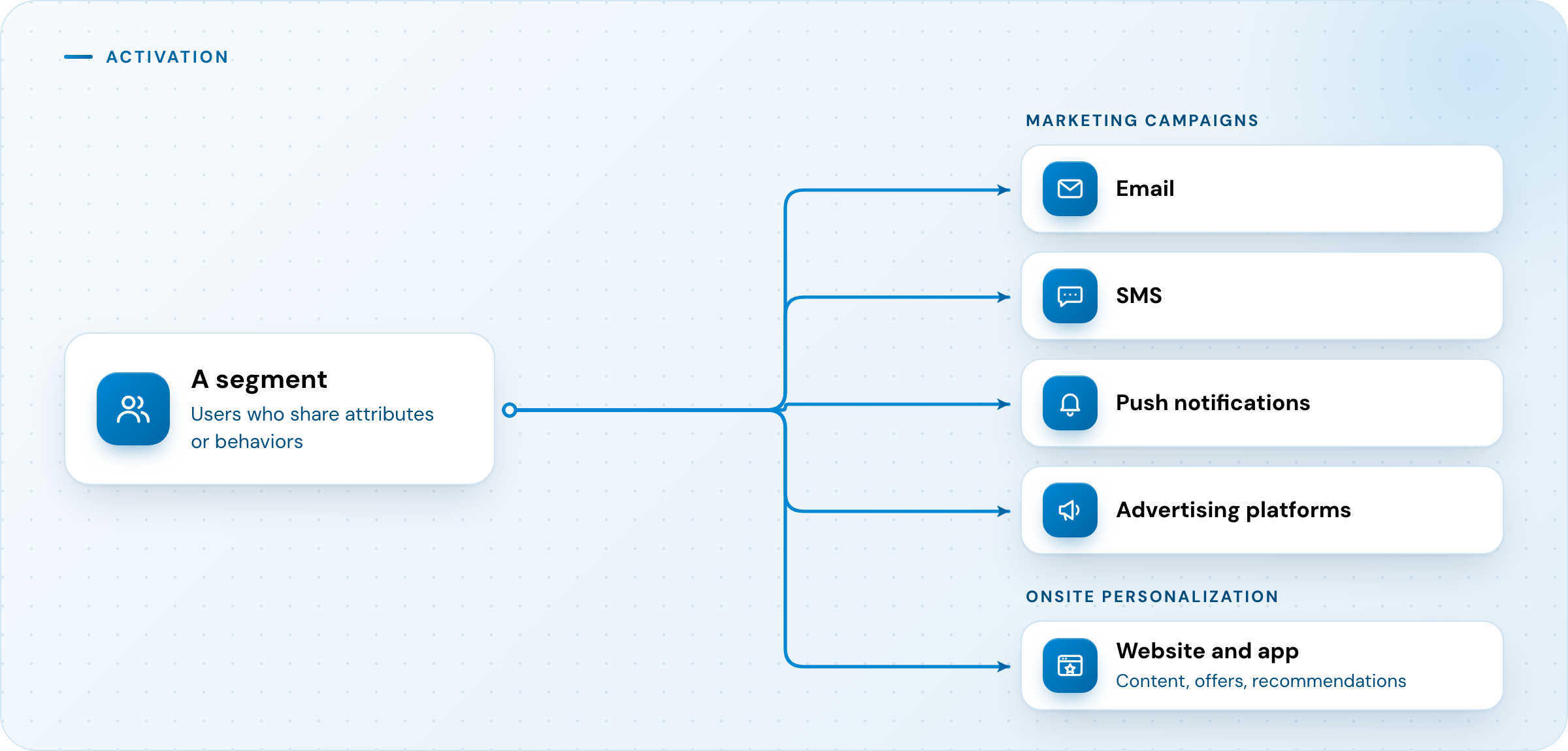
- Marketing Campaigns: Activation refers to using segments and insights to deliver targeted marketing campaigns across channels such as email, SMS, push notifications, and advertising platforms. This step translates analytics into concrete customer actions and business outcomes. To learn how each channel works, see Channels.
- Onsite Personalization: Onsite Personalization tailors the user experience on websites or apps based on user data and segments. Personalized content, offers, and product recommendations enhance engagement and conversion rates by meeting individual customer needs.
Data Syncs
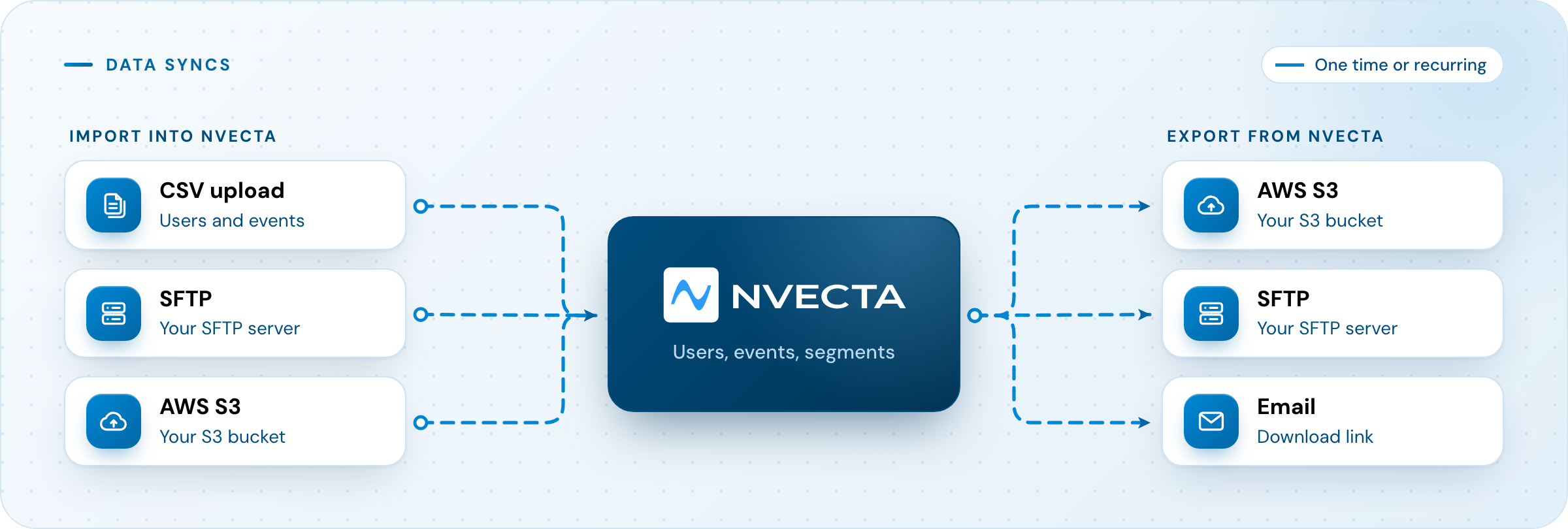
Data Syncs move customer data between NVECTA and your other systems. You can send users, events, segments and push subscribers from NVECTA to third-party systems such as AWS S3 and SFTP, or receive them by email. A sync can run once or on a recurring schedule (hourly, daily, weekly or monthly), so your data warehouse, BI tools and other systems stay up to date with the data in NVECTA. To learn more, see Export Users & Events.
Syncs also work the other way. You can bring users and events into NVECTA from CSV files, SFTP or AWS S3. To learn more, see Import Data.
Key Data Concepts
Users
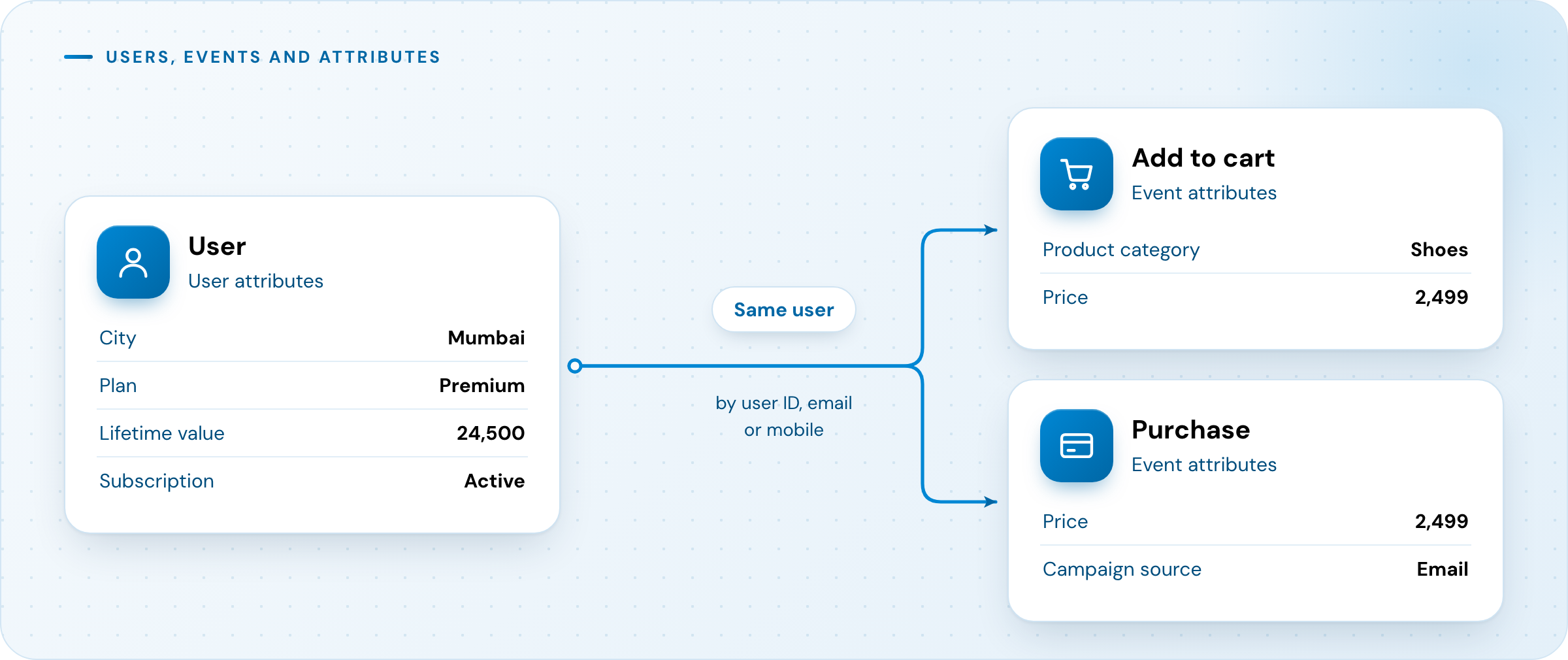
Users represent individual customers or visitors interacting with your digital properties. Each user is identified uniquely, whether anonymized or authenticated, to track their behavior accurately over time. To learn how to identify users on your website, see Tracking Users.
Events
Events are distinct actions or interactions performed by users, such as making a purchase, adding an item to a cart, or signing up for a newsletter. Events provide the raw data points necessary for understanding user behavior. To learn how to send events from your website, see Tracking Events.
Attributes
Attributes are the descriptive properties related to users or events. User attributes might include demographics, lifetime value, or subscription status, while event attributes describe event-specific details like product category, price, or campaign source. To learn how user and event data is structured in NVECTA, see Data Structure. To learn how events and their attributes are defined, see Track Events - Definitions, Attributes and Events.
Data Models
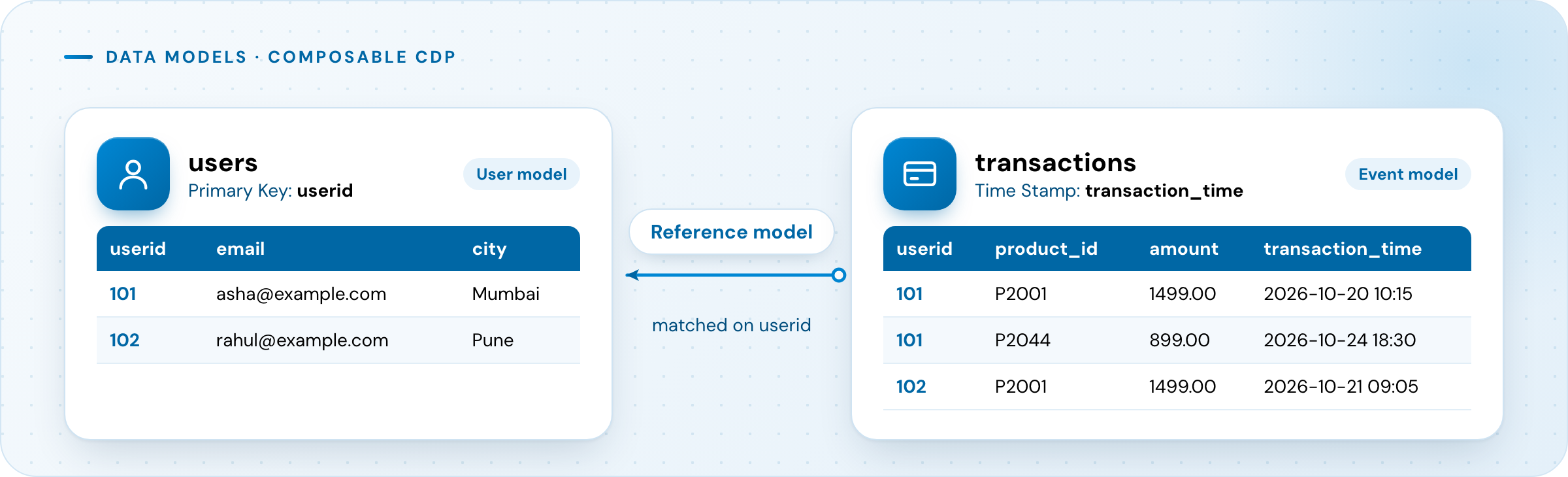
A data model describes how your data is organized so that NVECTA can use it. In NVECTA’s own data model, events work like fact tables (the actions users take) and user profiles work like dimension tables (who those users are). The two are joined by a user identifier, which can be a user ID, email or mobile number.
If your customer data lives in a data warehouse, Composable CDP lets you create models on top of your warehouse tables instead of copying that data into NVECTA:
- User model: One row per user, holding their user ID, email, mobile and profile details such as city or plan.
- Event model: One row per action a user took, such as a transaction or a login, with a timestamp for when it happened. It links to a user model through a shared identifier, such as a user ID, email or mobile number.
Once your models are set up, you can use your warehouse data in analytics, segments and campaigns, like any other data in NVECTA. To learn more, see Introduction to Composable CDP.
Real-World Examples
- BFSI (Banking, Financial Services, and Insurance): A bank collects data on user logins, transaction types, and loan application events. Unifying this data helps create segments of high-value loan applicants to target with personalized marketing campaigns, while onsite personalization shows relevant loan offers during website visits.
- Ecommerce: An online store tracks user events such as product views, cart additions, and purchases alongside user attributes like browsing history and purchase frequency. Using segmentation, marketers activate campaigns for high-potential buyers and personalize onsite product recommendations based on past behavior.
This foundational knowledge will guide you through the NVECTA platform to leverage customer data for powerful marketing and personalized experiences. Explore the detailed documentation sections to get started, implement best practices, and troubleshoot common challenges.
Updated about 21 hours ago